How To Enhance Location Aware Apps with Google’s Directions Service

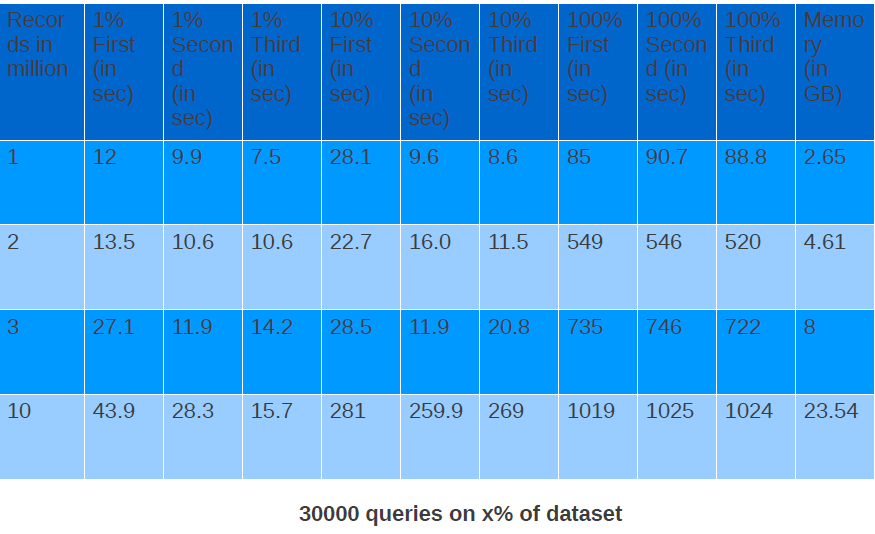
In my previous blog post, I talked about how we can use HTML 5 GeoLocation capabilities to build location aware applications with JAXRS and MongoDB at the backend. Today, we will extend the LocalJobs application we built in that blog post with Google’s Direction Service. It is recommended that you first read my previous post and then continue with this blog entry. The Directions Web Service allows applications to obtain Driving, Bicycling, and Walking directions through an XML/JSON REST interface. All of the features of the Map API v3 Directions service are supported, including “avoid highways”, “avoid tolls”, and waypoint optimisation.To see the application in action, just go to http://localjobs1-t20.rhcloud.com/. Enter skills such as java , php , mongodb , etc. and press the “Find Jobs” button. The Browser will then ask you to allow the application to use your computer’s location. Click on “allow” and you will see results as shown below:

Read full blog at https://www.openshift.com/blogs/how-to-enhance-location-aware-apps-with-googles-directions-service

How To Build Real-Time Location-Aware Applications using MongoDB , WebSockets , and HTML 5 GeoLocation API

One of the advantages of OpenShift or any other Platform as a Service is that it gives developers the power to turn their ideas into applications. As a developer, you are only concerned about writing code and the platform manages and scales the underlying infrastructure for you. I am also a developer and I love to write code.

A few days ago, I came up with a very simple idea to show messages in real-time on a map. A user posts a message via the application user interface, the application captures the user’s current location using an HTML5 Geo-location API, and then displays the message on a map. If another user posts a message from some other part of world, the first user will see that same message in real-time. As users start posting messages, they will see all of the messages appearing on the map.

Read full post at https://www.openshift.com/blogs/how-to-build-real-time-location-aware-applications

MongoDB Query Tip : Find All The Documents Where Array Length is Greater Than N

Suppose we have blog document in blogs collection as shown below.

> db.blogs.insert({author : "Shekhar Gulati","title":"Hello World","text":"Hello World!!","tags":["mongodb","openshift"]})
>
>
> db.blogs.insert({author : "Shekhar Gulati","title":"Hello World","text":"Hello World!!","tags":["mongodb","openshift","nosql"]})

Now you want to find out all those blogs which have more than 2 tags then query is shown below.

> db.blogs.find({$where : "this.tags.length > 2"}).pretty()
{
	"_id" : ObjectId("51011037bf779459a978f96f"),
	"author" : "Shekhar Gulati",
	"title" : "Hello World",
	"text" : "Hello World!!",
	"tags" : [
		"mongodb",
		"openshift",
		"nosql"
	]
}

Say Hello to Jelastic

These days Platform as a Service (PaaS) is one of my interest areas and I like to play with different PaaS providers to see how easy or difficult it is to develop and deploy application on them. The best thing about most of the current new generation PaaS systems is that they don’t require you to change your code or learn new programming paradigm. Google App Engine is thing of past and is losing ground in PaaS race. For last six months I have spend some of my spare time on OpenShift and Cloud Foundry and one thing I can say is that I love both of the platforms. Today I decided to spend some time on Jelastic — seeing how easy or difficult is to deploy a simple Spring MongoDB application on it. According to Jelastic website

Jelastic is the next generation of Java hosting platforms which can run and scale ANY Java application with no code changes required

Jelastic provides a web ui using which you can create the deployment environment and upload your war file to it.To check the usability of the UI I decided that I will not refer to Jelastic documentation and will try to deploy the application based on my understanding. So in this blog I am sharing the steps I performed to deploy a simple Spring MongoDB application to Jelastic.

  1. To start I created a very simple simple moviestore application using Spring Roo. For those of you who are not aware of Spring Roo can refer to my article series at IBM Developerworks on Spring Roo.Once you have installed Spring Roo, fire the Roo shell and execute following commands. This will create a Spring MVC web application with MongoDB as backend.
    project --topLevelPackage com.shekhar.moviestore --projectName moviestore
    mongo setup --databaseName moviestore
    entity mongo --class ~.domain.Movie
    field string --fieldName title --notNull
    field string --fieldName description --notNull
    repository mongo --interface ~.repository.MovieRepository
    service --interface ~.service.MovieService
    web mvc setup
    web mvc all --package ~.web
    q
    
  2. You can test the application locally by first starting the MongoDB server and then starting the application using mvn tomcat:run.
  3. But the point is to test the application on Jelastic. So go to http://jelastic.com/ and sign up for free. You don’t need to pay anything. I choose North America hosting provider.
  4. Once you have registered at Jelastic login with your credentials at https://app.jelastic.servint.net/
  5. After you have logged in to Jelastic portal you will see a Create environment link on the left. In Jelastic you have to first create environment under which your application will run. Click on the environment link and choose MongoDB, Tomcat, Java 6 as the environment topology. This is shown in image below. I really liked the UI. It is sexy.
  6. When you press create it will take couple of minutes to create the environment. So please be patient.
  7.  You will receive an email from Jelastic with the MongoDB connection details. It will give you a url to access MongoDB from web UI and an admin username and password.In my case I received url http://mongodb-moviestore.jelastic.servint.net/. I am not going to share username and password.
  8. The MongoDB UI is a RockMongo MongoDB web client. Login into it using admin username and password and Rock 🙂
  9. Next we need to create a MongoDB database and user with which our application can connect. To create database first click on databases and then “Create new Database”. Enter the name of database as moviestore and press create button. Next click on newly created moviestore database and click more then authentication and then click on add user to create a new user. Create a user with username as moviestore and password as password and press Add user.
  10. Now that we have created a user we should update the database.properties and applicationContext-mongo.xml files which were created by Spring Roo. By default they were pointing to localhost. Update the files as shown below.
    database.properties

    #Updated at Tue Feb 28 12:26:32 IST 2012
    #Tue Feb 28 12:26:32 IST 2012
    mongo.host=mongodb-moviestore.jelastic.servint.net
    mongo.name=moviestore
    mongo.password=password
    mongo.port=27017
    mongo.username=moviestore
    

    applicationContext-mongo.xml

    <?xml version="1.0" encoding="UTF-8" standalone="no"?>
    <beans xmlns="http://www.springframework.org/schema/beans" xmlns:cloud="http://schema.cloudfoundry.org/spring" xmlns:context="http://www.springframework.org/schema/context" xmlns:mongo="http://www.springframework.org/schema/data/mongo" xmlns:xsi="http://www.w3.org/2001/XMLSchema-instance" xsi:schemaLocation="http://www.springframework.org/schema/context http://www.springframework.org/schema/context/spring-context-3.1.xsd        http://www.springframework.org/schema/data/mongo        http://www.springframework.org/schema/data/mongo/spring-mongo-1.0.xsd        http://www.springframework.org/schema/beans        http://www.springframework.org/schema/beans/spring-beans-3.1.xsd        http://schema.cloudfoundry.org/spring http://schema.cloudfoundry.org/spring/cloudfoundry-spring-0.8.xsd">
    
        <mongo:db-factory dbname="${mongo.name}" host="${mongo.host}" id="mongoDbFactory" password="${mongo.password}" port="${mongo.port}" username="${mongo.username}"/>
    
        <mongo:repositories base-package="com.shekhar.moviestore"/>
    
        <!-- To translate any MongoExceptions thrown in @Repository annotated classes -->
        <context:annotation-config/>
    
        <bean class="org.springframework.data.mongodb.core.MongoTemplate" id="mongoTemplate">
            <constructor-arg ref="mongoDbFactory"/>
        </bean>
    
    </beans>
    
  11. Build the maven project by executing mvn clean install command.
  12. Then upload the war by clicking on upload link in the Jelastic web UI.This will take some time depending on your internet connection.
  13. After the war is uploaded you will see the war in deployment manager tab. Click deploy to moviestore environment to deploy to tomcat and select context as ROOT.
  14. Finally you will be able to view the application running at http://moviestore.jelastic.servint.net/

This was my first write up on Jelastic and I will continue experimenting with it and evaluating its capabilities. I will also spend time reading its documentation and see how it compare with other PaaS providers. Overall I was impressed with Jelastic and to me it looks like a good deployment option for Java applications.

Writing to OpenShift Express File System

One of the features that you will not find in most Platform as a Service solutions is writing to file system. Writing to file system is very important as you need it in case you want to write user uploaded content to file system, or write lucene index or read some configuration file from a directory. OpenShift Express from the start support writing to file system.

In this blog I will create a simple Spring MVC MongoDB application which store movie documents. I will be using Spring Roo to quickly scaffold the application. Spring Roo does not provide file upload functionality so I will modify the default application to add that support. Then I will deploy the application to OpenShift Express.

Creating a OpenShift Express JBoss AS7 application

The first step is to create the JBoss AS7 applictaion in OpenShift Express. To do that type the command as shown below. I am assuming you have OpenShift Express Ruby gem installed on your machine.

rhc-create-app -l <rhlogin email> -a movieshop -t jbossas-7.0 -d

This will create a sample Java web application which you can view at http://movieshop-<namespace&gt;.rhcloud.com.

Adding support for MongoDB Cartridge

As we are creating Spring MongoDB application we should add support for MongoDB by executing the command as shown below.

rhc-ctl-app -l <rhlogin email> -a movieshop -e add-mongodb-2.0 -d

Removing default generated file from git

We don’t need the default generated files so remove them by executing following commands.

git rm -rf src pom.xml
git commit -a -m "removed default generated files"

Creating Spring MVC MongoDB MovieShop Application

Fire the Roo shell and execute the following commands to create the application.

project --topLevelPackage com.xebia.movieshop --projectName movieshop --java 6
mongo setup
entity mongo --class ~.domain.Movie
repository mongo --interface ~.repository.MovieRepository
service --interface ~.service.MovieService
field string --fieldName title --notNull
field string --fieldName description --notNull --sizeMax 4000
field string --fieldName stars --notNull
field string --fieldName director --notNull
web mvc setup
web mvc all --package ~.web

Adding file upload support

Add two fields to Movie entity as shown below.

@Transient
private CommonsMultipartFile file;
private String fileName;

public CommonsMultipartFile getFile() {
    return this.file;
}
public void setFile(CommonsMultipartFile file) {
    this.file = file;
}
public String getFileName() {
   return fileName;
}
public void setFileName(String fileName) {
   this.fileName = fileName;
}

Edit the create.jspx file as shown below to add file upload as shown below.

<?xml version="1.0" encoding="UTF-8" standalone="no"?>
<div xmlns:c="http://java.sun.com/jsp/jstl/core" xmlns:field="urn:jsptagdir:/WEB-INF/tags/form/fields" xmlns:form="urn:jsptagdir:/WEB-INF/tags/form" xmlns:jsp="http://java.sun.com/JSP/Page" xmlns:spring="http://www.springframework.org/tags" version="2.0">
    <jsp:directive.page contentType="text/html;charset=UTF-8"/>
    <jsp:output omit-xml-declaration="yes"/>
    <form:create id="fc_com_xebia_movieshop_domain_Movie" modelAttribute="movie" path="/movies" render="${empty dependencies}" z="wysyQcUIaJOAUzNYNVt5nMEdvHk=" multipart="true">
        <field:input field="title" id="c_com_xebia_movieshop_domain_Movie_title" required="true" z="SpYrTojoyx2F7X5CjEfFQ6CBdA4="/>
        <field:textarea field="description" id="c_com_xebia_movieshop_domain_Movie_description" required="true" z="vxiB62k7E7FzhnVz1kU7CCIYEkw="/>
        <field:input field="stars" id="c_com_xebia_movieshop_domain_Movie_stars" required="true" z="XdvY0mpBitMGzrARD3TmTxxXZHg="/>
        <field:input field="director" id="c_com_xebia_movieshop_domain_Movie_director" required="true" z="6L8yvzx1cZgTq0QKP1dHbGHbQxI="/>
        <field:input field="file" id="c_com_shekhar_movieshop_domain_Movie_file" label="Upload image" type="file" z="user-managed"/>
        <field:input field="fileName" id="c_com_xebia_movieshop_domain_Movie_fileName" z="user-managed" render="false"/>
    </form:create>
    <form:dependency dependencies="${dependencies}" id="d_com_xebia_movieshop_domain_Movie" render="${not empty dependencies}" z="nyAj+bBGTpzOr2SwafD6lx7vi30="/>
</div>

Also change the input.tagx file to add support for input type file. Add the following line as shown below

<c:when test="${type eq 'file'}">
      <form:input id="_${sec_field}_id" path="${sec_field}" disabled="${disabled}"  type="file"/>
</c:when>

Modify the MovieController to write file either to the OpenShift_DATA_DIR or my local machine in case System.getEnv(“OPENSHIFT_DATA_DIR”) is null. The code is shown below.

import java.io.File;
import java.io.FileInputStream;
import java.io.UnsupportedEncodingException;
import java.math.BigInteger;

import javax.servlet.ServletOutputStream;
import javax.servlet.http.HttpServletRequest;
import javax.servlet.http.HttpServletResponse;
import javax.validation.Valid;

import org.apache.commons.io.IOUtils;
import org.springframework.beans.factory.annotation.Autowired;
import org.springframework.roo.addon.web.mvc.controller.scaffold.RooWebScaffold;
import org.springframework.stereotype.Controller;
import org.springframework.ui.Model;
import org.springframework.validation.BindingResult;
import org.springframework.web.bind.annotation.PathVariable;
import org.springframework.web.bind.annotation.RequestMapping;
import org.springframework.web.bind.annotation.RequestMethod;
import org.springframework.web.bind.annotation.RequestParam;
import org.springframework.web.multipart.commons.CommonsMultipartFile;
import org.springframework.web.util.UriUtils;
import org.springframework.web.util.WebUtils;

import com.xebia.movieshop.domain.Movie;
import com.xebia.movieshop.service.MovieService;

@RequestMapping("/movies")
@Controller
@RooWebScaffold(path = "movies", formBackingObject = Movie.class)
public class MovieController {

	private static final String STORAGE_PATH = System.getEnv("OPENSHIFT_DATA_DIR") == null ? "/home/shekhar/tmp/" : System.getEnv("OPENSHIFT_DATA_DIR");

	@Autowired
    MovieService movieService;

	@RequestMapping(method = RequestMethod.POST, produces = "text/html")
	public String create(@Valid Movie movie, BindingResult bindingResult,
			Model uiModel, HttpServletRequest httpServletRequest) {
		if (bindingResult.hasErrors()) {
			populateEditForm(uiModel, movie);
			return "movies/create";
		}
		CommonsMultipartFile multipartFile = movie.getFile();
		String orgName = multipartFile.getOriginalFilename();
		uiModel.asMap().clear();
		System.out.println(orgName);
		String[] split = orgName.split("\\.");
		movie.setFileName(split[0]);
		movie.setFile(null);
		movieService.saveMovie(movie);
		String filePath = STORAGE_PATH + orgName;
		File dest = new File(filePath);

		try {
			multipartFile.transferTo(dest);
		} catch (Exception e) {
			throw new RuntimeException(e);
		}
		return "redirect:/movies/"
				+ encodeUrlPathSegment(movie.getId().toString(),
						httpServletRequest);
	}

	@RequestMapping(value = "/image/{fileName}", method = RequestMethod.GET)
	public void getImage(@PathVariable String fileName, HttpServletRequest req, HttpServletResponse res) throws Exception{
		File file = new File(STORAGE_PATH+fileName+".jpg");
		res.setHeader("Cache-Control", "no-store");
		res.setHeader("Pragma", "no-cache");
		res.setDateHeader("Expires", 0);
		res.setContentType("image/jpg");
		ServletOutputStream ostream = res.getOutputStream();
		IOUtils.copy(new FileInputStream(file), ostream);
		ostream.flush();
		ostream.close();
	}

Also change the show.jspx file to display the image.

<?xml version="1.0" encoding="UTF-8" standalone="no"?>
<div xmlns:field="urn:jsptagdir:/WEB-INF/tags/form/fields" xmlns:jsp="http://java.sun.com/JSP/Page" xmlns:page="urn:jsptagdir:/WEB-INF/tags/form" version="2.0">
    <jsp:directive.page contentType="text/html;charset=UTF-8"/>
    <jsp:output omit-xml-declaration="yes"/>
    <page:show id="ps_com_xebia_movieshop_domain_Movie" object="${movie}" path="/movies" z="2GhOPmD72lRGGsTvy9DYx8/b/b4=">
        <field:display field="title" id="s_com_xebia_movieshop_domain_Movie_title" object="${movie}" z="L3rzNq9mt4vOBL/2S9L5XTn4pGA="/>
        <field:display field="description" id="s_com_xebia_movieshop_domain_Movie_description" object="${movie}" z="rctpFQukL584DSNTEhcZ/zqm19U="/>
        <field:display field="stars" id="s_com_xebia_movieshop_domain_Movie_stars" object="${movie}" z="Mi3QNsQkI5hqOVW44XwXAGF2zKE="/>
        <field:display field="director" id="s_com_xebia_movieshop_domain_Movie_director" object="${movie}" z="rhXx3l+3zMxx0O0ht2Td3Icx1ZE="/>
        <field:display field="fileName" id="s_com_xebia_movieshop_domain_Movie_fileName" object="${movie}" z="7XTMedYLsWVvZkq2fKT0EZpZaPE="/>
        <IMG alt="${movie.fileName}" src="/movieshop/movies/image/${movie.fileName}" />
    </page:show>
</div>

Finally change the webmvc-config.xml to have CommonsMultipartResolver bean as shown below.

<bean
		class="org.springframework.web.multipart.commons.CommonsMultipartResolver"
		id="multipartResolver" >
		<property name="maxUploadSize" value="100000"></property>
	</bean>

Pointing to OpenShift MongoDB datastore

Change the applicationContext-mongo.xml to point to OpenShift MongoDB instance as shown below.

<mongo:db-factory dbname="${mongo.name}" host="${OPENSHIFT_NOSQL_DB_HOST}"
			port="${OPENSHIFT_NOSQL_DB_PORT}" username="${OPENSHIFT_NOSQL_DB_USERNAME}"
			password="${OPENSHIFT_NOSQL_DB_PASSWORD}" />

Add OpenShift Maven Profile

OpenShift applications require maven profile called openshift which is executed when git push is done.

<profiles>
		<profile>
			<!-- When built in OpenShift the 'openshift' profile will be used when
				invoking mvn. -->
			<!-- Use this profile for any OpenShift specific customization your app
				will need. -->
			<!-- By default that is to put the resulting archive into the 'deployments'
				folder. -->
			<!-- http://maven.apache.org/guides/mini/guide-building-for-different-environments.html -->
			<id>openshift</id>
			<build>
				<finalName>movieshop</finalName>
				<plugins>
					<plugin>
						<artifactId>maven-war-plugin</artifactId>
						<version>2.1.1</version>
						<configuration>
							<outputDirectory>deployments</outputDirectory>
							<warName>ROOT</warName>
						</configuration>
					</plugin>
				</plugins>
			</build>
		</profile>
	</profiles>

Deploying Application to OpenShift

finally do git push to deploy the application to OpenShift and you can view the application running at http://movieshop-random.rhcloud.com/
How to rename field in all the MongoDB documents?

Today I was faced with a situation where in I need to rename a field in all the MongoDB documents. The best way to do this is using $rename operator shown below.

db.post.update ( {}, { $rename : { "creationDate" : "creationdate" }},false,true )

Here true corresponds to updating all the all the documents i.e. multi is true.

From MongoDB documentation. Here’s the MongoDB shell syntax for update():

db.collection.update( criteriaobjNewupsertmulti )

Arguments:

  • criteria – query which selects the record to update;
  • objNew – updated object or $ operators (e.g., $inc) which manipulate the object
  • upsert – if this should be an “upsert” operation; that is, if the record(s) do not exist, insert one. Upsert only inserts a single document.
  • multi – indicates if all documents matching criteria should be updated rather than just one. Can be useful with the $ operators below.

How Working Set Affects MongoDB Performance?

This is third post in my series of posts on MongoDB. This post will talk about how working set affects performance of MongoDB. The idea of this experiment came to me after I read a very good blog from Colin Howe on MongoDB Working Set. The tests performed in this blog are on similar lines as the ones talked by Colin Howe but performed with Java and MongoDB version 2.0.1. If you have worked with MongoDB or read about it you might have heard of the term Working Set. Working Set is the amount of data(including indexes) that will be in used by your application and if this data fits in RAM then the application performance will be great else it would degrade drastically When the data can’t fit in RAM MongoDB has to hit disk which impacts performance.  I recommend reading blog from Adrian Hills on the importance of Working Set. To help you understand working set better I am citing the example from Adrian blog :

Suppose you have 1 year’s worth of data. For simplicity, each month relates to 1GB of data giving 12GB in total, and to cover each month’s worth of data you have 1GB worth of indexes again totalling 12GB for the year.

If you are always accessing the last 12 month’s worth of data, then your working set is: 12GB (data) + 12GB (indexes) = 24GB.

However, if you actually only access the last 3 month’s worth of data, then your working set is: 3GB (data) + 3GB (indexes) = 6GB.

From the example above if your machine has more than 6GB RAM then your application will perform great otherwise it will be slow. The important thing to know about working set is that MongoDB uses LRUstrategy to decide which documents are in RAM and you can’t tell MongoDB to keep a particular document or collection in RAM. Now that you know what is working set and how important it is let’s start the experiment.

Setup 

Dell Vostro Ubuntu 11.04 box with 4 GB RAM and 300 GB hard disk. Java 6 MongoDB 2.0.1 Spring MongoDB 1.0.0.M5 which internally uses MongoDB Java driver 2.6.5 version.

Document

The documents I am storing in MongoDB looks like as shown below. The average document size is 2400 bytes.  Please note the _id field also has an index. The index that I will be creating will be on name field.

{
"_id" : ObjectId("4ed89c140cf2e821d503a523"),
"name" : "Shekhar Gulati",
"someId1" : NumberLong(1000006),
"str1" : "U",
"date1" : ISODate("1997-04-10T18:30:00Z"),
"index" : 1,
"bio" : "I am a Java Developer. I am a Java Developer. I am a Java Developer. I am a Java Developer. I am a Java Developer. I am a
Java Developer. I am a Java Developer. I am a Java Developer. I am a Java Developer. I am a Java Developer. I am a Java
Developer. I am a Java Developer. I am a Java Developer. I am a Java Developer. I am a Java Developer. I am a Java Developer. I
am a Java Developer. I am a Java Developer. I am a Java Developer. I am a Java Developer. I am a Java Developer. I am a Java
Developer. I am a Java Developer. I am a Java Developer. I am a Java Developer. I am a Java Developer. I am a Java Developer. I
am a Java Developer. I am a Java Developer. I am a Java Developer. I am a Java Developer. I am a Java Developer. I am a Java
Developer. I am a Java Developer. I am a Java Developer. I am a Java Developer. I am a Java Developer. I am a Java Developer. I
am a Java Developer. I am a Java Developer. I am a Java Developer. I am a Java Developer. I am a Java Developer. I am a Java
Developer. I am a Java Developer. I am a Java Developer. I am a Java Developer. I am a Java Developer. I am a Java Developer. I
am a Java Developer. I am a Java Developer. I am a Java Developer. I am a Java Developer. I am a Java Developer. I am a Java
Developer. I am a Java Developer. I am a Java Developer. I am a Java Developer. I am a Java Developer. I am a Java Developer. I
am a Java Developer. I am a Java Developer. I am a Java Developer. I am a Java Developer. I am a Java Developer. I am a Java
Developer. I am a Java Developer. I am a Java Developer. I am a Java Developer. I am a Java Developer. I am a Java Developer. I
am a Java Developer. I am a Java Developer. I am a Java Developer. I am a Java Developer. I am a Java Developer. I am a Java
Developer. I am a Java Developer. I am a Java Developer. I am a Java Developer. I am a Java Developer. I am a Java Developer. I
am a Java Developer. I am a Java Developer. I am a Java Developer. I am a Java Developer. I am a Java Developer. I am a Java
Developer. I am a Java Developer. I am a Java Developer. I am a Java Developer. I am a Java Developer. I am a Java Developer. I
am a Java Developer. I am a Java Developer. I am a Java Developer. I am a Java Developer. I am a Java Developer. I am a Java
Developer. I am a Java Developer. "
}

Test Case

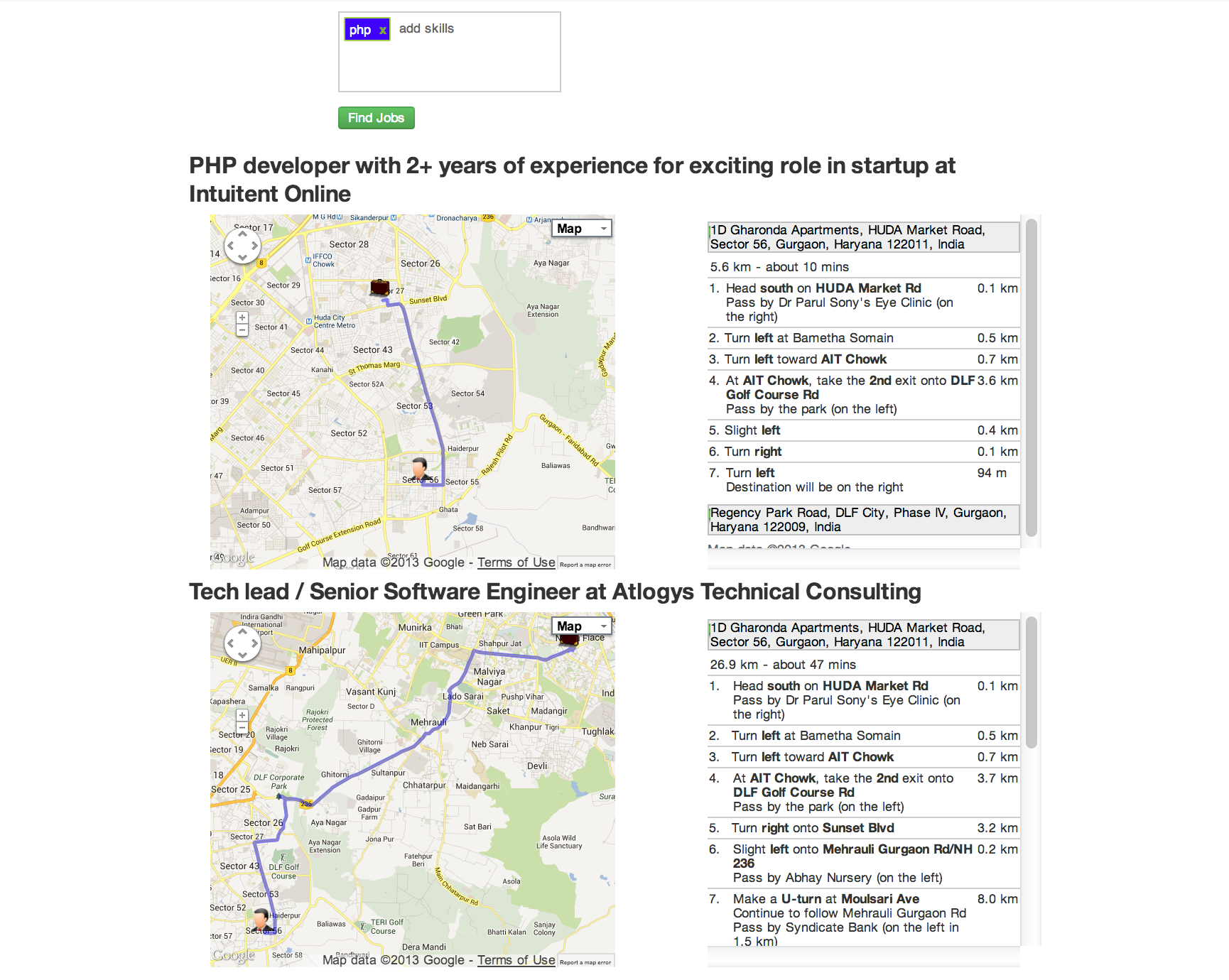
The test case will run 6 times with 10k, 100k, 1 million,2 million, 3 million, and 10 million records. The document used is shown under document heading and is the same as the one used in first post just with one extra field index(a simple int field which just auto increments by one) . Before inserting the records index is created on index field and then records are inserted in batch of 100 records. Finally 30000 queries are performed on a selected part of the collection. The selection varies from 1% of the data in the collection to 100% of the collection. The queries were performed 3 times on the selected dataset to give MongoDB chance to put the selected dataset in RAM. The JUnit test case is shown below.

	@Test
	public void workingSetTests() throws Exception {
		benchmark(10000);
		cleanMongoDB();
		benchmark(100000);
		cleanMongoDB();
		benchmark(1000000);
		cleanMongoDB();
		benchmark(2000000);
		cleanMongoDB();
		benchmark(3000000);
		cleanMongoDB();
		benchmark(10000000);
		cleanMongoDB();
	}

	private void benchmark(int totalNumberOfKeys) throws Exception {
		IndexDefinition indexDefinition = new Index("index", Order.ASCENDING)
				.named("index_1");
		mongoTemplate.ensureIndex(indexDefinition, User.class);
		int batchSize = 100;
		int i = 0;

		long startTime = System.currentTimeMillis();
		LineIterator iterator = FileUtils.lineIterator(new File(FILE_NAME));
		while (i < totalNumberOfKeys && iterator.hasNext()) {
			List users = new ArrayList();
			for (int j = 0; j < batchSize; j++) {
				String line = iterator.next();
				User user = convertLineToObject(line);
				user.setIndex(i);
				users.add(user);
				i += 1;
			}
			mongoTemplate.insert(users, User.class);

		}
		long endTime = System.currentTimeMillis();
		logger.info(String.format("%d documents inserted took %d milliseconds",	totalNumberOfKeys, (endTime - startTime)));

		performQueries(totalNumberOfKeys, 1);
		performQueries(totalNumberOfKeys, 1);
		performQueries(totalNumberOfKeys, 1);
		performQueries(totalNumberOfKeys, 10);
		performQueries(totalNumberOfKeys, 10);
		performQueries(totalNumberOfKeys, 10);
		performQueries(totalNumberOfKeys, 100);
		performQueries(totalNumberOfKeys, 100);
		performQueries(totalNumberOfKeys, 100);

		String collectionName = mongoTemplate
				.getCollectionName(User.class);
		CommandResult stats = mongoTemplate.getCollection(collectionName)
				.getStats();
		logger.info("Stats : " + stats);
		double size = stats.getDouble("storageSize");
		logger.info(String
				.format("Storage Size : %.2f M", size / (1024 * 1024)));

	}

	private void performQueries(int totalNumberOfKeys, int focus) {
		int gets = 30000;
		long startTime = System.currentTimeMillis();
		for (int index = 0; index < gets; index++) {
			Random random = new Random();
			boolean focussedGet = random.nextInt(100) != 0;
			int key = 0;
			if (focussedGet) {
				key = random.nextInt((totalNumberOfKeys * focus) / 100);
			} else {
				key = random.nextInt(totalNumberOfKeys);
			}
			mongoTemplate.findOne(Query.query(Criteria.where("index").is(key)),
					User.class);
		}
		long endTime = System.currentTimeMillis();
		logger.info(String.format("%d gets (focussed on bottom %d%%) took %d milliseconds", gets,focus, (endTime - startTime)));
	}

Results

In the table above number of records are in million and time to do 30k queries is in seconds.

One thing that this data clearly shows is that if you have you have working set which can fit in RAM performance almost remains same agnostic of total number of documents in MongoDB. This can easily be seen by comparing 3 run of 1 % dataset of all dataset values. Performance of 30k queries on 1% of dataset on both  3 million records and 10 million records are very close.

Using MongoDB Replica Set With Spring MongoDB 1.0.0.RC1

The primary means for replication is to ensure data survives single or multiple machine failures. The more replicas you have, the more likely is your data to survive one or more hardware crashes. With three replicas, you can afford to lose two nodes and still serve the data. MongoDB supports two forms of replication, Replica Sets and Master Slave. Replica Sets is the recommended way to do replication in MongoDB and will cover only Replica Sets in this post.

Couple of weeks back I was working in POC where we need to set up MongoDB replication. As I am Spring aficionado I decided to use Spring MongoDB to interact with Replica Set. We used Spring Roo to quickly bootstrap the project. All the project setup, Spring MongoDB setup, JUnit test cases, evern Spring MVC UI was created in minutes thanks to Spring Roo. I am big Spring Roo fan — I just love it. Thanks SpringSource for such an amazing project. Spring Roo uses Spring MongoDB version 1.0.0.M5 which has a bug that it does not support WriteConcern value REPLICAS_SAFE. But with the current release 1.0.0.RC1 that issue has been fixed and now you can use REPLICAS_SAFE. REPLICAS_SAFE is the recommended value for WriteConcern in case of replication.  This is a step by step guide from creation of Spring project to working MongoDB replica set.

  1. Create the project using Spring Roo. If you are not aware of Spring Roo you can read my Spring Roo series. I am using Spring Roo to quickly configure a Spring MongoDB project.
    project --topLevelPackage com.xebia.mongodb.replication --projectName mongodb-replication-demo --java 6
    mongo setup --databaseName bookshop --host localhost --port 27017
    entity mongo --class ~.domain.Book --testAutomatically --identifierType org.bson.types.ObjectId
    field string --fieldName title --notNull
    field string --fieldName author --notNull
    field number --type double --fieldName price --notNull
    repository mongo --interface ~.repository.BookRepository --entity ~.domain.Book
    

    This will create a Spring maven project, configure MongoDB to work with Spring, create one Collection Book and will add three fields title, author, and price to the collection. All the CRUD operations will carried out using BookRepository.

  2.  Start the MongoDB server using ./mongod and run BookIntegrationTest and make sure all tests pass.
  3. Setup replica set following the MongoDB documentation http://www.mongodb.org/display/DOCS/Replica+Set+Tutorial.
  4. Update the applicationContext-mongo.xml as shown below but before add the property mongo.replicaset which will have all nodes.
    <?xml version="1.0" encoding="UTF-8" standalone="no"?>
    <beans xmlns="http://www.springframework.org/schema/beans" xmlns:cloud="http://schema.cloudfoundry.org/spring" xmlns:context="http://www.springframework.org/schema/context" xmlns:mongo="http://www.springframework.org/schema/data/mongo" xmlns:xsi="http://www.w3.org/2001/XMLSchema-instance" xsi:schemaLocation="http://www.springframework.org/schema/context http://www.springframework.org/schema/context/spring-context-3.0.xsd        http://www.springframework.org/schema/data/mongo        http://www.springframework.org/schema/data/mongo/spring-mongo-1.0.xsd        http://www.springframework.org/schema/beans        http://www.springframework.org/schema/beans/spring-beans-3.0.xsd        http://schema.cloudfoundry.org/spring http://schema.cloudfoundry.org/spring/cloudfoundry-spring-0.8.xsd">
    
        <mongo:db-factory dbname="${mongo.database}" id="mongoDbFactory" mongo-ref="mongo"/>
    
        <mongo:repositories base-package="com.xebia.mongodb.replication"/>
    
        <!-- To translate any MongoExceptions thrown in @Repository annotated classes -->
        <context:annotation-config/>
    
        <bean class="org.springframework.data.mongodb.core.MongoTemplate" id="mongoTemplate">
            <constructor-arg ref="mongoDbFactory"/>
        </bean>
    
    	<mongo:mongo id="mongo" replica-set="${mongo.replicaset}" write-concern="REPLICA_SAFE">
    		<mongo:options auto-connect-retry="true"/>
    	</mongo:mongo>
    </beans>
    

    If you run the tests again all the tests will fail and you will see following exception.

    Caused by: org.springframework.beans.factory.BeanDefinitionStoreException: Unexpected exception parsing XML document from file [/home/shekhar/dev/workspaces/writing/mongodb-replication-demo/target/classes/META-INF/spring/applicationContext-mongo.xml]; nested exception is java.lang.ArrayIndexOutOfBoundsException: 1
    at org.springframework.beans.factory.xml.XmlBeanDefinitionReader.
    doLoadBeanDefinitions(XmlBeanDefinitionReader.java:412)
    

    The reason for this exception is because there is a bug in Spring MongoDB 1.0.0.M5 which is not able to parse WriteConcern REPLICA_SAFE value.

  5. To make it work we have to work with Spring MongoDB latest version 1.0.0.RC1. This is released just 3 days back on 7th December 2011.Update the pom.xml with 1.0.0.RC1.
     <dependency>
    	<groupId>org.springframework.data</groupId>
            <artifactId>spring-data-mongodb</artifactId>
            <version>1.0.0.RC1</version>
    </dependency>
    

    Run the BookIntegrationTest the tests will fail again and see the following exception stacktraces.

    java.lang.NoSuchMethodError: org.springframework.core.annotation.AnnotationUtils
    .getAnnotation(Ljava/lang/reflect/AnnotatedElement;Ljava/lang/Class;)
    Ljava/lang/annotation/Annotation;
    at org.springframework.transaction.annotation.SpringTransactionAnnotationParser
    .parseTransactionAnnotation(SpringTransactionAnnotationParser.java:38)
    
  6. To make it ran you have to use latest Spring version 3.1.0.RC2 in pom.xml
    <spring.version>3.1.0.RC2</spring.version>
    
  7. Final change you need to make is in applicationContext-mongo.xml. Change the value of write-concern to REPLICAS_SAFE.
    <mongo:mongo id="mongo" replica-set="${mongo.replicaset}" write-concern="REPLICAS_SAFE">
    	<mongo:options auto-connect-retry="true"/>
    </mongo:mongo>
    
  8. Run the tests and all the tests will pass.

Are We Really Talking About Commodity Hardware When Working With MongoDB?

Last couple of months I have been reading, learning, playing with MongoDB and one thing that I have read or found myself is that its performance depends largely on the amount of RAM in your system. As a general rule larger the RAM better the performance which I can easily understand as you are not hitting disk so you get great performance. When we talk about commodity hardware I think we talk about 4GB or at max 8 GB RAM boxes which means if your application working set can fit in 4GB or 8 GB RAM you are good otherwise your performance will suffer. Then you have two choices either add more RAM or horizontally scale your system i.e Sharding. To me adding more RAM means you are moving away from commodity hardware and moving toward big costly boxes. So we should horizontally scale our system by adding more 4 GB or 8GB RAM boxes. Correct??

I thought companies or people who are using MongoDB would have been following this approach i.e. they are using commodity boxes and scaling their systems. But I was wrong. Most of presentations (from companies like Craiglist and ForeSquare) that I saw are using big 64 GB or more RAM, faster disks. So where are we talking about commodity hardware?


How MongoDB Different Write Concern Values Affect Performance On A Single Node?

In the first post I talked about how indexes affect the write speed in MongoDB. In this second post I will share my findings on how different write concerns affect the write speed on a single node. Please refer to the first post for the setup related information.  A write concern controls the behavior of write operation and gives developers the choice to choose the value matching their requirements. For instance there are some documents which are not very important and if one of them get lost your business will not get screwed. For those you can choose less stricter value of write concern and for objects where you want don’t want your object to be lost you should choose stricter value of write concern. Let’s take a look at different write concern values available in Java driver. Please note in this experiment I used MongoDB java driver 2.7.2 instead of Spring MongoDB.

  1. Normal :  This is the default option where every write operation is fire and forget which means it just writes to the driver and return back. It does not wait for write to be available in server. So, if another thread tries to read the document just after the document has been written it  might found not find it. There is a very high probability of data loss with this option. I think this should not be considered in cases where data durability is important and you are only using single instance of MongoDB server. Even with replication you can loose data with this option (I will talk about in my future post).
  2. None : This is almost same as Normal with just one different that in Normal if network goes down or there is some other network issue you get an exception but with None you don’t get any exception if there are some network issues. This makes it highly unreliable.
  3. Safe : As suggested by name it is safer than the above two. The write operation waits for the MongoDB server to acknowledge the write but data is still not written to disk. With safe you will not face issue that when another thread tried to read the object you just wrote, the object was not found. So, it provides a guarantee that object once written will be found. That’s Good. But still you can loose data because data is not written to disk and if server died for some reason data will be lost.
  4. Journal Safe : Before we talk about this option. Lets first talk about what is Journaling in MongoDB. Journaling is a feature of MongDB where a write ahead log file of all the operations is maintained. In scenarios when MongoDB is not cleanly shutdown like using kill -9 command the data can be recovered from Journal files. By default data is written to journal files after every 100 milliseconds. You can change it to lie between 2 ms to 300 ms. With version 2.0 journaling is enable by default on 64 bit MongoDB servers. With Journal Safe write concern option your write will wait till the journal file is updated.
  5. Fysnc : With Fsync write concern the write operation waits till the data is not written to disk. This is the safest option on a Single node as only way you can loose data is when the hard disk crashes.

I have left the other values which are not applicable to single node but make more sense when replication is enable. I will cover them in future posts.

Test Case

The test case was very simple I will be doing 1 million writes with each of options except fsync and will find out the writes per second speed for each of the write concern values.

Document

The document is similar to the one used in first post. It is 2395 bytes.

{
"_id" : ObjectId("4eda74ef84ae8b2410f5fa8e"),
"age" : "27",
"lName" : "Gulati1",
"fName" : "Shekhar1"
"bio" : "I am a Java Developer. I am a Java Developer. I am a Java Developer. I am a Java Developer. I am a Java Developer. I am a Java Developer. I am a Java Developer. I am a Java Developer. I am a Java Developer. I am a Java Developer. I am a Java Developer. I am a Java Developer. I am a Java Developer. I am a Java Developer. I am a Java Developer. I am a Java Developer. I am a Java Developer. I am a Java Developer. I am a Java Developer. I am a Java Developer. I am a Java Developer. I am a Java Developer. I am a Java Developer. I am a Java Developer. I am a Java Developer. I am a Java Developer. I am a Java Developer. I am a Java Developer. I am a Java Developer. I am a Java Developer. I am a Java Developer. I am a Java Developer. I am a Java Developer. I am a Java Developer. I am a Java Developer. I am a Java Developer. I am a Java Developer. I am a Java Developer. I am a Java Developer. I am a Java Developer. I am a Java Developer. I am a Java Developer. I am a Java Developer. I am a Java Developer. I am a Java Developer. I am a Java Developer. I am a Java Developer. I am a Java Developer. I am a Java Developer. I am a Java Developer. I am a Java Developer. I am a Java Developer. I am a Java Developer. I am a Java Developer. I am a Java Developer. I am a Java Developer. I am a Java Developer. I am a Java Developer. I am a Java Developer. I am a Java Developer. I am a Java Developer. I am a Java Developer. I am a Java Developer. I am a Java Developer. I am a Java Developer. I am a Java Developer. I am a Java Developer. I am a Java Developer. I am a Java Developer. I am a Java Developer. I am a Java Developer. I am a Java Developer. I am a Java Developer. I am a Java Developer. I am a Java Developer. I am a Java Developer. I am a Java Developer. I am a Java Developer. I am a Java Developer. I am a Java Developer. I am a Java Developer. I am a Java Developer. I am a Java Developer. I am a Java Developer. I am a Java Developer. I am a Java Developer. I am a Java Developer. I am a Java Developer. I am a Java Developer. I am a Java Developer. I am a Java Developer. I am a Java Developer. I am a Java Developer. I am a Java Developer. I am a Java Developer. I am a Java Developer. I am a Java Developer. I am a Java Developer. I am a Java Developer. I am a Java Developer. ",
}

JUnit Test

The JUnit test case is shown below. In each test case it inserts one million records with a different value of write concern.

public class SingleNodeWriteConcernTests {

	private final static int ONE_MILLION = 1000000;

	private final Logger logger = Logger
			.getLogger(SingleNodeWriteConcernTests.class);

	@Test
	public void shouldInsertRecordsInNonCurrentMode() throws Exception {
		ServerAddress serverAddress = new ServerAddress("localhost", 27017);

		Mongo mongo = new Mongo(serverAddress);
		mongo.setWriteConcern(WriteConcern.NONE);
		runASingleTestCase(mongo, "NONE");

		mongo = new Mongo(serverAddress);
		mongo.setWriteConcern(WriteConcern.JOURNAL_SAFE);
		runASingleTestCase(mongo, "JOURNAL_SAFE");

		mongo = new Mongo(serverAddress);
		mongo.setWriteConcern(WriteConcern.NORMAL);
		runASingleTestCase(mongo, "NORMAL");

		mongo = new Mongo(serverAddress);
		mongo.setWriteConcern(WriteConcern.SAFE);
		runASingleTestCase(mongo, "SAFE");

	}

	private void runASingleTestCase(Mongo mongo, String name) throws Exception {
		DB db = mongo.getDB("play");
		DBCollection people = db.getCollection("people");
		if (db.collectionExists("people")) {
			people.drop();
		}
		insertRecords(mongo, name);

		mongo.dropDatabase("play");
	}

	private void insertRecords(Mongo mongo, final String name) throws Exception {

		DB db = mongo.getDB("play");
		final DBCollection collection = db.getCollection("people");
		collection.ensureIndex("fName");
		long startTime = System.currentTimeMillis();
		for (int i = 1; i <= ONE_MILLION; i++) {
			BasicDBObject obj = new BasicDBObject();
			Map<String, String> map = new HashMap<String, String>();
			map.put("fName", "Shekhar" + i);
			map.put("lName", "Gulati" + i);
			map.put("age", String.valueOf(i));
			map.put("bio", StringUtils.repeat("I am a Java Developer. ", 100));
			obj.putAll(map);
			collection.insert(obj);
		}
		long endTime = System.currentTimeMillis();
		double seconds = ((double) (endTime - startTime)) / (1000);
		double rate = ONE_MILLION / seconds;

		String message = String
				.format("WriteConcern %s inserted %d records in %.2f seconds at %.2f (rec/s)",
						name, ONE_MILLION, seconds, rate);
		logger.info(message);

	}

}

Results

As you might have also expected Normal and None are the fastest because of the way they work i.e. fire and forget. Safe writes takes 3.5 times more than Normal writes. With Journal safe value you come down to 24 documents per second which is very low. As you can see as you move towards more write safety you loose a lot on write speed. This is again a decision you have to make depending on your use case.

Can something be done to increase write speed in Safe and Journal Safe options?

The results shown above are based on records being inserted sequentially one at a time. I tried an experiment where in I divided 1 million records to a batch of 100,000 records each. And let 10 threads write 1 million record in parallel.  The write speed for Safe and Journal Safe increased but None and Normal decreased as shown below.

The write speed for Safe with 10 threads is 1.4 times the write speed with one thread and similarly write speed for Journal Safe is 10 times of the write speed with one thread. This is because while one thread is waiting other threads can work in parallel which allows to better utilize CPU.