Deploy WebSocket Web Applications With JBoss Wildfly

Wildfly application server on OpenShift

Wildfly is the new name for the community edition of the JBoss Application Server. The current development version of Wildfly (8.0) will be adding support for Java EE 7. Java EE 7 brings a lot of goodies for Java(EE) developers. One of the features of Java EE 7 is the JSR 356 Java API for WebSockets, which specifies a Java API that developers can use to integrate WebSockets into their applications — both on the server side as well as on the Java client side. In case you are new to WebSockets or JSR 356, please refer to my earlier blog post on this subject. In this blog post, we will install Wildfly on OpenShift using the DIY cartridge and look at the sample WebSocket application bundled with the quickstart.

OpenShift already has best in class Java support with Tomcat 6Tomcat 7JBoss AS7, and JBoss EAP 6 bundled with it. You can also run Jetty or GlassFish on it using the DIY cartridges. In addition, OpenShift provides support for Jenkins continuous integration server.

Read full blog at https://www.openshift.com/blogs/deploy-websocket-web-applications-with-jboss-wildfly

How to Build and Deploy OpenShift Java Projects using Travis CI

Recently, Travis CI announced support for deploying OpenShift applications from Travis builds. Travis-CI.org is a free hosted continuous integration server for open source applications. Commercial non-opensource project developers can use the Travis CI commercial offering. This blog shows how developers can use Travis-CI.org to build and deploy OpenShift Java applications. These instructions also apply to commercial offerings Travis-CI.com

Please note that out-of-the-box OpenShift provides support for Jenkins based deployments. You can refer to my blog on Jenkins for more information.

Read full blog https://www.openshift.com/blogs/how-to-build-and-deploy-openshift-java-projects-using-travis-ci.

Run Gradle Builds on OpenShift

OpenShift has supported Apache Maven as default build system for Java based projects since the first release. All the Java projects created by OpenShift are maven based. A few months ago we also added support for Apache Ant. All OpenShift gears now have Apache Ant installed on them. So, using Apache Ant to build your project is as easy as updating the OpenShift build action hook. You can refer to my blog post to learn how you can use Ant to build your OpenShift projects.

Lately I have seen lot of developers asking how they can use Gradle to build their projects. Gradle combines the power and flexibility of Ant with the dependency management and conventions of Maven into a more effective way to build. A lot of open source projects and enterprises are using Gradle as their build system. The Spring Framework is one popular example of an open source project using Gradle. In this blog post, we will learn how we can configure an OpenShift Java project to use Gradle instead of Apache Maven to build the project.

Read full blog here https://www.openshift.com/blogs/run-gradle-builds-on-openshift

Download OpenShift Origin Virtual Image

In case you wish to download OpenShift Origin virtual image using wget and get the error shown below then you should use command shown below.

Connecting to mirror.openshift.com|184.72.214.144|:443... connected.
OpenSSL: error:14077458:SSL routines:SSL23_GET_SERVER_HELLO:reason(1112)
Unable to establish SSL connection.
wget https://mirror.openshift.com/pub/origin-server/release/3/images/openshift-origin.zip --secure-protocol=SSLv3

If you wish to use another name for the file, you can use –O option as shown below.

wget --O openshift_origin_3.zip https://mirror.openshift.com/pub/origin-server/release/3/images/openshift-origin.zip --secure-protocol=SSLv3

Building Single Page Web Applications with Backbone.js, JaxRS, MongoDB, and OpenShift

Backbone.js is a mature, popular, and lightweight javascript library which aims to bring structure to your client-side code. The goal of backbone.js is to bring MVC, a software architecture pattern, to client side development.Actually, backbone.js is an MV framework where view is also responsible for controller logic as well. In this blog, we will build a simple social bookmarking application.

In brief, MVC is a programming design pattern for separating the different concerns of your application. The M corresponds to Model and is used to define domain object. The V corresponds to View and is responsible for display logic. Finally, the C corresponds to Controller and is responsible for user interactions and interactions between Views and Models.

You can find source code of the application here https://github.com/shekhargulati/getbookmarks. Backbone.js is used by Linkedin, Foursquare, Wunderkit, Groupon, etc to build complex applications. You can view the full list here.

Read full blog at https://www.openshift.com/blogs/building-single-page-web-applications-with-backbonejs-jaxrs-mongodb-and-openshift

Best Practices For Horizontal Application Scaling

best practice is a technique or methodology that, through experience and research, has proven to reliably lead to superior results. In this blog post, I will talk about few best practices that I have learned over the years which might help you in designing scalable web applications.

But before we talk about scaling best practices, we should define the meaning of scalability. Most of the people confuse scalability with performance. Performance refers to the capability of a system to provide a certain response time. Scalability can be defined as ease with which a system or component can be modified to fit the problem area in such a way that the system can accommodate increased usage, increased datasets, and remains maintainable. A system can be performant but might not be scalable. For example, a web application can be very responsive and fast for 100 users and 1GB of data, but it will not be considered scalable if it can’t maintain the same speed with 100 times the data with 100 times the users. You achieve scalable architecture when you can handle more load by adding more of the same stuff. You want to be able to scale by throwing money at a problem which means throwing more boxes at a problem as you need them.

Read full blog at https://www.openshift.com/blogs/best-practices-for-horizontal-application-scaling

How To Build Location-Aware Web Applications using HTML5 and MongoDB

We all use location aware applications in our day-to-day life. Applications like Foursquare, Facebook places, etc help us share our location (or places we visit) with our friends and family. Applications such as Google Local help us find out which businesses are near our current location. So, if we need a good coffee shop recommendation, we can ask Google Local to find us all the coffee shops near our location. This not only helps the customer, but also helps businesses reach the right audience and sell their products more effectively. It is a win-win situation for both consumers and businesses.

To build such an application , you need the geolocation of the user. According to Wikipedia, “Geolocation is the identification of the real-world geographic location of an object”. Until now, there was no standard way to find the location of a user in a web application. We could use an open source library like Google Gears to get the geo location of a user but this library is not under development anymore and should only be used with older browsers, which do not support W3C GeoLocation API. The W3C GeoLocation API is a specification that provides standard scripted access to geographical information associated with the hosting device. Geo Location support is not officially part of HTML 5 specification but people use it interchangeably and most commonly you will hear about GeoLocation APIs with respect to HTML5. This API provides an abstraction layer on top of how geolocation information of a user is gathered. All modern browsers support the GeoLocation API. The below table is taken from http://caniuse.com/#feat=geolocation.

Read full blog at https://www.openshift.com/blogs/how-to-build-location-aware-web-applications-using-html5-and-mongodb

How To Enhance Location Aware Apps with Google’s Directions Service

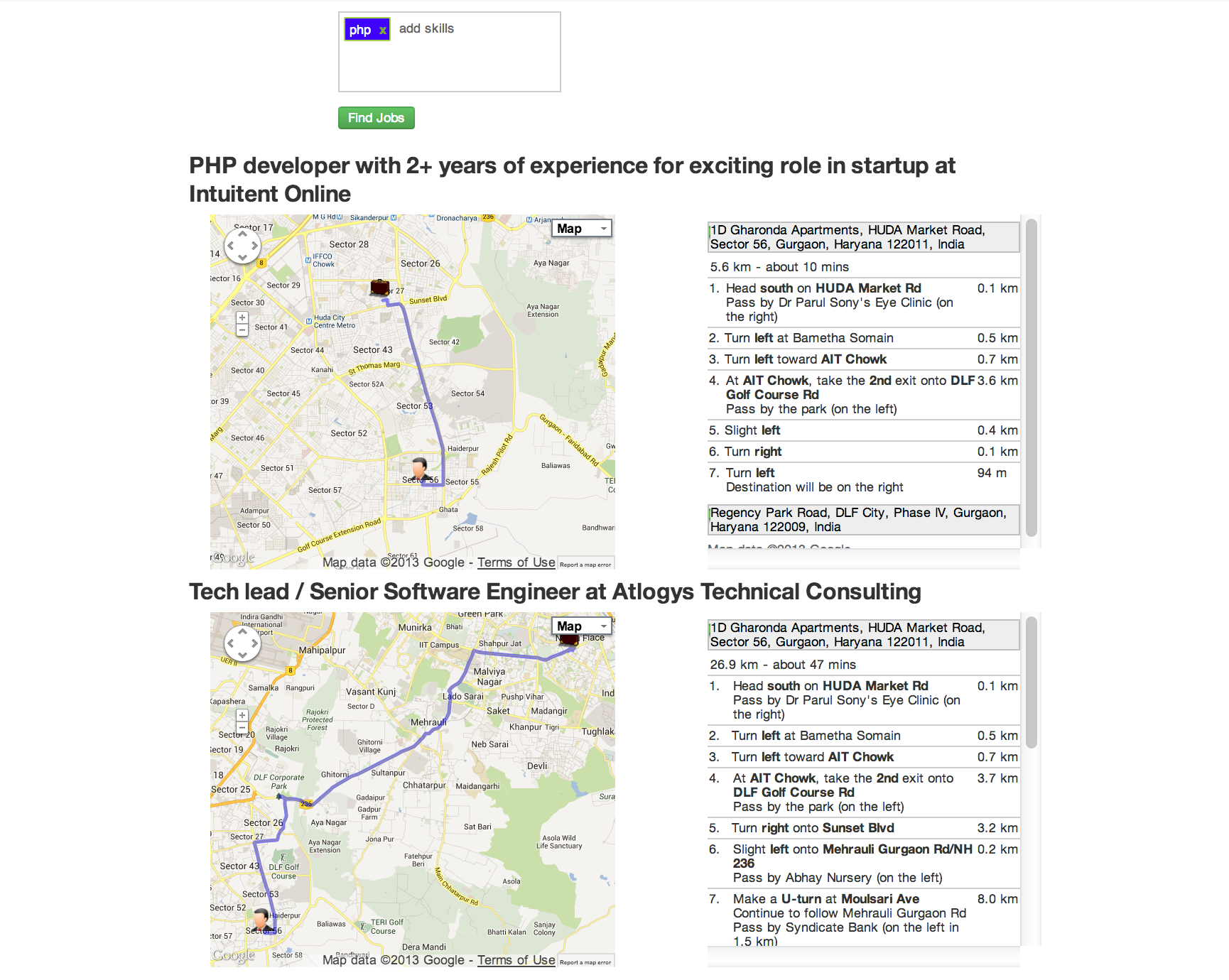
In my previous blog post, I talked about how we can use HTML 5 GeoLocation capabilities to build location aware applications with JAXRS and MongoDB at the backend. Today, we will extend the LocalJobs application we built in that blog post with Google’s Direction Service. It is recommended that you first read my previous post and then continue with this blog entry. The Directions Web Service allows applications to obtain Driving, Bicycling, and Walking directions through an XML/JSON REST interface. All of the features of the Map API v3 Directions service are supported, including “avoid highways”, “avoid tolls”, and waypoint optimisation.To see the application in action, just go to http://localjobs1-t20.rhcloud.com/. Enter skills such as java , php , mongodb , etc. and press the “Find Jobs” button. The Browser will then ask you to allow the application to use your computer’s location. Click on “allow” and you will see results as shown below:

Read full blog at https://www.openshift.com/blogs/how-to-enhance-location-aware-apps-with-googles-directions-service

How To Build Real-Time Location-Aware Applications using MongoDB , WebSockets , and HTML 5 GeoLocation API

One of the advantages of OpenShift or any other Platform as a Service is that it gives developers the power to turn their ideas into applications. As a developer, you are only concerned about writing code and the platform manages and scales the underlying infrastructure for you. I am also a developer and I love to write code.

A few days ago, I came up with a very simple idea to show messages in real-time on a map. A user posts a message via the application user interface, the application captures the user’s current location using an HTML5 Geo-location API, and then displays the message on a map. If another user posts a message from some other part of world, the first user will see that same message in real-time. As users start posting messages, they will see all of the messages appearing on the map.

Read full post at https://www.openshift.com/blogs/how-to-build-real-time-location-aware-applications

OpenShift Rails QuickStart

  1. Create a Ruby 1.9 application
    rhc app create -a railsdemo -t ruby-1.9
    
  2. After running the command railsdemo folder will get created in your directory. Run the command shown below. This will generate rails code in the railsdemo folder.It will ask you whether you want to override, say yes.
    rails new railsdemo
    
  3. Next run commands shown below
    cd railsdemo
    bundle install
    rails generate controller home index
    rm public/index.html
    
  4. Add the following route to config/routes.rb:
    root :to => "home#index"
    
  5. Generate Post entity with fields as shown below
    rails generate scaffold Post name:string title:string content:text
    
  6. Add Database support by uncommenting following lines from .openshift/action_hooks/deploy script
    pushd ${OPENSHIFT_REPO_DIR} > /dev/null
    bundle exec rake db:migrate RAILS_ENV="production"
    popd > /dev/null
    
  7. Add mysql cartridge
    rhc cartridge add -a railsdemo -c mysql-5.1
    
  8. Update config/database.yml
    production:
      adapter: mysql2
      encoding: utf8
      database: <%=ENV['OPENSHIFT_APP_NAME']%>
      pool: 5
      host: <%=ENV['OPENSHIFT_MYSQL_DB_HOST']%>
      port: <%=ENV['OPENSHIFT_MYSQL_DB_PORT']%>
      username: <%=ENV['OPENSHIFT_MYSQL_DB_USERNAME']%>
      password: <%=ENV['OPENSHIFT_MYSQL_DB_PASSWORD']%>
      socket: <%=ENV['OPENSHIFT_MYSQL_DB_SOCKET']%>
    
  9. Add gem in Gemfile
    gem 'mysql2'
    
  10. Add, Commit, and Push the Code
    git add .
    git commit -a -m "Initial setup"
    git push
    
  11. Finally you can view the application running at http://railsdemo-domainname.rhcloud.com and you can create new posts at http://railsdemo-domainname.rhcloud.com/posts