How To Build Location-Aware Web Applications using HTML5 and MongoDB

We all use location aware applications in our day-to-day life. Applications like Foursquare, Facebook places, etc help us share our location (or places we visit) with our friends and family. Applications such as Google Local help us find out which businesses are near our current location. So, if we need a good coffee shop recommendation, we can ask Google Local to find us all the coffee shops near our location. This not only helps the customer, but also helps businesses reach the right audience and sell their products more effectively. It is a win-win situation for both consumers and businesses.

To build such an application , you need the geolocation of the user. According to Wikipedia, “Geolocation is the identification of the real-world geographic location of an object”. Until now, there was no standard way to find the location of a user in a web application. We could use an open source library like Google Gears to get the geo location of a user but this library is not under development anymore and should only be used with older browsers, which do not support W3C GeoLocation API. The W3C GeoLocation API is a specification that provides standard scripted access to geographical information associated with the hosting device. Geo Location support is not officially part of HTML 5 specification but people use it interchangeably and most commonly you will hear about GeoLocation APIs with respect to HTML5. This API provides an abstraction layer on top of how geolocation information of a user is gathered. All modern browsers support the GeoLocation API. The below table is taken from http://caniuse.com/#feat=geolocation.

Read full blog at https://www.openshift.com/blogs/how-to-build-location-aware-web-applications-using-html5-and-mongodb

How To Enhance Location Aware Apps with Google’s Directions Service

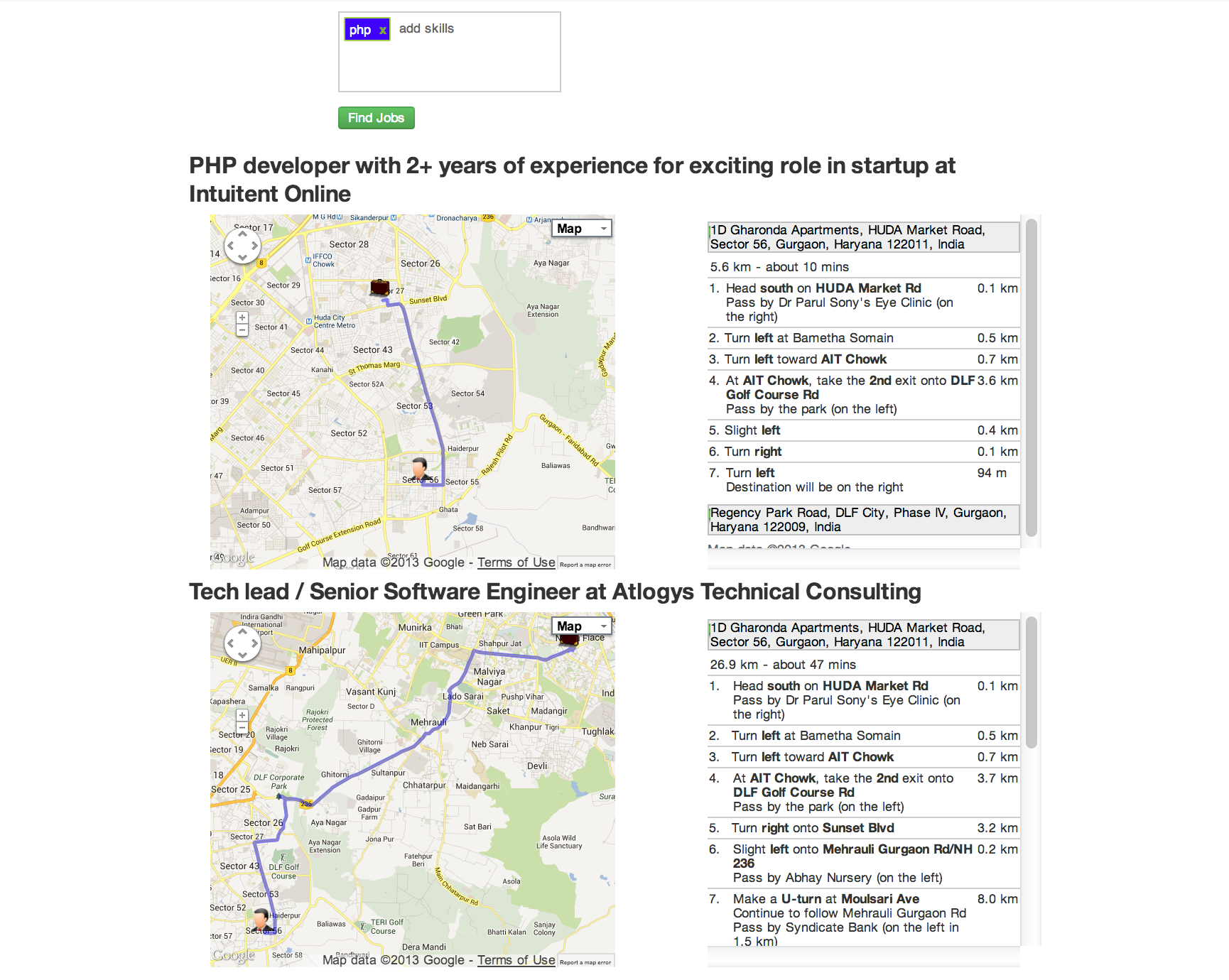
In my previous blog post, I talked about how we can use HTML 5 GeoLocation capabilities to build location aware applications with JAXRS and MongoDB at the backend. Today, we will extend the LocalJobs application we built in that blog post with Google’s Direction Service. It is recommended that you first read my previous post and then continue with this blog entry. The Directions Web Service allows applications to obtain Driving, Bicycling, and Walking directions through an XML/JSON REST interface. All of the features of the Map API v3 Directions service are supported, including “avoid highways”, “avoid tolls”, and waypoint optimisation.To see the application in action, just go to http://localjobs1-t20.rhcloud.com/. Enter skills such as java , php , mongodb , etc. and press the “Find Jobs” button. The Browser will then ask you to allow the application to use your computer’s location. Click on “allow” and you will see results as shown below:

Read full blog at https://www.openshift.com/blogs/how-to-enhance-location-aware-apps-with-googles-directions-service

How To Build Real-Time Location-Aware Applications using MongoDB , WebSockets , and HTML 5 GeoLocation API

One of the advantages of OpenShift or any other Platform as a Service is that it gives developers the power to turn their ideas into applications. As a developer, you are only concerned about writing code and the platform manages and scales the underlying infrastructure for you. I am also a developer and I love to write code.

A few days ago, I came up with a very simple idea to show messages in real-time on a map. A user posts a message via the application user interface, the application captures the user’s current location using an HTML5 Geo-location API, and then displays the message on a map. If another user posts a message from some other part of world, the first user will see that same message in real-time. As users start posting messages, they will see all of the messages appearing on the map.

Read full post at https://www.openshift.com/blogs/how-to-build-real-time-location-aware-applications

How To Run Apache Tomcat 8 on OpenShift

OpenShift PaaS gives developers the ability to try out new unsupported frameworks, programming languages, and servers. Today, while learning about WebSockets I learned that the current development version of Apache Tomcat i.e. version 8, has support for JSR356. JSR356 provides standard Java API for WebSockets. Although Apache Tomcat 7 provides support for WebSockets, it uses its own proprietary API. So, in order to test the JSR356 standard based WebSockets support in Apache Tomcat 8, I decided to give it a try. However, rather than installing Apache Tomcat 8 on my local development machine, I decided to install it on OpenShift.

Read full post at https://www.openshift.com/blogs/how-to-run-apache-tomcat-8-on-openshift

Load Twitter Page using JavaScript

Today I had to look at twitter page which was very long. Twitter load results when you reach the bottom of the page. And each time twitter load very few results so it was becoming very tiring to see page in one go. So, I decided to do this task programmatically using JavaScript. Open the chrome developer console and run these three lines.

function A(){console.log("Scrolling ...");window.scrollTo(0,document.body.scrollHeight)}

function B(){window.setInterval(A,1000)}

B()

Download JDK 7 update 25 via wget

To download Oracle JDK 7 via wget run the following following command

$ wget --no-cookies --no-check-certificate  --header "Cookie: gpw_e24=http%3A%2F%2Fwww.oracle.com" "http://download.oracle.com/otn-pub/java/jdk/7u25-b15/jdk-7u25-linux-x64.tar.gz"

$  mv jdk-7u25-linux-x64.tar.gz\?AuthParam\=1372827196_48b20a1d74cd809579eb76e369de596b jdk-7u25.tar.gz

Spring Integration RSS Feed Issue

If you are working with Spring Integration feed example https://github.com/SpringSource/spring-integration-samples/tree/master/basic/feed and get following error message “Could not find fetcher.properties on classpath“. The solution is to create an empty file called fetcher.properties in src/test/resources folder and this will fix the issue.


MongoDB Query Tip : Find All The Documents Where Array Length is Greater Than N

Suppose we have blog document in blogs collection as shown below.

> db.blogs.insert({author : "Shekhar Gulati","title":"Hello World","text":"Hello World!!","tags":["mongodb","openshift"]})
>
>
> db.blogs.insert({author : "Shekhar Gulati","title":"Hello World","text":"Hello World!!","tags":["mongodb","openshift","nosql"]})

Now you want to find out all those blogs which have more than 2 tags then query is shown below.

> db.blogs.find({$where : "this.tags.length > 2"}).pretty()
{
	"_id" : ObjectId("51011037bf779459a978f96f"),
	"author" : "Shekhar Gulati",
	"title" : "Hello World",
	"text" : "Hello World!!",
	"tags" : [
		"mongodb",
		"openshift",
		"nosql"
	]
}

Spring Test Failing with A ServletContext is required to configure default servlet handling

If you are getting exception shown below in your Spring test

Caused by: java.lang.IllegalArgumentException: A ServletContext is required to configure default servlet handling
at org.springframework.util.Assert.notNull(Assert.java:112)
at org.springframework.web.servlet.config.annotation.DefaultServletHandlerConfigurer.(DefaultServletHandlerConfigurer.java:54)
at org.springframework.web.servlet.config.annotation.WebMvcConfigurationSupport.defaultServletHandlerMapping(WebMvcConfigurationSupport.java:330)
at org.springframework.web.servlet.config.annotation.DelegatingWebMvcConfiguration$$EnhancerByCGLIB$$c733f512.CGLIB$defaultServletHandlerMapping$22()
at org.springframework.web.servlet.config.annotation.DelegatingWebMvcConfiguration$$EnhancerByCGLIB$$c733f512$$FastClassByCGLIB$$b76778f9.invoke()
at org.springframework.cglib.proxy.MethodProxy.invokeSuper(MethodProxy.java:228)
at org.springframework.context.annotation.ConfigurationClassEnhancer$BeanMethodInterceptor.intercept(ConfigurationClassEnhancer.java:285)
at org.springframework.web.servlet.config.annotation.DelegatingWebMvcConfiguration$$EnhancerByCGLIB$$c733f512.defaultServletHandlerMapping()
at sun.reflect.NativeMethodAccessorImpl.invoke0(Native Method)
at sun.reflect.NativeMethodAccessorImpl.invoke(NativeMethodAccessorImpl.java:39)
at sun.reflect.DelegatingMethodAccessorImpl.invoke(DelegatingMethodAccessorImpl.java:25)
at java.lang.reflect.Method.invoke(Method.java:597)
at org.springframework.beans.factory.support.SimpleInstantiationStrategy.instantiate(SimpleInstantiationStrategy.java:160)

Then to fix this error migrate to Spring 3.2 release. Change the maven dependency as shown below

<dependency>
 <groupId>org.springframework</groupId>
 <artifactId>spring-context</artifactId>
 <version>3.2.0.RELEASE</version>
</dependency>

2012 in review

The WordPress.com stats helper monkeys prepared a 2012 annual report for this blog.

Here’s an excerpt:

19,000 people fit into the new Barclays Center to see Jay-Z perform. This blog was viewed about 87,000 times in 2012. If it were a concert at the Barclays Center, it would take about 5 sold-out performances for that many people to see it.

Click here to see the complete report.