How Working Set Affects MongoDB Performance?

This is third post in my series of posts on MongoDB. This post will talk about how working set affects performance of MongoDB. The idea of this experiment came to me after I read a very good blog from Colin Howe on MongoDB Working Set. The tests performed in this blog are on similar lines as the ones talked by Colin Howe but performed with Java and MongoDB version 2.0.1. If you have worked with MongoDB or read about it you might have heard of the term Working Set. Working Set is the amount of data(including indexes) that will be in used by your application and if this data fits in RAM then the application performance will be great else it would degrade drastically When the data can’t fit in RAM MongoDB has to hit disk which impacts performance.  I recommend reading blog from Adrian Hills on the importance of Working Set. To help you understand working set better I am citing the example from Adrian blog :

Suppose you have 1 year’s worth of data. For simplicity, each month relates to 1GB of data giving 12GB in total, and to cover each month’s worth of data you have 1GB worth of indexes again totalling 12GB for the year.

If you are always accessing the last 12 month’s worth of data, then your working set is: 12GB (data) + 12GB (indexes) = 24GB.

However, if you actually only access the last 3 month’s worth of data, then your working set is: 3GB (data) + 3GB (indexes) = 6GB.

From the example above if your machine has more than 6GB RAM then your application will perform great otherwise it will be slow. The important thing to know about working set is that MongoDB uses LRUstrategy to decide which documents are in RAM and you can’t tell MongoDB to keep a particular document or collection in RAM. Now that you know what is working set and how important it is let’s start the experiment.

Setup 

Dell Vostro Ubuntu 11.04 box with 4 GB RAM and 300 GB hard disk. Java 6 MongoDB 2.0.1 Spring MongoDB 1.0.0.M5 which internally uses MongoDB Java driver 2.6.5 version.

Document

The documents I am storing in MongoDB looks like as shown below. The average document size is 2400 bytes.  Please note the _id field also has an index. The index that I will be creating will be on name field.

{
"_id" : ObjectId("4ed89c140cf2e821d503a523"),
"name" : "Shekhar Gulati",
"someId1" : NumberLong(1000006),
"str1" : "U",
"date1" : ISODate("1997-04-10T18:30:00Z"),
"index" : 1,
"bio" : "I am a Java Developer. I am a Java Developer. I am a Java Developer. I am a Java Developer. I am a Java Developer. I am a
Java Developer. I am a Java Developer. I am a Java Developer. I am a Java Developer. I am a Java Developer. I am a Java
Developer. I am a Java Developer. I am a Java Developer. I am a Java Developer. I am a Java Developer. I am a Java Developer. I
am a Java Developer. I am a Java Developer. I am a Java Developer. I am a Java Developer. I am a Java Developer. I am a Java
Developer. I am a Java Developer. I am a Java Developer. I am a Java Developer. I am a Java Developer. I am a Java Developer. I
am a Java Developer. I am a Java Developer. I am a Java Developer. I am a Java Developer. I am a Java Developer. I am a Java
Developer. I am a Java Developer. I am a Java Developer. I am a Java Developer. I am a Java Developer. I am a Java Developer. I
am a Java Developer. I am a Java Developer. I am a Java Developer. I am a Java Developer. I am a Java Developer. I am a Java
Developer. I am a Java Developer. I am a Java Developer. I am a Java Developer. I am a Java Developer. I am a Java Developer. I
am a Java Developer. I am a Java Developer. I am a Java Developer. I am a Java Developer. I am a Java Developer. I am a Java
Developer. I am a Java Developer. I am a Java Developer. I am a Java Developer. I am a Java Developer. I am a Java Developer. I
am a Java Developer. I am a Java Developer. I am a Java Developer. I am a Java Developer. I am a Java Developer. I am a Java
Developer. I am a Java Developer. I am a Java Developer. I am a Java Developer. I am a Java Developer. I am a Java Developer. I
am a Java Developer. I am a Java Developer. I am a Java Developer. I am a Java Developer. I am a Java Developer. I am a Java
Developer. I am a Java Developer. I am a Java Developer. I am a Java Developer. I am a Java Developer. I am a Java Developer. I
am a Java Developer. I am a Java Developer. I am a Java Developer. I am a Java Developer. I am a Java Developer. I am a Java
Developer. I am a Java Developer. I am a Java Developer. I am a Java Developer. I am a Java Developer. I am a Java Developer. I
am a Java Developer. I am a Java Developer. I am a Java Developer. I am a Java Developer. I am a Java Developer. I am a Java
Developer. I am a Java Developer. "
}

Test Case

The test case will run 6 times with 10k, 100k, 1 million,2 million, 3 million, and 10 million records. The document used is shown under document heading and is the same as the one used in first post just with one extra field index(a simple int field which just auto increments by one) . Before inserting the records index is created on index field and then records are inserted in batch of 100 records. Finally 30000 queries are performed on a selected part of the collection. The selection varies from 1% of the data in the collection to 100% of the collection. The queries were performed 3 times on the selected dataset to give MongoDB chance to put the selected dataset in RAM. The JUnit test case is shown below.

	@Test
	public void workingSetTests() throws Exception {
		benchmark(10000);
		cleanMongoDB();
		benchmark(100000);
		cleanMongoDB();
		benchmark(1000000);
		cleanMongoDB();
		benchmark(2000000);
		cleanMongoDB();
		benchmark(3000000);
		cleanMongoDB();
		benchmark(10000000);
		cleanMongoDB();
	}

	private void benchmark(int totalNumberOfKeys) throws Exception {
		IndexDefinition indexDefinition = new Index("index", Order.ASCENDING)
				.named("index_1");
		mongoTemplate.ensureIndex(indexDefinition, User.class);
		int batchSize = 100;
		int i = 0;

		long startTime = System.currentTimeMillis();
		LineIterator iterator = FileUtils.lineIterator(new File(FILE_NAME));
		while (i < totalNumberOfKeys && iterator.hasNext()) {
			List users = new ArrayList();
			for (int j = 0; j < batchSize; j++) {
				String line = iterator.next();
				User user = convertLineToObject(line);
				user.setIndex(i);
				users.add(user);
				i += 1;
			}
			mongoTemplate.insert(users, User.class);

		}
		long endTime = System.currentTimeMillis();
		logger.info(String.format("%d documents inserted took %d milliseconds",	totalNumberOfKeys, (endTime - startTime)));

		performQueries(totalNumberOfKeys, 1);
		performQueries(totalNumberOfKeys, 1);
		performQueries(totalNumberOfKeys, 1);
		performQueries(totalNumberOfKeys, 10);
		performQueries(totalNumberOfKeys, 10);
		performQueries(totalNumberOfKeys, 10);
		performQueries(totalNumberOfKeys, 100);
		performQueries(totalNumberOfKeys, 100);
		performQueries(totalNumberOfKeys, 100);

		String collectionName = mongoTemplate
				.getCollectionName(User.class);
		CommandResult stats = mongoTemplate.getCollection(collectionName)
				.getStats();
		logger.info("Stats : " + stats);
		double size = stats.getDouble("storageSize");
		logger.info(String
				.format("Storage Size : %.2f M", size / (1024 * 1024)));

	}

	private void performQueries(int totalNumberOfKeys, int focus) {
		int gets = 30000;
		long startTime = System.currentTimeMillis();
		for (int index = 0; index < gets; index++) {
			Random random = new Random();
			boolean focussedGet = random.nextInt(100) != 0;
			int key = 0;
			if (focussedGet) {
				key = random.nextInt((totalNumberOfKeys * focus) / 100);
			} else {
				key = random.nextInt(totalNumberOfKeys);
			}
			mongoTemplate.findOne(Query.query(Criteria.where("index").is(key)),
					User.class);
		}
		long endTime = System.currentTimeMillis();
		logger.info(String.format("%d gets (focussed on bottom %d%%) took %d milliseconds", gets,focus, (endTime - startTime)));
	}

Results
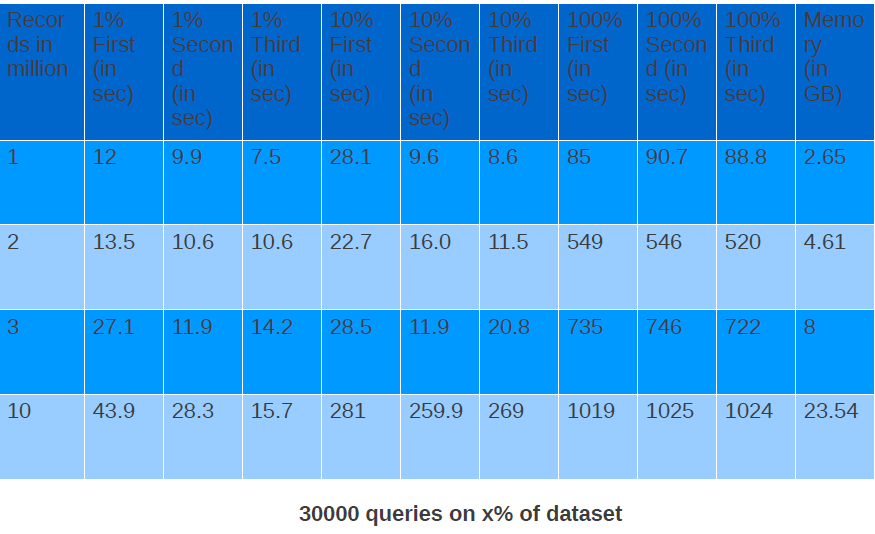
In the table above number of records are in million and time to do 30k queries is in seconds.

One thing that this data clearly shows is that if you have you have working set which can fit in RAM performance almost remains same agnostic of total number of documents in MongoDB. This can easily be seen by comparing 3 run of 1 % dataset of all dataset values. Performance of 30k queries on 1% of dataset on both  3 million records and 10 million records are very close.

How MongoDB Different Write Concern Values Affect Performance On A Single Node?

In the first post I talked about how indexes affect the write speed in MongoDB. In this second post I will share my findings on how different write concerns affect the write speed on a single node. Please refer to the first post for the setup related information.  A write concern controls the behavior of write operation and gives developers the choice to choose the value matching their requirements. For instance there are some documents which are not very important and if one of them get lost your business will not get screwed. For those you can choose less stricter value of write concern and for objects where you want don’t want your object to be lost you should choose stricter value of write concern. Let’s take a look at different write concern values available in Java driver. Please note in this experiment I used MongoDB java driver 2.7.2 instead of Spring MongoDB.

  1. Normal :  This is the default option where every write operation is fire and forget which means it just writes to the driver and return back. It does not wait for write to be available in server. So, if another thread tries to read the document just after the document has been written it  might found not find it. There is a very high probability of data loss with this option. I think this should not be considered in cases where data durability is important and you are only using single instance of MongoDB server. Even with replication you can loose data with this option (I will talk about in my future post).
  2. None : This is almost same as Normal with just one different that in Normal if network goes down or there is some other network issue you get an exception but with None you don’t get any exception if there are some network issues. This makes it highly unreliable.
  3. Safe : As suggested by name it is safer than the above two. The write operation waits for the MongoDB server to acknowledge the write but data is still not written to disk. With safe you will not face issue that when another thread tried to read the object you just wrote, the object was not found. So, it provides a guarantee that object once written will be found. That’s Good. But still you can loose data because data is not written to disk and if server died for some reason data will be lost.
  4. Journal Safe : Before we talk about this option. Lets first talk about what is Journaling in MongoDB. Journaling is a feature of MongDB where a write ahead log file of all the operations is maintained. In scenarios when MongoDB is not cleanly shutdown like using kill -9 command the data can be recovered from Journal files. By default data is written to journal files after every 100 milliseconds. You can change it to lie between 2 ms to 300 ms. With version 2.0 journaling is enable by default on 64 bit MongoDB servers. With Journal Safe write concern option your write will wait till the journal file is updated.
  5. Fysnc : With Fsync write concern the write operation waits till the data is not written to disk. This is the safest option on a Single node as only way you can loose data is when the hard disk crashes.

I have left the other values which are not applicable to single node but make more sense when replication is enable. I will cover them in future posts.

Test Case

The test case was very simple I will be doing 1 million writes with each of options except fsync and will find out the writes per second speed for each of the write concern values.

Document

The document is similar to the one used in first post. It is 2395 bytes.

{
"_id" : ObjectId("4eda74ef84ae8b2410f5fa8e"),
"age" : "27",
"lName" : "Gulati1",
"fName" : "Shekhar1"
"bio" : "I am a Java Developer. I am a Java Developer. I am a Java Developer. I am a Java Developer. I am a Java Developer. I am a Java Developer. I am a Java Developer. I am a Java Developer. I am a Java Developer. I am a Java Developer. I am a Java Developer. I am a Java Developer. I am a Java Developer. I am a Java Developer. I am a Java Developer. I am a Java Developer. I am a Java Developer. I am a Java Developer. I am a Java Developer. I am a Java Developer. I am a Java Developer. I am a Java Developer. I am a Java Developer. I am a Java Developer. I am a Java Developer. I am a Java Developer. I am a Java Developer. I am a Java Developer. I am a Java Developer. I am a Java Developer. I am a Java Developer. I am a Java Developer. I am a Java Developer. I am a Java Developer. I am a Java Developer. I am a Java Developer. I am a Java Developer. I am a Java Developer. I am a Java Developer. I am a Java Developer. I am a Java Developer. I am a Java Developer. I am a Java Developer. I am a Java Developer. I am a Java Developer. I am a Java Developer. I am a Java Developer. I am a Java Developer. I am a Java Developer. I am a Java Developer. I am a Java Developer. I am a Java Developer. I am a Java Developer. I am a Java Developer. I am a Java Developer. I am a Java Developer. I am a Java Developer. I am a Java Developer. I am a Java Developer. I am a Java Developer. I am a Java Developer. I am a Java Developer. I am a Java Developer. I am a Java Developer. I am a Java Developer. I am a Java Developer. I am a Java Developer. I am a Java Developer. I am a Java Developer. I am a Java Developer. I am a Java Developer. I am a Java Developer. I am a Java Developer. I am a Java Developer. I am a Java Developer. I am a Java Developer. I am a Java Developer. I am a Java Developer. I am a Java Developer. I am a Java Developer. I am a Java Developer. I am a Java Developer. I am a Java Developer. I am a Java Developer. I am a Java Developer. I am a Java Developer. I am a Java Developer. I am a Java Developer. I am a Java Developer. I am a Java Developer. I am a Java Developer. I am a Java Developer. I am a Java Developer. I am a Java Developer. I am a Java Developer. I am a Java Developer. I am a Java Developer. I am a Java Developer. I am a Java Developer. I am a Java Developer. ",
}

JUnit Test

The JUnit test case is shown below. In each test case it inserts one million records with a different value of write concern.

public class SingleNodeWriteConcernTests {

	private final static int ONE_MILLION = 1000000;

	private final Logger logger = Logger
			.getLogger(SingleNodeWriteConcernTests.class);

	@Test
	public void shouldInsertRecordsInNonCurrentMode() throws Exception {
		ServerAddress serverAddress = new ServerAddress("localhost", 27017);

		Mongo mongo = new Mongo(serverAddress);
		mongo.setWriteConcern(WriteConcern.NONE);
		runASingleTestCase(mongo, "NONE");

		mongo = new Mongo(serverAddress);
		mongo.setWriteConcern(WriteConcern.JOURNAL_SAFE);
		runASingleTestCase(mongo, "JOURNAL_SAFE");

		mongo = new Mongo(serverAddress);
		mongo.setWriteConcern(WriteConcern.NORMAL);
		runASingleTestCase(mongo, "NORMAL");

		mongo = new Mongo(serverAddress);
		mongo.setWriteConcern(WriteConcern.SAFE);
		runASingleTestCase(mongo, "SAFE");

	}

	private void runASingleTestCase(Mongo mongo, String name) throws Exception {
		DB db = mongo.getDB("play");
		DBCollection people = db.getCollection("people");
		if (db.collectionExists("people")) {
			people.drop();
		}
		insertRecords(mongo, name);

		mongo.dropDatabase("play");
	}

	private void insertRecords(Mongo mongo, final String name) throws Exception {

		DB db = mongo.getDB("play");
		final DBCollection collection = db.getCollection("people");
		collection.ensureIndex("fName");
		long startTime = System.currentTimeMillis();
		for (int i = 1; i <= ONE_MILLION; i++) {
			BasicDBObject obj = new BasicDBObject();
			Map<String, String> map = new HashMap<String, String>();
			map.put("fName", "Shekhar" + i);
			map.put("lName", "Gulati" + i);
			map.put("age", String.valueOf(i));
			map.put("bio", StringUtils.repeat("I am a Java Developer. ", 100));
			obj.putAll(map);
			collection.insert(obj);
		}
		long endTime = System.currentTimeMillis();
		double seconds = ((double) (endTime - startTime)) / (1000);
		double rate = ONE_MILLION / seconds;

		String message = String
				.format("WriteConcern %s inserted %d records in %.2f seconds at %.2f (rec/s)",
						name, ONE_MILLION, seconds, rate);
		logger.info(message);

	}

}

Results

As you might have also expected Normal and None are the fastest because of the way they work i.e. fire and forget. Safe writes takes 3.5 times more than Normal writes. With Journal safe value you come down to 24 documents per second which is very low. As you can see as you move towards more write safety you loose a lot on write speed. This is again a decision you have to make depending on your use case.

Can something be done to increase write speed in Safe and Journal Safe options?

The results shown above are based on records being inserted sequentially one at a time. I tried an experiment where in I divided 1 million records to a batch of 100,000 records each. And let 10 threads write 1 million record in parallel.  The write speed for Safe and Journal Safe increased but None and Normal decreased as shown below.

The write speed for Safe with 10 threads is 1.4 times the write speed with one thread and similarly write speed for Journal Safe is 10 times of the write speed with one thread. This is because while one thread is waiting other threads can work in parallel which allows to better utilize CPU.

How MongoDB write/read speed varies with or without index on a field?

Last 3 weeks I have been busy working on a PoC where we are thinking of using MongoDB as our datastore. In this series of blog posts I will be sharing my finding with the community. Please take these experiments with grain of salt and try out these experiments on your dataset and hardware. Also share with me if I am doing something stupid.  In this blog I will be sharing my findings on how index affect the write speed.

Scenario

I will be inserting 60 million documents and will be noting the time taken to write each batch of 10 million records.  The average document size is 2400 bytes (Look at the document in under Document heading). The test will be run first without index on the name field and then with index on the name field.

Conclusion

Write speed with index dropped to 0.27 times of write speed without index after inserting 20 million documents. 

Setup 

Dell Vostro Ubuntu 11.04 box with 4 GB RAM and 300 GB hard disk.

Java 6

MongoDB 2.0.1

Spring MongoDB 1.0.0.M5 which internally uses MongoDB Java driver 2.6.5 version.

Document

The documents I am storing in MongoDB looks like as shown below. The average document size is 2400 bytes.  Please note the _id field also has an index. The index that I will be creating will be on name field.

{
"_id" : ObjectId("4ed89c140cf2e821d503a523"),
"name" : "Shekhar Gulati",
"someId1" : NumberLong(1000006),
"str1" : "U",
"date1" : ISODate("1997-04-10T18:30:00Z"),
"bio" : "I am a Java Developer. I am a Java Developer. I am a Java Developer. I am a Java Developer. I am a Java Developer. I am a
Java Developer. I am a Java Developer. I am a Java Developer. I am a Java Developer. I am a Java Developer. I am a Java
Developer. I am a Java Developer. I am a Java Developer. I am a Java Developer. I am a Java Developer. I am a Java Developer. I
am a Java Developer. I am a Java Developer. I am a Java Developer. I am a Java Developer. I am a Java Developer. I am a Java
Developer. I am a Java Developer. I am a Java Developer. I am a Java Developer. I am a Java Developer. I am a Java Developer. I
am a Java Developer. I am a Java Developer. I am a Java Developer. I am a Java Developer. I am a Java Developer. I am a Java
Developer. I am a Java Developer. I am a Java Developer. I am a Java Developer. I am a Java Developer. I am a Java Developer. I
am a Java Developer. I am a Java Developer. I am a Java Developer. I am a Java Developer. I am a Java Developer. I am a Java
Developer. I am a Java Developer. I am a Java Developer. I am a Java Developer. I am a Java Developer. I am a Java Developer. I
am a Java Developer. I am a Java Developer. I am a Java Developer. I am a Java Developer. I am a Java Developer. I am a Java
Developer. I am a Java Developer. I am a Java Developer. I am a Java Developer. I am a Java Developer. I am a Java Developer. I
am a Java Developer. I am a Java Developer. I am a Java Developer. I am a Java Developer. I am a Java Developer. I am a Java
Developer. I am a Java Developer. I am a Java Developer. I am a Java Developer. I am a Java Developer. I am a Java Developer. I
am a Java Developer. I am a Java Developer. I am a Java Developer. I am a Java Developer. I am a Java Developer. I am a Java
Developer. I am a Java Developer. I am a Java Developer. I am a Java Developer. I am a Java Developer. I am a Java Developer. I
am a Java Developer. I am a Java Developer. I am a Java Developer. I am a Java Developer. I am a Java Developer. I am a Java
Developer. I am a Java Developer. I am a Java Developer. I am a Java Developer. I am a Java Developer. I am a Java Developer. I
am a Java Developer. I am a Java Developer. I am a Java Developer. I am a Java Developer. I am a Java Developer. I am a Java
Developer. I am a Java Developer. "
}

JUnit TestCases

The first JUnit test inserts 10 million record and after every 10 million records dumps the time taken to write batch of 10 million records. Perform  a find query on an unindexed field name and prints the time taken to perform the find operation. This tests runs for 6 batches so 60 million records are inserted.

@Configurable
@RunWith(SpringJUnit4ClassRunner.class)
@ContextConfiguration(locations = "classpath:/META-INF/spring/applicationContext*.xml")
public class Part1Test {

private static final String FILE_NAME = "/home/shekhar/dev/test-data/10mrecords.txt";

	private static final int TOTAL_NUMBER_OF_BATCHES = 6;

	private static final Logger logger = Logger
			.getLogger(SprintOneTestCases.class);

	@Autowired
	MongoTemplate mongoTemplate;

	@Before
	public void setup() {
		mongoTemplate.getDb().dropDatabase();
	}

	@Test
	public void shouldWrite60MillionRecordsWithoutIndex() throws Exception {

		for (int i = 1; i <= TOTAL_NUMBER_OF_BATCHES; i++) {
			logger.info("Running Batch ...." + i);
			long startTimeForOneBatch = System.currentTimeMillis();
		LineIterator iterator = FileUtils.lineIterator(new File(FILE_NAME));
			while (iterator.hasNext()) {
				String line = iterator.next();
				User user = convertLineToObject(line);
				mongoTemplate.insert(user);
			}

			long endTimeForOneBatch = System.currentTimeMillis();
			double timeInSeconds = ((double) (endTimeForOneBatch - startTimeForOneBatch)) / 1000;
			logger.info(String
					.format("Time taken to write %d batch of 10 million records is %.2f seconds",
							i, timeInSeconds));

			Query query = Query.query(Criteria.where("name").is(
					"Shekhar Gulati"));
			logger.info("Unindexed find query for name Shekhar Gulati");
			performFindQuery(query);
			performFindQuery(query);

			CommandResult collectionStats = mongoTemplate
					.getCollection("users").getStats();
			logger.info("Collection Stats : " + collectionStats.toString());

			logger.info("Batch finished running...." + i);
		}

	}

	private void performFindQuery(Query query) {
		long firstFindQueryStartTime = System.currentTimeMillis();
		List<User> query1Results = mongoTemplate.find(query, User.class);
		logger.info("Number of results found are " + query1Results.size());
		long firstFindQueryEndTime = System.currentTimeMillis();
		logger.info("Total Time Taken to do a find operation "
				+ (firstFindQueryEndTime - firstFindQueryStartTime) / 1000
				+ " seconds");
	}

	private User convertLineToObject(String line) {
		String[] fields = line.split(";");
		User user = new User();
		user.setFacebookName(toString(fields[0]));
		user.setSomeId1(toLong(fields[1]));
		user.setStr1(toString(fields[2]));
		user.setDate1(toDate(fields[3]));
		user.setBio(StringUtils.repeat("I am a Java Developer. ", 100));
		return user;
	}

	private long toLong(String field) {
		return Long.parseLong(field);
	}

	private Date toDate(String field) {
		SimpleDateFormat dateFormat = new SimpleDateFormat(
				"yyyy-MM-dd HH:mm:ss");
		Date date = null;
		try {
			date = dateFormat.parse(field);
		} catch (ParseException e) {
			date = new Date();
		}
		return date;
	}

	private String toString(String field) {
		if (StringUtils.isBlank(field)) {
			return "dummy";
		}
		return field;
	}

}

listing 1. 60 million records getting inserted and read without index

In the second test case I first created the index and then started inserting the records. This time find operations were performed on the indexed field name.

	@Test
	public void shouldWrite60MillionRecordsWithIndex()
			throws Exception {

		long startTime = System.currentTimeMillis();
		createIndex();

		for (int i = 1; i <= TOTAL_NUMBER_OF_BATCHES; i++) {
			logger.info("Running Batch ...." + i);
			long startTimeForOneBatch = System.currentTimeMillis();
		LineIterator iterator = FileUtils.lineIterator(new File(FILE_NAME));
			while (iterator.hasNext()) {
				String line = iterator.next();
				User obj = convertLineToObject(line);
				mongoTemplate.insert(obj);
			}

			long endTimeForOneBatch = System.currentTimeMillis();
			logger.info("Total Time Taken to write " + i
					+ " batch of Records in milliseconds : "
					+ (endTimeForOneBatch - startTimeForOneBatch));
	double timeInSeconds = ((double)(endTimeForOneBatch - startTimeForOneBatch))/1000;

                        logger.info(String.format("Time taken to write %d batch of 10 million records is %.2f seconds", i,timeInSeconds));

		Query query = Query.query(Criteria.where("name").is("Shekhar Gulati"));
			logger.info("Indexed find query for name Shekhar Gulati");
			performFindQuery(query);
			performFindQuery(query);

			CommandResult collectionStats = mongoTemplate.getCollection("name").getStats();
			logger.info("Collection Stats : " + collectionStats.toString());

			logger.info("Batch finished running...." + i);
		}

	}

	private void createIndex() {
		IndexDefinition indexDefinition = new Index("name", Order.ASCENDING)
				.named(" name_1");
		long startTimeToCreateIndex = System.currentTimeMillis();
		mongoTemplate.ensureIndex(indexDefinition, User.class);
		long endTimeToCreateIndex = System.currentTimeMillis();
		logger.info("Total Time Taken createIndex "
				+ (endTimeToCreateIndex - startTimeToCreateIndex) / 1000
				+ " seconds");
	}

Write Concern

WriteConcern value was NONE which is fire and forget. You can read more about write concerns here.

Write Resuts

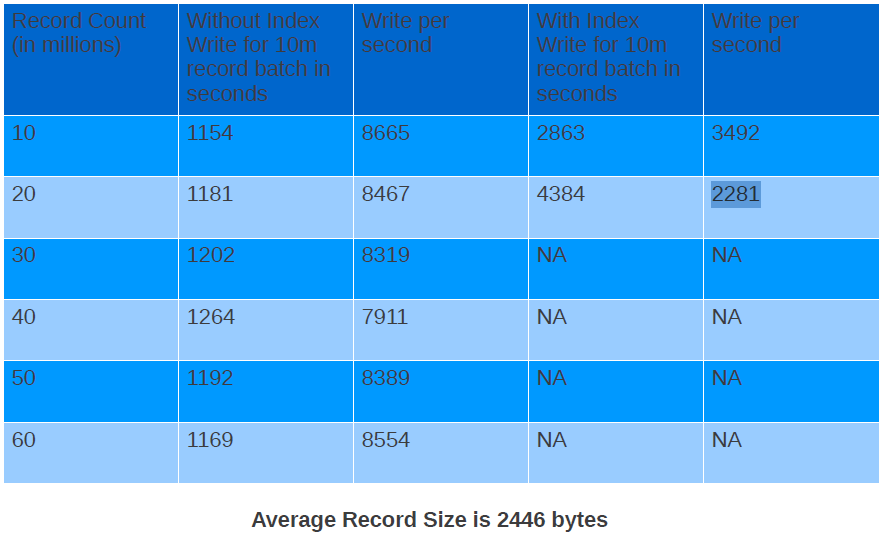
After running the test cases shown above I found out that for the first 10 million i.e. from 0 to 10 million inserts write per second with index was 0.4 times of without index. The more surprising was that for the next batch of 10 million records the write speed with index was reduced to 0.27 times without index.

Looking at the table above you can see that the write speed when we don’t have index is remains consistent and does not degrades. But the write speed when we had index varied a lot from 3492 documents per second to 2281 documents per second. I was not able to complete the test after 20 million as it was taking way too much time to do next 10 million. This can lead to lot of problems in case you added index on a field after you have inserted first 10 million records without index. The write speed is not even consistent and you have to think of sharding to achieve the speed limits you want.

Read Results

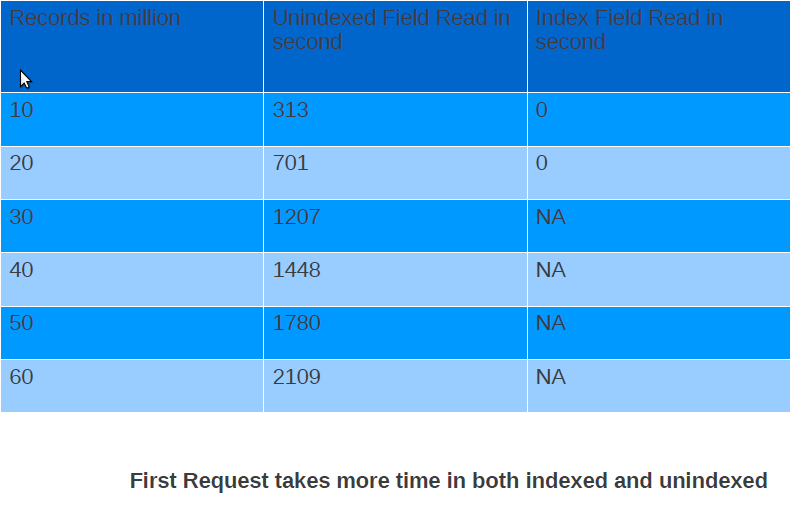
Read results don’t show anything interesting except that you should have index on the field you would be querying on otherwise read performance will be very bad. This can be explained very easily because data will not be in RAM and you will be hitting disk. And when you hit disk performance will take a ride.

This is what all I have for this post. I am not making any judgement whether these numbers are good or bad. I think that should be governed by the use case, data, hardware you will working on. Please feel free to comment and share your knowledge.

Java Puzzler : They just find me !!

Couple of days back I wrote a piece of code which was behaving in an unexpected manner. I was confused what was happening. Take a look at the sample code below and predict its behavior

package com.shekhar;

public class JavaPuzzler {

	public static void main(String[] args) {
		JavaPuzzler javaPuzzler = new JavaPuzzler();
		javaPuzzler.doSth();
	}

	public void doSth() {
		float f = 1.2f;
		if (f >= 1.0) {
			f = 0.9999999999999f;
		}
		InnerClass innerClass = new InnerClass(f);
		System.out.println(innerClass.getValue());
	}

	private class InnerClass {

		private float value;

		public InnerClass(float value) {
			if (value >= 1.0f) {
				throw new IllegalArgumentException(
						"Value can't be greater than 1.0f");
			}

			this.value = value;
		}

		public float getValue() {
			return value;
		}
	}
}

My initial expectation was that I would get value 0.9999999999999f as answer.Try it and find the answer. Share your answer and reasoning in comments.

Java Puzzlers on local variable initialization

Intent of my blog

Some time back, i posted a blog on common interview questions on overriding.The blog was very popular on dzone so i decided to write some of the java puzzlers on local variable initialization.One thing which should be kept in mind is that Local variables should be initalized before they are used.Knowing this fact try to answer these questions.

Local Variable Initialization Puzzlers

Question1


public class Question1{
 public static void main(String[] args) {
 int x;
 int y = 10;
 if (y == 10) {
 x = y;
 }
 System.out.println("x is " + x);
 }
}

Question 2


class Question2{
 public static void main(String[] args) {
 int x;
 if(true){
 x = 10;
 }
 System.out.println("x is " + x);
 }
}

Question 3


class Question3{
 public static void main(String[] args) {
 int x;
 final int y = 10;
 if(y == 10){
 x = 10;
 }
 System.out.println("x is " + x);

 }
}

Question 4


class Question4{
 static int y = 10;

 public static void main(String[] args) {
 int x ;
 if(y == 10){
 x = 10;
 }
 System.out.println("x is " + x);
 }
}

Question 5


class Question5{
 static final int y = 10;

 public static void main(String[] args) {
 int x ;
 if(y == 10){
 x = 10;
 }
 System.out.println("x is " + x);
 }
}

Again, like the previous post, i am not posting the solutions because i dont want to take away the fun. So, play with these and have fun.

Overriding Question asked in interviews

Intent of my Blog

Overriding is the concept which is very much asked in the interview.In almost every interview i have given or taken overriding questions were present.So, i decided to document all the possible overriding questions.Try out these questions and have fun.

What is Overriding?

According to wikipedia

“Method overriding, in object oriented programming, is a language feature that allows a subclass to provide a specific implementation of a method that is already provided by one of its superclasses. The implementation in the subclass overrides (replaces) the implementation in the superclass.”

Overriding Questions

Question 1

public class OverridingQuestion1 {

 public static void main(String[] args) {
 A a = new A();
 a.execute();
 B b = new B();
 b.execute();
 a = new B();
 a.execute();
 b = (B) new A();
 b.execute();
 }

}

class A {
 public void execute() {
 System.out.println("A");
 }
}

class B extends A {
 @Override
 public void execute() {
 System.out.println("B");
 }
}

Question 2


class A1 {

 private void prepare(){
 System.out.println("Preparing A");
 }
}

class B1 extends A1 {

 public void prepare(){
 System.out.println("Preparing B");
 }
 public static void main(String[] args) {
 A1 a1 = new B1();
 a1.prepare();
 }
}

Question 3

public class OverridingQuestion3 {

 public static void main(String[] args) {
 A2 a2 = new A2();
 System.out.println(a2.i);
 B2 b2 = new B2();
 System.out.println(b2.i);
 a2 = new B2();
 System.out.println(a2.i);
 }

}
class A2{
 int i = 10;

}
class B2 extends A2{
 int i = 20;

}

Question 4


public class OverridingQuestion4 {

 public static void main(String[] args) {
 A3 a3 = new A3();
 a3.execute();
 B3 b3 = new B3();
 b3.execute();
 a3 = new B3();
 a3.execute();
 b3 = (B3)new A3();
 b3.execute();
 }

}

class A3{
 public static void execute(){
 System.out.println("A3");
 }

}
class B3 extends A3{
 public static void execute(){
 System.out.println("B3");
 }
}

Question 5


public class OverridingQuestion5 {

 public static void main(String[] args) {
 A4 a4 = new B4();
 a4.execute();
 }

}

class A4{
 public void execute() throws Exception{
 System.out.println("A");
 }
}
class B4 extends A4{
 @Override
 public void execute(){
 System.out.println("B");
 }
}

As if now i can think of the above 5 questions. If you have any other overriding question, please put that in comment.
I am not posting solution to these questions. So, try these, and post the solution in comments.

Again fallen into java puzzler trap– Another Java Puzzler

Intent of My Blog
Today, while writing a piece of code, i found that i have again fallen into a java trap.This is a java puzzler that i read in java puzzler book.

What is the output of this java puzzler?

public class JavaPuzzler {

public static void main(String[] args) {
JavaPuzzler javaPuzzler = null;
System.out.println(javaPuzzler.get());
}

private static String get(){
return "i am a java puzzler";
}

}

Before reading the answer ,please try running this in eclipse and see whether you got it correct.

Solution

You might think that it should throw NullPointerException because the main method invokes get() method  on local variable which is initialized to null, and you can’t invoke a method on null.

But if you run this program, you will see that it prints “i am a java puzzler” . The reason  is that get() is a static method.

Does Java Puzzlers make Good Interview Questions?

Intent of my Blog

Recently i wrote an blog entry on one of the java puzzlers that was asked to me in an interview.I received some of the comments which said this is unfair to ask java puzzlers in an interview.So i thought of writing an blog which discusses whether java puzzlers make good interview questions or not.

Does Java Puzzlers make Good Interview Questions?

I think before answering this question that should we ask java puzzlers in an interview or not we need to define some guidelines about what makes a good interview question. And if java puzzlers fit within those guidelines then we can ask the them in an interview.I am giving my personal point of view please add in your comments if you think something different.

Guideline for a Good Technical Interview Question

  1. Question should be How not what = Should be Practical which means that Interviewer should not ask the definition of some term or concept the interview question should be such that it discusses  practical application of concept.Asking how has the advantage that interviewer gets the correct feedback about interviewee that interviewee actually understand the concept.
  2. Question should be on simpler concepts = Asking a difficult question doesn’t make an interview question good.In my personal opinion interview question should be about the concepts which a developer normally use. You can vary the difficulty level of question depending upon position you are hiring but the concept should be simple.For example you can ask questions on overriding which can be simple or difficult but the concept of overriding is such that every java developer should know.
  3. Question can be Extended =  A good interview question should be such that you can build your interview on that question which means that if you ask a question on overriding you can start with the easier question and then build your interview by asking questions that increases in difficulty.
  4. Question should not be specific to API = The question that i mentioned in my post was good but it was specific to the HashSet remove method arguments. Let me explain, when you create an hashset  like HashSet<Short> s = new HashSet<Short>() you might expect that when you are doing s.remove(i-1) should remove only short objects but when you take a look at the remove method it takes Object .This is something specific to api which  most of the developers might not know. So asking such a question becomes useless.
  5. Question should provide a learning point = A good interview question should provide a value add to the interviewee. It might be possible that interviewee knows everything which is great and you can hire him/her. But even if he/she doesn’t know the answer they can at least  learn a good technical point.

Does java puzzlers fit these guidelines?

In my view java puzzler fit some of the guidelines:-

  1. All Java Puzzler are about How not What so java puzzlers can provide interviewer the practical understanding of the interviewee.
  2. Java Puzzlers are about simpler concepts but the Puzzlers are not simple because they discuss the trap or corner cases of the API. You can use these concepts for interviews but the questions are very specific to api and most of the times should not be asked in interview.
  3. Java Puzzlers can be extended but again because they are not easy most of the times you will not get the correct answer.
  4. Java Puzzlers are specific to API and they require very good understanding of java api.
  5. Java Puzzlers definitely provide a learning value to interviewee because these questions touches the corner cases  of the api which normally developers doesn’t know.

Conclusion

In my view you can ask some of the java puzzlers in an interview as java puzzlers definetly provide a value. Sometimes you should only take a concept and build you question on that and sometime take the whole question. If you think the java puzzler you are asking is difficult and a normal developer who hasn’t read java puzzlers book can’t answer please dont make that question a decider question means your decision to hire a person should not be based only on  java puzzler. Java Puzzlers are definetly very good questions and you should use them wisely in interview.

These are some of my view points. Please share your also.

Java Puzzlers are asked in interviews

Intent of my Blog

This blog is about one of the question that i was asked in an interview two years back. I forgot this question but yesterday i again faced this question and this is a “java puzzler”.

Question

Yesterday while looking for videos on “java puzzlers” i found out link on youtube by Joshua Bloch.When i started viewing this video one of the puzzle reminded of a question i was asked in an interview two years back. Although this question is not in Java(TM) Puzzlers: Traps, Pitfalls, and Corner Cases but it is one of the question i thought worth sharing.Try this question and have fun.

public class JavaPuzzler{
    public static void main(String[] args) {
        HashSet<Short> s = new HashSet<Short>();//1
        for(short i = 0; i<100;i++){//2
            s.add(i);//3
            s.remove(i-1);//4
        }
        System.out.println(s.size());//5
    }
}

Before viewing the answer of this question please try guessing the answer to this question and then run code in eclipse to check whether you what you were thinking matches the answer.If the answer amaze you it is a java puzzler.

Answer

Answer of this puzzler is 100.

To understand why we get 100 as answer lets try to understand the code line by line.

In line 1 we created an HashSet which is of type java.lang.Short .

In line 2 we are doing a for loop

In line3 we are adding short primitive which will be autoboxed to Short object  to the HashSet Collection.

In line 4, we are trying to remove an element from HashSet, which we added just before the current element. But there is a small gotcha (can you guess what is it?), the gotcha is when we do s.remove(i-1),  first of all expression (i -1) is evaluated in which short is widened to int and then int is converted to Integer object. This is due to autoboxing in java 1.5 version.If you look into the javadoc of remove method of HashSet, you will find that it takes an Object, so you can remove Integer objects  from HashSet of Short objects, but this will not work as a result none of the Short objects will get removed.

So in line 5 we get output as 100.

Hope you find this puzzle interesting, i will strongly recommend viewing this presentation.

You can share any of yours interview question which you think is a “java puzzler”.

Java Puzzlers are found in day to day work

Intent of my Blog

Today i was writing a piece of code and found one java puzzle. When i debugged it, i remembered that i read it something like this when i was reading  Java(TM) Puzzlers: Traps, Pitfalls, and Corner Cases .

Java Puzzle

Today while doing my day to day office work i found one java puzzle which i thought was worth writing.

Can you guess what is the output of following  java code:-

public class Test {

	/**
	 * @param args
	 */
	public static void main(String[] args) {
		String[] arr = {"java ","puzzlers ","is ","a ","good ","book"};
		String message = null;
		for(String str : arr){
			message += str;
		}
		System.out.println(message);
	}

}

I am posting the answer as well as the solution to overcome this problem.But first try this java puzzler yourself.Run this piece of code in eclipse and see what you guessed is correct.

Answer
If you ran this code you will get nulljava puzzlers is a good book
but you might be thinking that it should print java puzzlers is a good book If you don’t know that when you are concatenating the string null is taken as a string and was appended to the result . + operator is overridden for string so it does the concatenation for you.

The Easiest Solution to this problem can be initializing message with empty string rather than null.

public class Test {

	/**
	 * @param args
	 */
	public static void main(String[] args) {
		String[] arr = {"java ","puzzlers ","is ","a ","good ","book"};
		String message = "";// replacing null with empty string
		for(String str : arr){
			message += str;
		}
		System.out.println(message);
	}

}

But this solution also has a problem and that problem is related to performance because when you are iterating over array you are doing String using concatenation in a loop. In each iteration, the String is converted to a StringBuffer/StringBuilder, appended to, and converted back to a String.This can lead to decrease in performance of your program.
The best solution is the use of StringBuilder class.

public class Test {

	/**
	 * @param args
	 */
	public static void main(String[] args) {
		String[] arr = {"java ","puzzlers ","is ","a ","good ","book"};
		StringBuilder message =  new StringBuilder();
		for(String str : arr){
			message.append(str);
		}
		System.out.println(message.toString());
	}

}

If you think there is anyother better solution please put that in comment.