Last 3 weeks I have been busy working on a PoC where we are thinking of using MongoDB as our datastore. In this series of blog posts I will be sharing my finding with the community. Please take these experiments with grain of salt and try out these experiments on your dataset and hardware. Also share with me if I am doing something stupid. In this blog I will be sharing my findings on how index affect the write speed.
Scenario
I will be inserting 60 million documents and will be noting the time taken to write each batch of 10 million records. The average document size is 2400 bytes (Look at the document in under Document heading). The test will be run first without index on the name field and then with index on the name field.
Conclusion
Write speed with index dropped to 0.27 times of write speed without index after inserting 20 million documents.
Setup
Dell Vostro Ubuntu 11.04 box with 4 GB RAM and 300 GB hard disk.
Java 6
MongoDB 2.0.1
Spring MongoDB 1.0.0.M5 which internally uses MongoDB Java driver 2.6.5 version.
Document
The documents I am storing in MongoDB looks like as shown below. The average document size is 2400 bytes. Please note the _id field also has an index. The index that I will be creating will be on name field.
{
"_id" : ObjectId("4ed89c140cf2e821d503a523"),
"name" : "Shekhar Gulati",
"someId1" : NumberLong(1000006),
"str1" : "U",
"date1" : ISODate("1997-04-10T18:30:00Z"),
"bio" : "I am a Java Developer. I am a Java Developer. I am a Java Developer. I am a Java Developer. I am a Java Developer. I am a
Java Developer. I am a Java Developer. I am a Java Developer. I am a Java Developer. I am a Java Developer. I am a Java
Developer. I am a Java Developer. I am a Java Developer. I am a Java Developer. I am a Java Developer. I am a Java Developer. I
am a Java Developer. I am a Java Developer. I am a Java Developer. I am a Java Developer. I am a Java Developer. I am a Java
Developer. I am a Java Developer. I am a Java Developer. I am a Java Developer. I am a Java Developer. I am a Java Developer. I
am a Java Developer. I am a Java Developer. I am a Java Developer. I am a Java Developer. I am a Java Developer. I am a Java
Developer. I am a Java Developer. I am a Java Developer. I am a Java Developer. I am a Java Developer. I am a Java Developer. I
am a Java Developer. I am a Java Developer. I am a Java Developer. I am a Java Developer. I am a Java Developer. I am a Java
Developer. I am a Java Developer. I am a Java Developer. I am a Java Developer. I am a Java Developer. I am a Java Developer. I
am a Java Developer. I am a Java Developer. I am a Java Developer. I am a Java Developer. I am a Java Developer. I am a Java
Developer. I am a Java Developer. I am a Java Developer. I am a Java Developer. I am a Java Developer. I am a Java Developer. I
am a Java Developer. I am a Java Developer. I am a Java Developer. I am a Java Developer. I am a Java Developer. I am a Java
Developer. I am a Java Developer. I am a Java Developer. I am a Java Developer. I am a Java Developer. I am a Java Developer. I
am a Java Developer. I am a Java Developer. I am a Java Developer. I am a Java Developer. I am a Java Developer. I am a Java
Developer. I am a Java Developer. I am a Java Developer. I am a Java Developer. I am a Java Developer. I am a Java Developer. I
am a Java Developer. I am a Java Developer. I am a Java Developer. I am a Java Developer. I am a Java Developer. I am a Java
Developer. I am a Java Developer. I am a Java Developer. I am a Java Developer. I am a Java Developer. I am a Java Developer. I
am a Java Developer. I am a Java Developer. I am a Java Developer. I am a Java Developer. I am a Java Developer. I am a Java
Developer. I am a Java Developer. "
}
JUnit TestCases
The first JUnit test inserts 10 million record and after every 10 million records dumps the time taken to write batch of 10 million records. Perform a find query on an unindexed field name and prints the time taken to perform the find operation. This tests runs for 6 batches so 60 million records are inserted.
@Configurable
@RunWith(SpringJUnit4ClassRunner.class)
@ContextConfiguration(locations = "classpath:/META-INF/spring/applicationContext*.xml")
public class Part1Test {

private static final String FILE_NAME = "/home/shekhar/dev/test-data/10mrecords.txt";

	private static final int TOTAL_NUMBER_OF_BATCHES = 6;

	private static final Logger logger = Logger
			.getLogger(SprintOneTestCases.class);

	@Autowired
	MongoTemplate mongoTemplate;

	@Before
	public void setup() {
		mongoTemplate.getDb().dropDatabase();
	}

	@Test
	public void shouldWrite60MillionRecordsWithoutIndex() throws Exception {

		for (int i = 1; i <= TOTAL_NUMBER_OF_BATCHES; i++) {
			logger.info("Running Batch ...." + i);
			long startTimeForOneBatch = System.currentTimeMillis();
		LineIterator iterator = FileUtils.lineIterator(new File(FILE_NAME));
			while (iterator.hasNext()) {
				String line = iterator.next();
				User user = convertLineToObject(line);
				mongoTemplate.insert(user);
			}

			long endTimeForOneBatch = System.currentTimeMillis();
			double timeInSeconds = ((double) (endTimeForOneBatch - startTimeForOneBatch)) / 1000;
			logger.info(String
					.format("Time taken to write %d batch of 10 million records is %.2f seconds",
							i, timeInSeconds));

			Query query = Query.query(Criteria.where("name").is(
					"Shekhar Gulati"));
			logger.info("Unindexed find query for name Shekhar Gulati");
			performFindQuery(query);
			performFindQuery(query);

			CommandResult collectionStats = mongoTemplate
					.getCollection("users").getStats();
			logger.info("Collection Stats : " + collectionStats.toString());

			logger.info("Batch finished running...." + i);
		}

	}

	private void performFindQuery(Query query) {
		long firstFindQueryStartTime = System.currentTimeMillis();
		List<User> query1Results = mongoTemplate.find(query, User.class);
		logger.info("Number of results found are " + query1Results.size());
		long firstFindQueryEndTime = System.currentTimeMillis();
		logger.info("Total Time Taken to do a find operation "
				+ (firstFindQueryEndTime - firstFindQueryStartTime) / 1000
				+ " seconds");
	}

	private User convertLineToObject(String line) {
		String[] fields = line.split(";");
		User user = new User();
		user.setFacebookName(toString(fields[0]));
		user.setSomeId1(toLong(fields[1]));
		user.setStr1(toString(fields[2]));
		user.setDate1(toDate(fields[3]));
		user.setBio(StringUtils.repeat("I am a Java Developer. ", 100));
		return user;
	}

	private long toLong(String field) {
		return Long.parseLong(field);
	}

	private Date toDate(String field) {
		SimpleDateFormat dateFormat = new SimpleDateFormat(
				"yyyy-MM-dd HH:mm:ss");
		Date date = null;
		try {
			date = dateFormat.parse(field);
		} catch (ParseException e) {
			date = new Date();
		}
		return date;
	}

	private String toString(String field) {
		if (StringUtils.isBlank(field)) {
			return "dummy";
		}
		return field;
	}

}
listing 1. 60 million records getting inserted and read without index
In the second test case I first created the index and then started inserting the records. This time find operations were performed on the indexed field name.
	@Test
	public void shouldWrite60MillionRecordsWithIndex()
			throws Exception {

		long startTime = System.currentTimeMillis();
		createIndex();

		for (int i = 1; i <= TOTAL_NUMBER_OF_BATCHES; i++) {
			logger.info("Running Batch ...." + i);
			long startTimeForOneBatch = System.currentTimeMillis();
		LineIterator iterator = FileUtils.lineIterator(new File(FILE_NAME));
			while (iterator.hasNext()) {
				String line = iterator.next();
				User obj = convertLineToObject(line);
				mongoTemplate.insert(obj);
			}

			long endTimeForOneBatch = System.currentTimeMillis();
			logger.info("Total Time Taken to write " + i
					+ " batch of Records in milliseconds : "
					+ (endTimeForOneBatch - startTimeForOneBatch));
	double timeInSeconds = ((double)(endTimeForOneBatch - startTimeForOneBatch))/1000;

                        logger.info(String.format("Time taken to write %d batch of 10 million records is %.2f seconds", i,timeInSeconds));

		Query query = Query.query(Criteria.where("name").is("Shekhar Gulati"));
			logger.info("Indexed find query for name Shekhar Gulati");
			performFindQuery(query);
			performFindQuery(query);

			CommandResult collectionStats = mongoTemplate.getCollection("name").getStats();
			logger.info("Collection Stats : " + collectionStats.toString());

			logger.info("Batch finished running...." + i);
		}

	}

	private void createIndex() {
		IndexDefinition indexDefinition = new Index("name", Order.ASCENDING)
				.named(" name_1");
		long startTimeToCreateIndex = System.currentTimeMillis();
		mongoTemplate.ensureIndex(indexDefinition, User.class);
		long endTimeToCreateIndex = System.currentTimeMillis();
		logger.info("Total Time Taken createIndex "
				+ (endTimeToCreateIndex - startTimeToCreateIndex) / 1000
				+ " seconds");
	}
Write Concern
WriteConcern value was NONE which is fire and forget. You can read more about write concerns here.
Write Resuts
After running the test cases shown above I found out that for the first 10 million i.e. from 0 to 10 million inserts write per second with index was 0.4 times of without index. The more surprising was that for the next batch of 10 million records the write speed with index was reduced to 0.27 times without index.
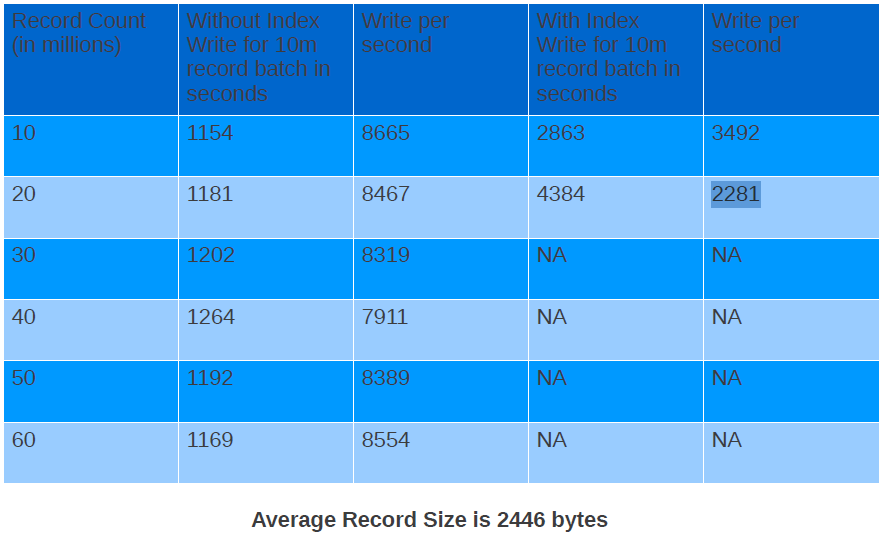
Looking at the table above you can see that the write speed when we don’t have index is remains consistent and does not degrades. But the write speed when we had index varied a lot from 3492 documents per second to 2281 documents per second. I was not able to complete the test after 20 million as it was taking way too much time to do next 10 million. This can lead to lot of problems in case you added index on a field after you have inserted first 10 million records without index. The write speed is not even consistent and you have to think of sharding to achieve the speed limits you want.
Read Results
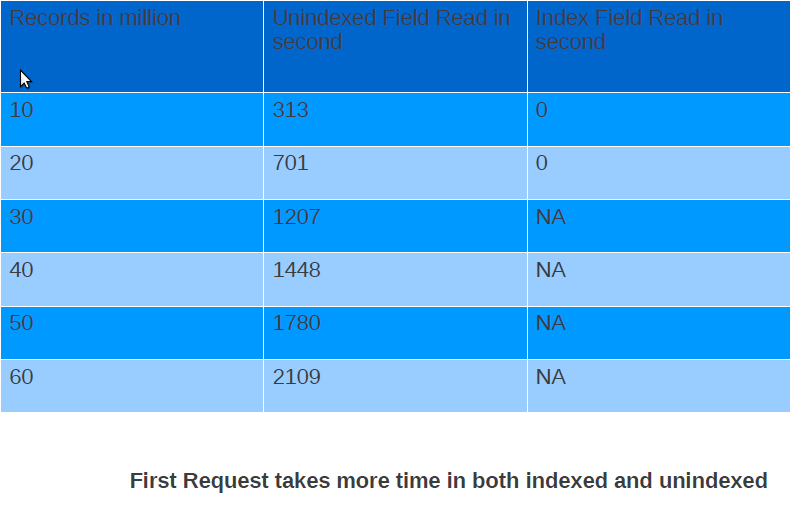
Read results don’t show anything interesting except that you should have index on the field you would be querying on otherwise read performance will be very bad. This can be explained very easily because data will not be in RAM and you will be hitting disk. And when you hit disk performance will take a ride.
This is what all I have for this post. I am not making any judgement whether these numbers are good or bad. I think that should be governed by the use case, data, hardware you will working on. Please feel free to comment and share your knowledge.

