Debugging failed HTTP request with Claude Code

I have a Python HTTP client built using the httpx library. The client worked fine when I was working with the test environment, but as soon as I pointed it to the prod environment, the request started failing with an HTTP 403 error. To be 100% sure, I tested the same request using the Bruno REST client and it worked. I used Bruno to generate cURL and Python 3 (without any dependencies) code, and they both worked as well. I spent 15 minutes debugging myself but couldn’t figure out the reason. The same request passing in Bruno, cURL, and Python 3 (without dependencies) was working, but the client code written with the httpx client library was failing.

So, I opened Claude Code and prompted it to debug the issue for me.

 I am facing an issue where if I run the cURL request below it succeeeds. The same call if we make it to @app/clients/identity_client.py  via id_test.py give 403. I am 
  having hard time understanding the difference between the two. Help me debug what is the difference between two and why it is failing. Then, help me fix it.


  curl --request POST \
    --url URL \
    --header 'content-type: application/json' \
    --data '{
    "key": "00e78489023b4d6ea2ed440ef5fb3e2f",
    "tenantDomain": "domain",
    "username": "user"
  }'

Claude Code first suggested that the 403 error was coming because of:

  1. Different base URLs: Your Python client uses env1.identitysystem.io but the working cURL uses env2.identitysystem.io
  2. Different key: The cURL uses a specific key while your client generates a random UUID

I told Claude that this was not the case. In my id_test.py I set the base URL to env2.identitysystem.io.

Claude Code then said:

You’re absolutely right! You are already setting the correct base URL in id_test.py. Looking at the client code again, the issue is likely the random key generation.

Claude Code then ran the Python client code with the key value from the cURL request and found out that the key is not the issue. Even with the same key, the API call was failing.

The issue persists. Let me debug further by checking if there are any HTTP headers differences. Let me modify the client to print the actual request being made and add proper headers:

Claude Code added debug logs to print headers and data to debug the issue.

Using the debug logs, it figured out the issue.

Great! Now I can see the issue more clearly. The response is an HTML 403 error from the load balancer (server: awselb/2.0), not from the API itself. This suggests there might be a User-Agent or other header requirement.

Now let’s test if setting a cURL-like User-Agent fixes the issue

Perfect! The issue was indeed the User-Agent header. The API/load balancer was blocking requests with the default httpx User-Agent but allows requests with a cURL-like User-Agent.

httpx library uses python-httpx/X.Y.Z as user agent where X.Y.Z depends on the httpx library version.

Claude Code successfully fixed the issue.

Root Cause: The Identity provider API/load balancer was blocking requests based on the User-Agent header. The default httpx User-Agent was being rejected with a 403 Forbidden error.

Conclusion

This type of issue is particularly frustrating for developers because environment dissimilarities create false assumptions. When the same request works in Bruno and cURL but fails in your application, you don’t immediately suspect something as basic as the User-Agent header.

These bugs are time-consuming because they violate our expectations – if the HTTP request is identical, it should work regardless of the client. The root cause often lies in subtle differences that aren’t obvious, like default headers that vary between tools.

Having a systematic debugging approach, whether through AI assistance or methodical logging, helps identify these hidden variables more efficiently than manual trial and error. Sometimes an external perspective is needed to spot what you’ve overlooked.
Notes from Gemini Embedding Paper

I was reading a paper by the Google DeepMind team on how they trained Gemini Embedding, a state-of-the-art, unified embedding model. This is the second paper I’ve read this month on training embedding models. Last week, I read about how the Jina embedding model was trained. The Jina embedding paper was thin and lacked details, so I didn’t write about it. This paper is full of insights, so I thought I’d write a short post sharing what I learned.

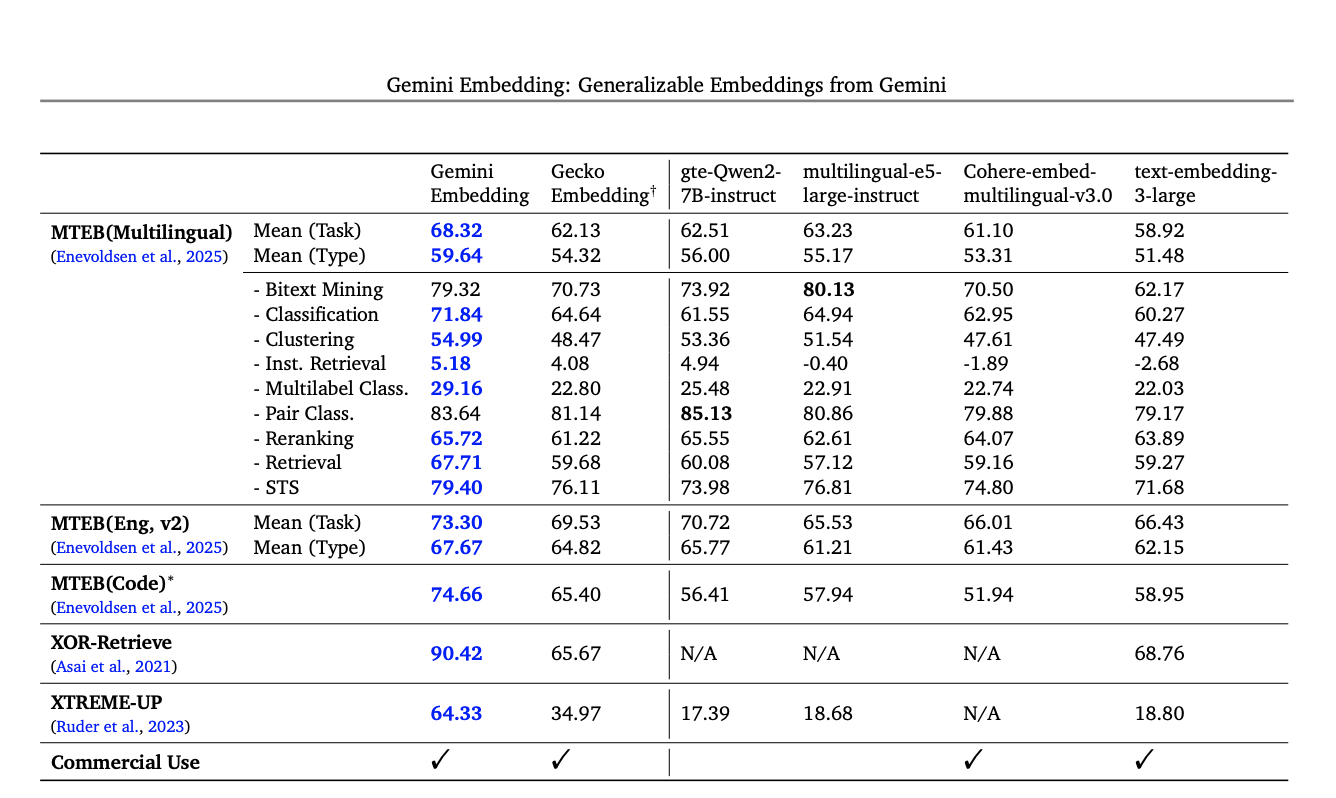
Gemini Embedding achieves state-of-the-art performance across MMTEB’s multilingual, English, and code benchmarks.

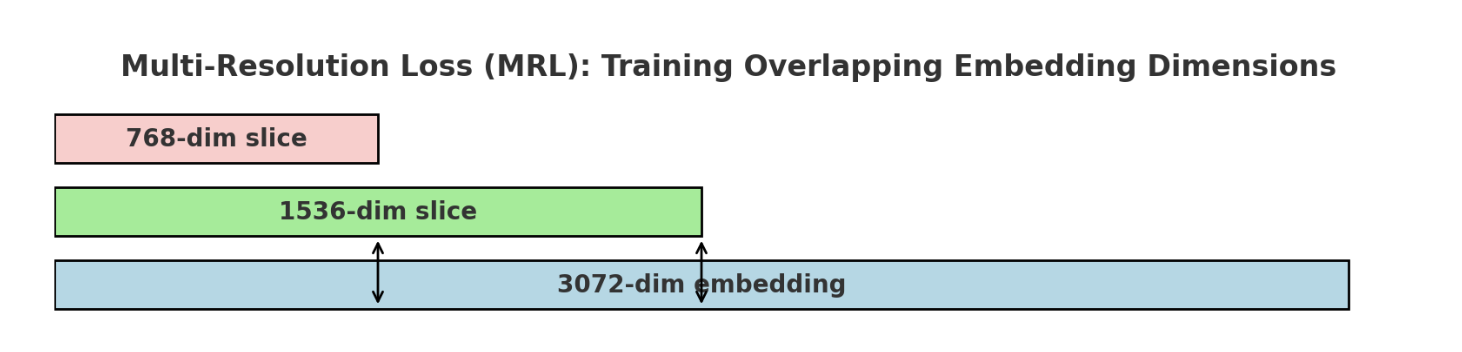
Gemini embeddings use a multi-resolution loss (MRL) so that a single model can produce embeddings of different sizes (768, 1536, 3072). During training, the model applies separate contrastive losses on different sub-portions of the embedding vector, ensuring that both shorter and longer embeddings are well-trained. This provides flexibility: smaller embeddings for efficiency, larger ones for accuracy — all from the same model.

They cite two main reasons why the Gemini Embedding model achieves state-of-the-art performance in benchmarks:

  • The Gemini Embedding model is initialized from the weights of the Gemini LLM backbone. They also note that several recent embedding models such as E5-Mistral, SFR-Mistral, BGE-ICL, and NV-Embed have been initialized from the Mistral-7B (Jiang et al., 2023) backbone and then further adapted as embedding models. The same is true for the jina-code-embeddings-0.5b and 1.5b models, as they are built on the Qwen2.5-Coder-0.5B and Qwen2.5-Coder-1.5B backbones.
  • The second reason they cite is high-quality datasets. These datasets are synthetically generated using Gemini LLM. They mention: “Leveraging Gemini’s diverse capabilities, we train Gemini Embedding on a comprehensive suite of embedding tasks. To construct a high-quality, heterogeneous training dataset, we employ Gemini for several critical data curation steps: filtering low-quality examples, determining relevant positive and negative passages for retrieval, and generating rich synthetic datasets. This curated dataset facilitates training with a contrastive learning objective, enabling Gemini Embedding to learn robust semantic representations.”

In the paper, they also mention that the Gemini embedding model is trained with a contrastive loss that pulls queries close to their correct targets while pushing away incorrect ones. Negatives are usually sampled from the same batch, and sometimes hard negatives are added to make learning more robust. Each example is also tagged with a task type, which conditions the model to learn embeddings useful across different domains like Q&A or fact-checking.

Each training example also includes a task description such as "question answering" or "fact checking". This string tells the model what kind of relationship between the query and target it should focus on. In effect, it makes the embeddings task-aware, allowing a single embedding model to generalize across multiple use cases.

They also discuss that to train the model they used a two-stage process — Pre-finetuning and Finetuning.

  • Pre-finetuning: First, the model is “pre-finetuned” on a large number of potentially noisy (query, target) pairs, omitting the hard-negative term from the loss function. They found it beneficial to use a large batch size, as the primary objective is to adapt the parameters from autoregressive generation to encoding.
  • Finetuning: Next, the model is fine-tuned on a large mixture of task-specific datasets containing (query, target, hard negative target) triples. For this phase of training, they found it beneficial to use smaller batch sizes (e.g., less than 1024) and to limit each batch to a single dataset, as distinguishing a given positive target from in-batch targets from the same task provides greater signal than discerning (say) a retrieval target from a classification label.

Comparing Different OpenAI Models on Extracting Structured Information from PDF Documents

I was working on a problem where I needed to extract information from hotel tariff sheet PDF documents. These documents provide details on seasonal room rates, occupancy terms, and related supplements. They serve as standard reference material for travel agents, tour operators, and partners when contracting accommodations. Below is a screenshot of a synthetic document (similar to the original) that I created using ChatGPT.

For this use case I used OpenAI responses API. I tried extraction with gpt-4.1-mini, gpt-4o, gpt-4o-mini, gpt-5-nanoand gpt-5-mini models.

Continue reading “Comparing Different OpenAI Models on Extracting Structured Information from PDF Documents”

Notes on mini-swe-agent

I was going over the code base of mini-swe-agent today. The core agent loop is 100 lines long. All agentic framework does something similar. Interesting facts about mini-swe-agent:

  • Only uses bash tool
  • Does not depend on function calling. It parses the response to extract commands that need to be run

The Mini-SWE-Agent operates in a continuous loop, iteratively solving problems by querying an LLM for actions, executing bash commands, and observing results until the task is complete.

Continue reading “Notes on mini-swe-agent”

Paper: Working with AI: Measuring the Occupational Implications of Generative AI

Today I was going over a paper by Microsoft Research team on how AI is impacting professsional work. This paper was published in July 2025. They analyzed 200k anonymized and privacy-scrubbed conversations between users and Microsoft Bing Copilot to understand how generative AI impacts different occupations and work activities.

They seperated analysis into two distinct perspectives:

  • User Goals: What people are trying to accomplish with AI assistance
  • AI Actions: What work activities the AI actually performs

They used O*NET database’s 332 Intermediate Work Activities (IWAs) as the basis of their classification. One of the surprising finding of the paper is that in 40% of conversations, user goals and AI actions were completely different – AI often acts as a coach/advisor rather than directly performing the user’s task.

They also list occupations where there is highest AI applicability like translators, sales reps, customer service representatives, writers, etc.

As per their study currently AI augments human work rather than fully automating it. Most occupations have some AI applicability, but none are fully automated. They also mentions that impact is uneven – some work activities highly affected, others not at all. Even successful AI assistance typically covers only moderate portions of work activities.

Continue reading “Paper: Working with AI: Measuring the Occupational Implications of Generative AI”

I Tested Gemma 3 270M on the Simplest NLP Task

Google recently released Gemma 3 270M, a remarkably compact 270 million parameter language model that promises efficient AI capabilities in a tiny package. As someone building AI voice agents, I was immediately interested in testing whether this model could handle one of my simplest but frequent use cases: generating message variations for conversational AI.

For example, given a message like “Please wait. I am checking if your username exists in the system,” I want the LLM to generate semantically equivalent variations such as “One moment please while I verify your username in our system.” This is a lightweight task that models like GPT-4.1-mini, Claude Haiku, or Gemini Flash handle well, but they still add latency. To minimize this, I’m considering using the Gemma 270M model in a sidecar to eliminate unnecessary network delays.

The Gemma 3 270M represents Google’s “right tool for the job” philosophy—a model designed specifically for fine-tuning rather than general-purpose use. According to Google’s release:

“Its true power is unlocked through fine-tuning. Once specialized, it can execute tasks like text classification and data extraction with remarkable accuracy, speed, and cost-effectiveness.”

What makes this model particularly interesting from a technical perspective is its parameter allocation: approximately 170M parameters are dedicated to embeddings, with only 100M for the transformer layers. This unusual split reflects Google’s strategy to maintain a large vocabulary while keeping the model compact—a design choice that facilitates adaptation to different languages and domains through fine-tuning.

The model is available in GGUF format and can run efficiently on CPU, making it accessible for edge deployment scenarios where larger models would be prohibitive.

Continue reading “I Tested Gemma 3 270M on the Simplest NLP Task”

Making coderunner-ui work with Docker using Claude Code

Today, I was browsing Hacker News when I stumbled upon an interesting project: coderunner-ui. The premise was compelling – a local-first AI workspace that lets you chat with LLMs and execute generated code in isolated environments, all without sending your data to the cloud. As someone who’s always looking for tools that respect privacy while providing powerful capabilities, this caught my attention immediately.

I cloned the repository, excited to try it out. Then I hit a wall: “Requires macOS on Apple Silicon.”

I use an Intel Mac. The Apple container system that coderunner-ui depends on is only available on Apple Silicon Macs.I have spent considerable time last few weeks solving something similar so I decided to dig deeper.

Continue reading “Making coderunner-ui work with Docker using Claude Code”

Extracting obligations from regulatory text

I have spent last few months working on a regulatory intelligence software. One of the important feature is extracting obligations from dense PDF documents. In this post I am sharing some of the lessons we’ve learned about architecting AI systems that work in production.

#1. Break complex tasks: List First, Analyze Later

One of our biggest breakthroughs came from realizing that obligation extraction isn’t a single-step process. Initially, we tried to extract complete, structured obligations in one pass, but this led to inconsistent results and missed obligations.

Our solution? A two-step approach that mirrors how human analysts work:

Step 1: Obligation Identification – Cast a wide net to find all potential obligation statements using trigger phrases like “shall”, “must”, “should”, and “is required to”. This agent prioritizes completeness over precision, ensuring we don’t miss anything.

async def identify_obligations(section_text):
    prompt = """
    Extract all obligation statements from this text.
    Look for trigger phrases: shall, must, should, is required to
    Return only the obligation statements as a list.
    """
    return await identification_agent.run(prompt + section_text)

Step 2: Detailed Analysis – Take each identified obligation and extract structured information: who is obligated, what they must do, under what conditions, and whether it’s a general requirement or regulatory power.

async def analyze_obligation(obligation_text, context):
    prompt = """
    Analyze this obligation and extract:
    - obligated_party: Who must comply
    - conditions: When/how it applies  
    - is_general_requirement: Boolean
    - is_regulatory_power: Boolean
    """
    return await analysis_agent.run(prompt, obligation_text, context)

This separation of concerns dramatically improved our recall rate. The identification agent can focus purely on finding obligations without getting bogged down in complex structuring tasks.

Continue reading “Extracting obligations from regulatory text”

Setting a realistic accuracy target for LLM tasks

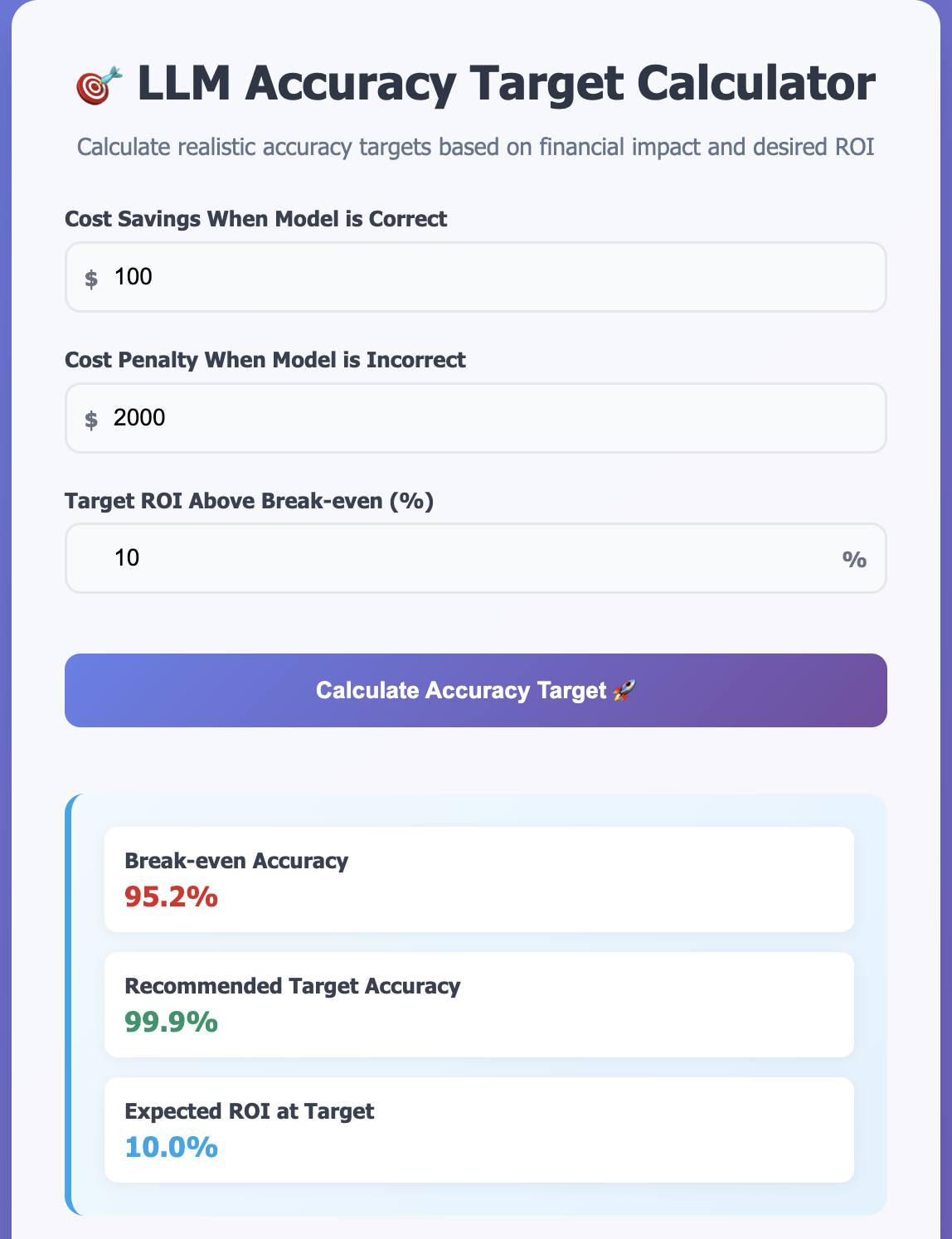
Today I was reading OpenAI guide on model selection https://platform.openai.com/docs/guides/model-selection where they explained how to calculate a reaslistic accuracy target for LLM task by evaluating financial impact of model decisions. They gave an example of fake news classifier.

In a fake news classification scenario:

  • Correctly classified news: If the model classifies it correctly, it saves you the cost of a human reviewing it – let’s assume $50.
  • Incorrectly classified news: If it falsely classifies a safe article or misses a fake news article, it may trigger a review process and possible complaint, which might cost us $300.

Our news classification example would need 85.8% accuracy to cover costs, so targeting 90% or more ensures an overall return on investment. Use these calculations to set an effective accuracy target based on your specific cost structures.

This is a good way to find the accuracy you need for the task. Break-even accuracy is calculated using the below formula

Break-even Accuracy = Cost of Wrong ÷ (Cost of Wrong + Cost Savings)

Below break-even you lose money. At break-even you break even. Above break-even you make profit. The target accuracy ensures your desired ROI. I have built a simple calculator that you can use https://tools.o14.ai/llm-task-accuracy-calculator.html.

This calculation works well when you are making binary decisions with LLMs. These are usually classification tasks. Below are some examples.

Content Moderation

  • Correct: Properly moderate content → Save $20 in manual review
  • Incorrect: Miss harmful content or over-moderate → $500 in legal/PR costs

Resume Screening

  • Correct: Identify good candidate → Save $100 in recruiter time
  • Incorrect: Miss good candidate or pass bad one → $2,000 in hiring costs

Code Review Automation

  • Correct: Catch bug before production → Save $200 in developer time
  • Incorrect: Miss critical bug → $10,000 in downtime costs

You can also adapt it to other domains like customer service chatbots. Instead of correct/incorrect, use quality tiers:

  • High quality response: Save $25 (avoid human agent)
  • Medium quality: $10 cost (requires follow-up)
  • Poor quality: $75 cost (frustrated customer + human intervention)

Any LLM task with measurable business impact can use cost-benefit analysis – you just need to define what “quality” means for your specific use case and map it to financial outcomes.

Changes in Cursor Pricing

Cursor, the AI-powered code editor that has transformed how developers write code, recently underwent a significant pricing overhaul that has sparked intense debate in the developer community. The changes reveal a fundamental challenge facing AI coding tools: how to fairly price services when underlying costs vary dramatically based on usage patterns.

The Old Pricing Model

Previously, Cursor’s $20 per month Pro plan operated on a straightforward request-based system. Users received 500 requests monthly, with Claude Sonnet 4 consuming two request units due to its higher computational demands, while other models like GPT-4.1 and Gemini consumed just one unit each. This meant Pro users could make approximately 250 Claude Sonnet 4 requests per month.

While this pricing model was transparent and predictable, it failed to account for the reality of modern AI systems where token consumption varies wildly between requests. A simple code completion might use 100 tokens, while a complex refactoring task could consume 50,000+ tokens—yet both counted as a single “request” under the old system.

The New Pricing Model

On June 16, 2025, Cursor introduced a new pricing model that reflects actual API costs. The Pro plan now includes $20 of frontier model usage per month at API pricing, with an option to purchase additional usage at cost. For users who prefer unlimited usage, Cursor offers an “Auto” mode that automatically routes requests to different frontier models based on capacity.

As Cursor explained in their blog post: “New models can spend more tokens per request on longer-horizon tasks. Though most users’ costs have stayed fairly constant, the hardest requests cost an order of magnitude more than simple ones. API-based pricing is the best way to reflect that.”

Based on current API pricing, the $20 credit covers approximately 225 Claude Sonnet 4 requests, 550 Gemini requests, or 650 GPT-4.1 requests under typical usage patterns. However, with coding agents and complex context passing, actual costs can be significantly higher.

The Broader Lesson: Token Economics Matter

Cursor’s pricing evolution illustrates a critical principle for LLM-based products: token consumption patterns must drive pricing strategies. Input tokens often cost more than output tokens in real-world scenarios, making efficient context engineering essential for cost control.

For developers building products in the LLM landscape, this shift serves as a reminder that sustainable pricing requires understanding and reflecting actual usage costs. The days of flat-rate “unlimited” AI services may be numbered as providers grapple with the economic realities of rapidly advancing—and increasingly expensive—AI models.

Cost Calculator

You can explore the cost implications using our interactive Cursor pricing calculator to see how the pricing changes affect different usage patterns.

As you can see in the screenshot above, the old pricing model did not account for tokens, making it significantly cheaper than the new plan. When you’re using coding agents and passing in context, you often end up hitting token usage levels similar to what I’ve shown.