xAI Grok 3 is impressive

Yes, I remember that I posted a couple of days back that I was not impressed by Grok 3. Until then I didn’t have access to the model. I only saw the launch video by Elon and his team. For some reason I found the video too boring, scripted, and self-boasting that I decided to write off xAI Grok 3. Today, I saw on X that Grok 3 is freely available, so I decided to give it a try.

I am working on a problem where we have multiple Excel reports with different formats and we want to read all the tables in these Excel files in a generic manner. We can have one or more tables in an Excel sheet. I have tried two approaches before trying out the Grok 3 approach, and they worked to some extent.

Continue reading “xAI Grok 3 is impressive”

My Thoughts on xAI Grok 3

Just wasted my 40 mins watching Grok 3 launch video. Below is what I posted on HN thread.

I don’t know, but I found the recording uninspiring. There was nothing new for me. We’ve all seen reasoning models by now—we know they work well for certain use cases. We’ve also seen “Deep Researchers,” so nothing new there either.

No matter what people say, they’re all just copying OpenAI. I’m not a huge fan of OpenAI, but I think they’re still the ones showing what can be done. Yes, xAI might have taken less time because of their huge cluster, but it’s not inspiring to me. Also, the dark room setup was depressing.

Do Nothing Script Generator

I learnt about do nothing scripting this week. Do-nothing scripting is a way to structure manual workflows into interactive scripts that guide the user step by step without automating the process immediately. By encapsulating each step in a function, this method ensures that no steps are skipped, reduces cognitive load, and provides a structured way to transition toward full automation over time.

You can convert your static documents to do nothing scripts. Instead of reading a document, you interacts with a script that prompts you for action, making it easier to maintain consistency and track progress. Then, eventually you can replace these functions with automation.

Continue reading “Do Nothing Script Generator”

Running Large Language Models at Scale

I was watching a talk by Dylan Patel from Semi Analysis where he covered important techniques AI labs are using to do inference at scale. I’ve shared my notes below and highly recommend checking out the full presentation.

There are two distinct phases in inference: prefill and decode. Prefill processes the initial prompt and is compute-intensive, while decode generates tokens iteratively and is memory bandwidth-intensive.

Several key techniques have emerged for efficient inference:

  • Continuous batching is essential for cost-effective operations. Rather than processing requests individually, continuous batching allows multiple user requests to be processed together, dramatically reducing costs compared to batch size one. This is particularly important when handling asynchronous user requests arriving at different times.
  • Disaggregated prefill separates the compute-intensive prefill phase from the bandwidth-intensive decode phase. Major providers implement this by using different accelerators for each phase, helping mitigate “noisy neighbor” problems and maintaining consistent performance under varying loads.
  • Context caching is an emerging optimization that avoids recomputing the key-value (KV) cache for frequently used prompts. While this requires significant CPU memory or storage, it can substantially reduce costs for applications that repeatedly reference the same context, such as legal document analysis. Google first implemented this technique. Now, both OpenAI and Anthropic implements this.

A critical challenge in large-scale deployments is managing “straggler” GPUs. As ByteDance discovered, even in high-end GPU clusters, individual chips can underperform due to the “Silicon Lottery” – natural variations in chip performance. In their case, a single underperforming GPU reduced cluster performance significantly, as training workloads are synchronous and are limited by the slowest component.

For organizations building inference infrastructure, managing memory bandwidth becomes a critical challenge. Running large models requires loading enormous numbers of parameters for each token generation, making memory bandwidth a key constraint for achieving desired tokens-per-second targets while serving multiple users.

The infrastructure challenges compound when scaling to larger models, requiring careful consideration of hardware capabilities, batching strategies, and caching mechanisms to maintain performance and cost-effectiveness.

Reducing size of Docling Pytorch Docker image

Last couple of days I’ve been working on optimizing the Docker image size of a PDF processing microservice. The service uses Docling, an open-source library developed by IBM Research, which internally uses PyTorch. Docling can extract text from PDFs and various other document types. Here’s a simplified version of our FastAPI microservice that wraps Docling’s functionality.

import os
import shutil
from pathlib import Path
from docling.document_converter import DocumentConverter
from fastapi import FastAPI, UploadFile

app = FastAPI()
UPLOAD_DIR = "uploads"
os.makedirs(UPLOAD_DIR, exist_ok=True)
converter = DocumentConverter()

@app.post("/")
async def root(file: UploadFile):
    file_location = os.path.join(UPLOAD_DIR, file.filename)
    with open(file_location, "wb") as buffer:
        shutil.copyfileobj(file.file, buffer)
    result = converter.convert(Path(file_location))
    md = result.document.export_to_markdown()
    return {"filename": file.filename, "text": md}

The microservice workflow is straightforward:

  • Files are uploaded to the uploads directory
  • Docling converter processes the uploaded file and converts it to markdown
  • The markdown content is returned in the response

Here are the dependencies listed in requirements.txt:

fastapi==0.115.8
uvicorn==0.34.0
python-multipart==0.0.20
docling==2.18.0

You can test the service using this cURL command:

curl --request POST \
  --url http://localhost:8000/ \
  --header 'content-type: multipart/form-data' \
  --form file=@/Users/shekhargulati/Downloads/example.pdf

On the first request, Docling downloads the required model from HuggingFace and stores it locally. On my Intel Mac machine, the initial request for a 4-page PDF took 137 seconds, while subsequent requests took less than 5 seconds. For production environments, using a GPU-enabled machine is recommended for better performance.

The Docker Image Size Problem

Initially, building the Docker image with this basic Dockerfile resulted in a massive 9.74GB image:

FROM python:3.12-slim
RUN apt-get update \
    && apt-get install -y
WORKDIR /app
COPY . .
RUN pip install -r requirements.txt
CMD ["uvicorn", "main:app", "--host", "0.0.0.0", "--port", "8000"]
docling-blog  v1  51d223c334ea   22 minutes ago   9.74GB

The large size is because PyTorch’s default pip installation includes CUDA packages and other GPU-related dependencies, which aren’t necessary for CPU-only deployments.

The Solution

To optimize the image size, modify the pip installation command to download only CPU-related packages using PyTorch’s CPU-specific package index. Here’s the optimized Dockerfile:

FROM python:3.12-slim
RUN apt-get update \
    && apt-get install -y \
    && rm -rf /var/lib/apt/lists/*
WORKDIR /app
COPY . .
RUN pip install --no-cache-dir -r requirements.txt --extra-index-url https://download.pytorch.org/whl/cpu
CMD ["uvicorn", "main:app", "--host", "0.0.0.0", "--port", "8000"]

Building with this optimized Dockerfile reduces the image size significantly:

docling-blog v2 ac40f5cd0a01   4 hours ago     1.74GB

The key changes that enabled this optimization:

  1. Added --no-cache-dir to prevent pip from caching downloaded packages
  2. Used --extra-index-url https://download.pytorch.org/whl/cpu to specifically download CPU-only PyTorch packages
  3. Added rm -rf /var/lib/apt/lists/* to clean up apt cache

This optimization reduces the Docker image size by approximately 82%, making it more practical for deployment and distribution.

My Notes on Open Deep Researcher

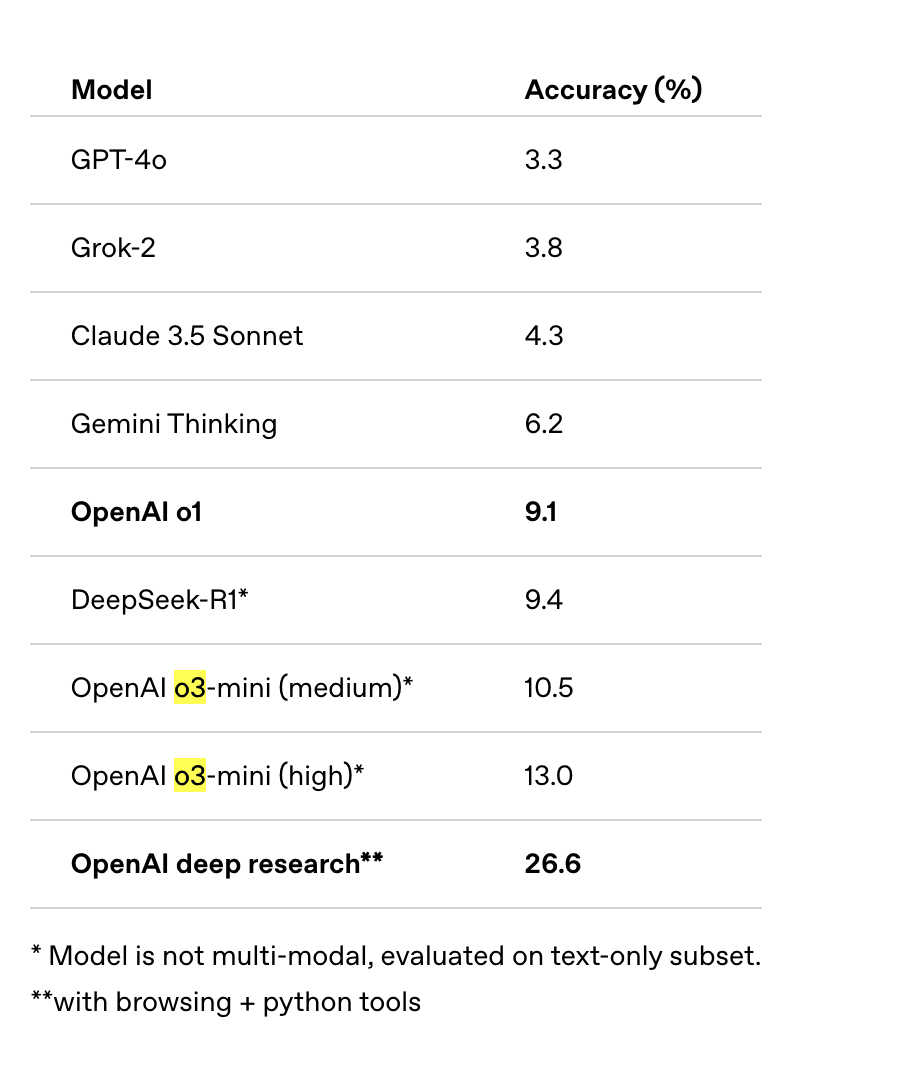
OpenAI recently released a new agentic application called Deep Research. This tool is available exclusively to pro users with a $200 monthly subscription. It utilizes their upcoming o3 reasoning model, which is not yet available via API. According to OpenAI’s blog, their Deep Research agent system achieves a score of 26.6% on the Humanity’s Last Exam evaluation benchmark. However, comparing an agent system directly to language models may not be the most appropriate comparison. A more suitable comparison would have been against similar research tools like Perplexity or Google’s Gemini Deep Research tool.

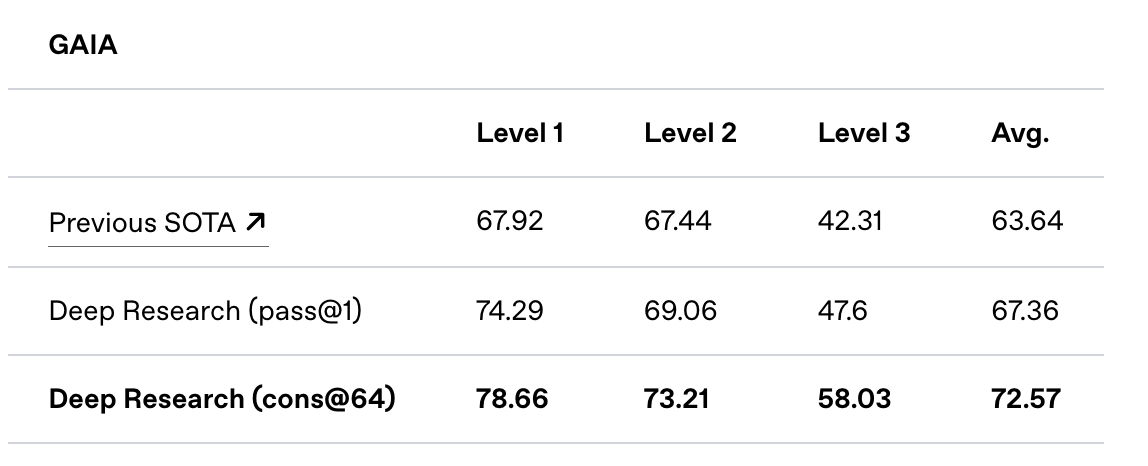
In addition to the Humanity’s Last Exam benchmark results, OpenAI shared their performance on the GAIA benchmark. GAIA is a public benchmark designed to evaluate AI systems on real-world questions, and the Deep Research agentic system has achieved a new state of the art (SOTA), leading the external leaderboard.

Today, HuggingFace launched an open source initiative to replicate OpenAI’s DeepResearch capabilities. It’s worth noting that while Google released their experimental Deep Research model in Gemini in December 2024, there weren’t any significant replication attempts at that time.

According to the HuggingFace team’s blog, they developed their prototype in under 24 hours and have improved upon the previous state of the art, advancing from Magentic-One’s 46% to 54% on the validation set.

Continue reading “My Notes on Open Deep Researcher”

What I Learned Building RAG-Based LLM Assistants

Building AI assistants using Retrieval Augmented Generation (RAG) taught me valuable lessons about user expectations and technical challenges. Here’s what I discovered along the way.

1. The Challenge of Multiple Assistants

Users often struggle when dealing with multiple AI assistants. They frequently ask questions to the wrong assistant or expect a single assistant to handle everything. We solved this by creating specific URLs for each assistant and adding clear chat placeholders to show which assistant they’re talking to. We also implemented role-based access control (RBAC) and a central homepage to help users navigate between assistants.

2. The ChatGPT Comparison

Users naturally compare any AI assistant with ChatGPT. They expect similar features like handling thank you messages, follow-up questions, and list-based queries. We enhanced our RAG implementation (RAG++) to better match these expectations.

3. Managing Conversations

Single-conversation interfaces create several challenges. Long conversations slow down page loading and can affect answer accuracy. Users rarely organize their chats effectively. We addressed this by:

  • Implementing automatic context management
  • Setting conversation history limits
  • Creating automatic chat organization features

4. Real-Time Information Access

Users want current information and often fear missing out. They still turn to search engines for real-time updates. To address this, we integrated search APIs and added an explicit search mode similar to ChatGPT’s browsing feature.

5. Setting Clear Boundaries

Users often don’t understand what RAG-based assistants can and cannot do. This leads to questions outside the assistant’s capabilities and mismatched expectations. Clear communication about limitations helps manage these expectations.

6. Handling I don't know answers

In RAG applications if you are unable to answer then you show some variant of I don't know in the assistant response. Users gvae us feedback they dislike when assistants say “I don’t know.” . We solved this by showing them something useful. For example if a user asked give me case study on unified visa platform then we showed following answer.

I couldn't find a specific case study on a unified Visa platform in the provided context. However, for related insights on payment systems and financial services integration, you might find the following case studies relevant:

- Case Study 1
- Case Study 2

7. Improving Question Quality

Many users struggle to ask effective questions. We helped by:

  • Generating follow-up questions
  • Implementing query rewriting
  • Teaching basic prompt engineering skills

8. Knowledge base Management

Real-time document indexing in RAG applications is a common user expectation. We found it helpful to for each assistat:

  • Display knowledge base statistics
  • Show when kb indexes were last updated
  • Provide document filtering options when making search queries. We extract a metadata from documents during indexing

9. Interface Improvements

Small UI features made a big difference. I have not seen these features in any public assistant like ChatGPT or Claude.

  • Adding conversation statistics. This include number of queries in a conversation and feedback analysis
  • Show metadata for each message like token count, time to first token, token/sec, total time to generate answer
  • Showing query timestamps
  • Replaying an entire conversation
  • Supporting multiple tabs and split windows
  • Regenerate with and without history
  • Giving editor mode along with the chat mode.

These lessons continue to shape how we build and improve our RAG-based assistants. Understanding user needs and expectations helps create more effective AI tools.

Case study: Building a LLM based workflow configuration generator for a low code product

I run a small indie consulting firm that specializes in building LLM-based solutions. Recently, I worked on an LLM solution where we had to generate JSON-based workflow configurations for a low code product. Think of it like AWS Step Functions where you write your business workflow in a JSON configuration file. In this post, I will share lessons learned while building this solution.

Below is an example workflow configuration. It is a simplified example. In their case, a step can have close to 50 fields.

{
    "name" : "Name of the workflow",
    "description" : "Description of the workflow",
    "steps" : {
        "step_1" : {
            "async" : false,
            "sql_query_name" : "Name of the query to execute",
            "transform_request" : "Can be a Go template",
            "transform_response" : "Can be a Go template",
            "steps" : {
                "step_1_1" : {

                },
                "step_1_2" : {

                }
            }
        },
        "step_2" : {
            "async" : true,
            "function_to_execute" : "Name of the query to execute",
            "transform_request" : "Can be a Go template",
            "transform_response" : "Can be a Go template",
            "steps" : {
                "step_2_1" : {

                },
                "step_2_2" : {

                }
            }
        }
    }
}

Important points to note in the above JSON configuration:

  • The workflow configuration is recursive. A step can have steps, and those steps can have further steps, and so on.
  • Step names follow a pattern ^[a-z]+(_[a-z]+)*$.
  • Certain JSON attributes require us to generate valid Go templates. These Go templates use some reusable library functions.
Continue reading “Case study: Building a LLM based workflow configuration generator for a low code product”

How Good Are LLMs at Generating Functional and Aesthetic UIs? An Experiment

I conducted an LLM training session last week. To teach attendees about structured output, I built an HTML/JS web application. This application allows users to input a webpage and specify fields they want to extract. The web app uses OpenAI’s LLM to extract the relevant information. Before making the OpenAI call, the app first sends a request to Jina to retrieve a markdown version of the webpage. Then, the extracted markdown is passed to OpenAI for further processing. You can access the tool here: Structured Extraction Tool.

Note: The tool will prompt you to enter your OpenAI key, which is stored in your browser’s local storage.

Below, I will demonstrate the app’s workflow using screenshots. The user starts by entering the webpage URL. In this example, I want to extract some information from a case study.

Next, users specify the fields they want to extract. We also support field templates for reusability. For each field, users provide a name, description, and its type.

After specifying the fields, users press the Extract Data button. The app displays the extracted data, along with token usage and cost.

Continue reading “How Good Are LLMs at Generating Functional and Aesthetic UIs? An Experiment”