One of the most common use cases of LLMs is summary generation. I have worked on multiple systems where we have summarized different kinds of documents – word, pdf, text, web pages, call transcripts, and video transcripts. I am building Videocrawl where we generate summaries of video content. In almost all the summary use cases I have implemented, we have gone with a static summary prompt where we instruct the LLM to generate a summary in a specific format. In my recent work, I have been playing with the idea of giving some agency to the summarizer so that we can generate dynamic summarization prompts. In this short post, I will share my approach.
Let’s make it concrete. Let’s assume that we want to summarize Search R1 paper. This paper covers how we can train LLMs to reason and leverage search engines for reinforcement learning.
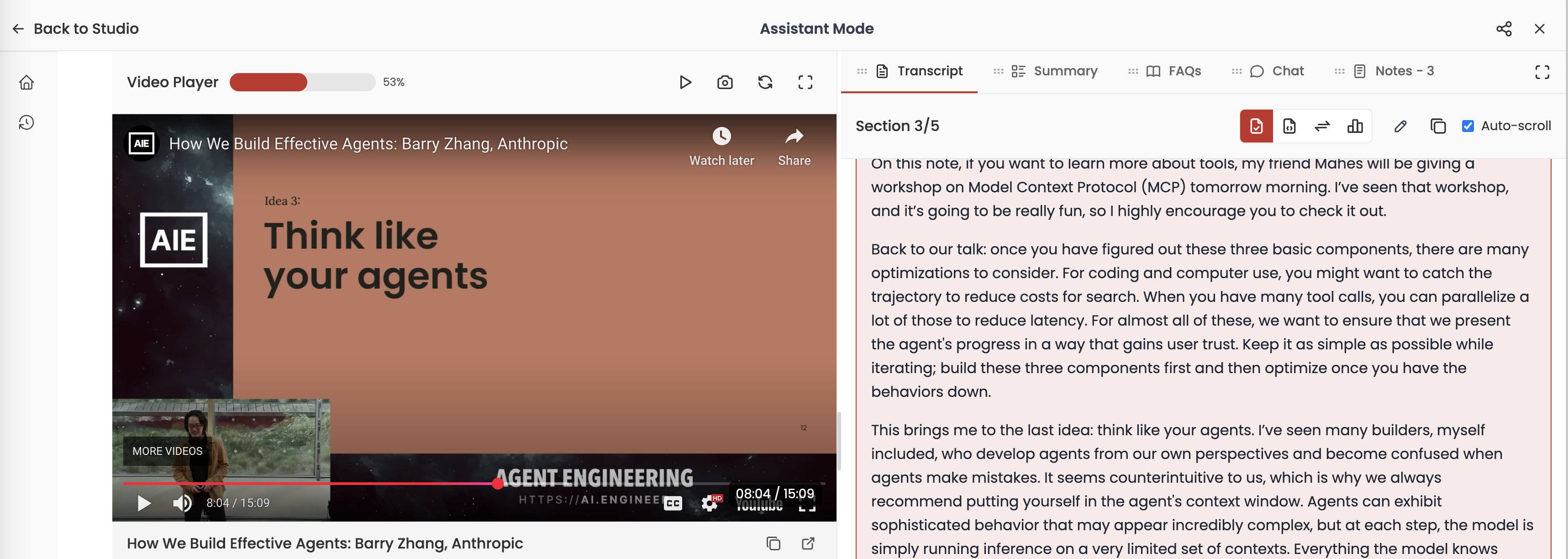
We’ve implemented a smart video progress tracking system in https://www.videocrawl.dev/ that remembers your watching position across sessions. Now when you close a tab or navigate away from a video, you’ll be able to pick up right where you left off when you return.
The feature includes:
A visual progress bar showing how much of the video you’ve watched
Automatic resumption from your last position when returning to a video
Persistent progress tracking across browser sessions
I am building Videocrawl (https://www.videocrawl.dev/), an AI companion app for videos. The application aims to improve my learning experience while watching videos. Most of my feature ideas come from using the application, identifying gaps in the experience, implementing solutions, testing them in production, learning from actual usage, and then making further improvements. This development cycle continues iteratively. I use LLMs for writing most of the code, primarily relying on Claude for my chat-driven development workflow.
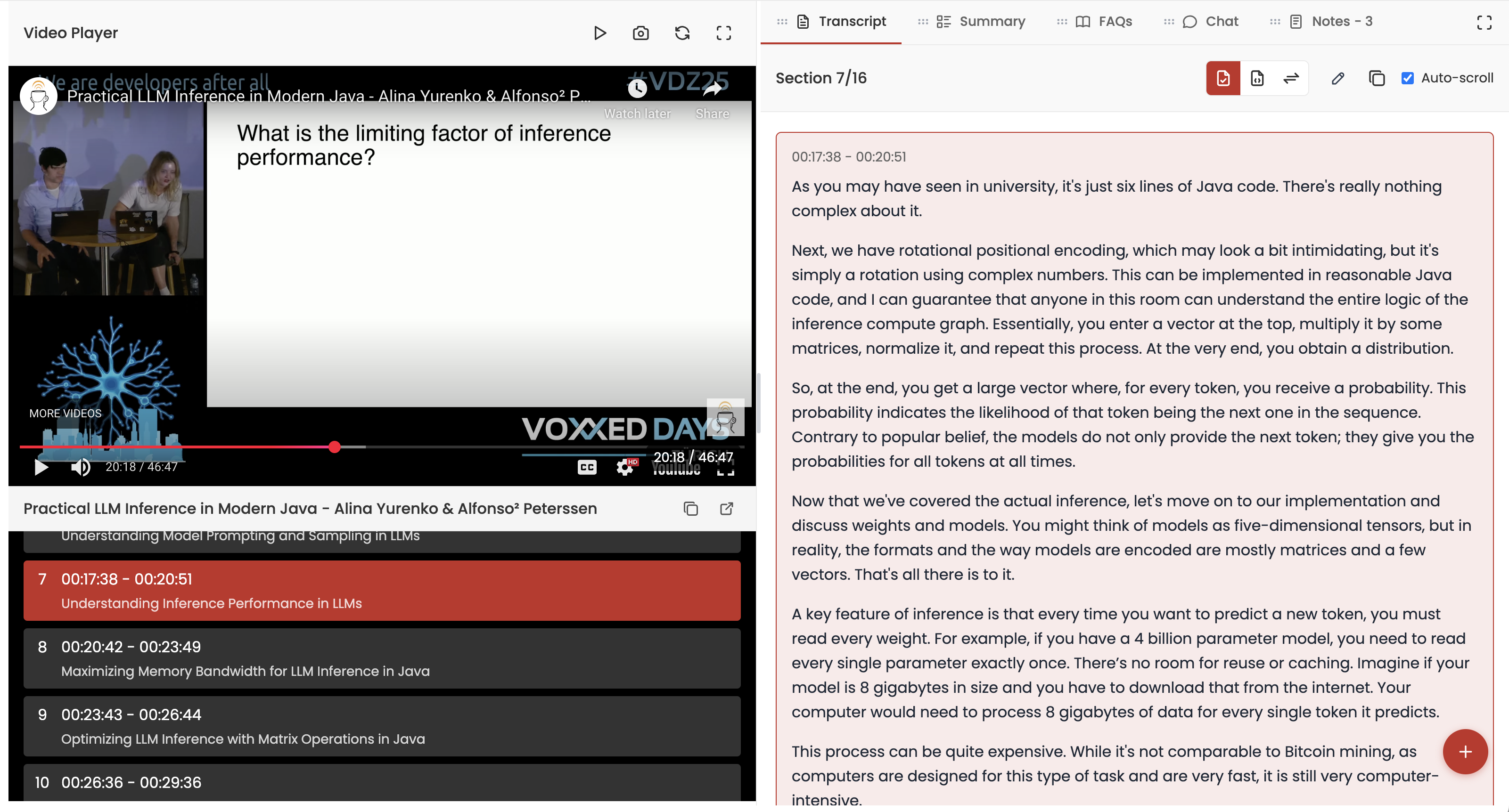
Videocrawl works by processing a YouTube video URL that you provide. We then present a side-by-side view with the video on the left and various LLM tools (clean transcript, summary, chat, and FAQs) on the right, as shown below. You can customize the layout based on your workflow preferences.
One feature I recently wanted to add was the ability to take a screenshot of the current video frame and save it as a note. We already supported text-based notes, so this seemed like a natural extension.
The concept was straightforward: when the user presses a camera button or uses a keyboard shortcut, we capture the current video frame and save it to their notes. Without LLMs, I would likely have avoided implementing such a feature, as it would require extensive research and trial-and-error. However, with LLMs, I felt confident that I could successfully attempt this implementation.
I watched AI Engineering at Jane Street talk yesterday. The talk offers many practical insights on how a good and mature engineering organization like Jane Street are using LLMs in their development process. My notes from the talk below:
Jane Street decided to train their own model. They had to because most of the shelf large language models are not proficient with OCaml due to the limited amount of training data available. This makes it difficult to find suitable off-the-shelf tools that can effectively work with OCaml code.
They took inspiration from a paper by Meta – AI-assisted Code Authoring at Scale. This paper detailed the results of fine-tuning a model specifically for use with Hack, a programming language similar to OCaml in that it is primarily used at one company and not widely adopted outside of that company. After reading this paper, Jane Street became more convinced about the potential of training models, which led them to explore the idea of replicating the results for their own use with OCaml. However, they soon realized that achieving good outcomes would require more than just taking an off-the-shelf model and showing it their code; they needed to collect numerous examples that aligned with their specific goals.
Jane Street collects training data through a method called workspace snapshotting, where they take snapshots of developer workstations throughout the day. This allows them to capture changes and build statuses, which can then be used to train their models effectively. This was an interesting approach to collecting data. It looks like an expensive and complex approach for creating dataset. They had to do this because they were not able to use pull request and commit data to generate this data. Some of the challenges they mentioned in the talk:
The feature descriptions used in their internal code review system (Iron) are not written in the same way as prompts that a developer would use in an editor.
Features can be very large (e.g., 500 to 1000 lines), which complicates their use as training data. Smaller, isolated changes are needed for effective training .
Commits are not isolated changes and lack descriptions, making them less useful for training purposes.
They aligned the model’s outputs with human standards of good code through reinforcement learning. This involves verifying that the generated code can be parsed, type-checked, and passes tests when applied to the codebase.
They also had to build their own code editor integrations. They use sidecare proxy/application to manages context, constructs prompts, and monitors build status for the editor integrations. It allows for seamless updates and changes without requiring individual editor modifications, enhancing the overall developer experience. They collect editor metrics to figure out the latency and effectiveness of the diffs generated by this model.
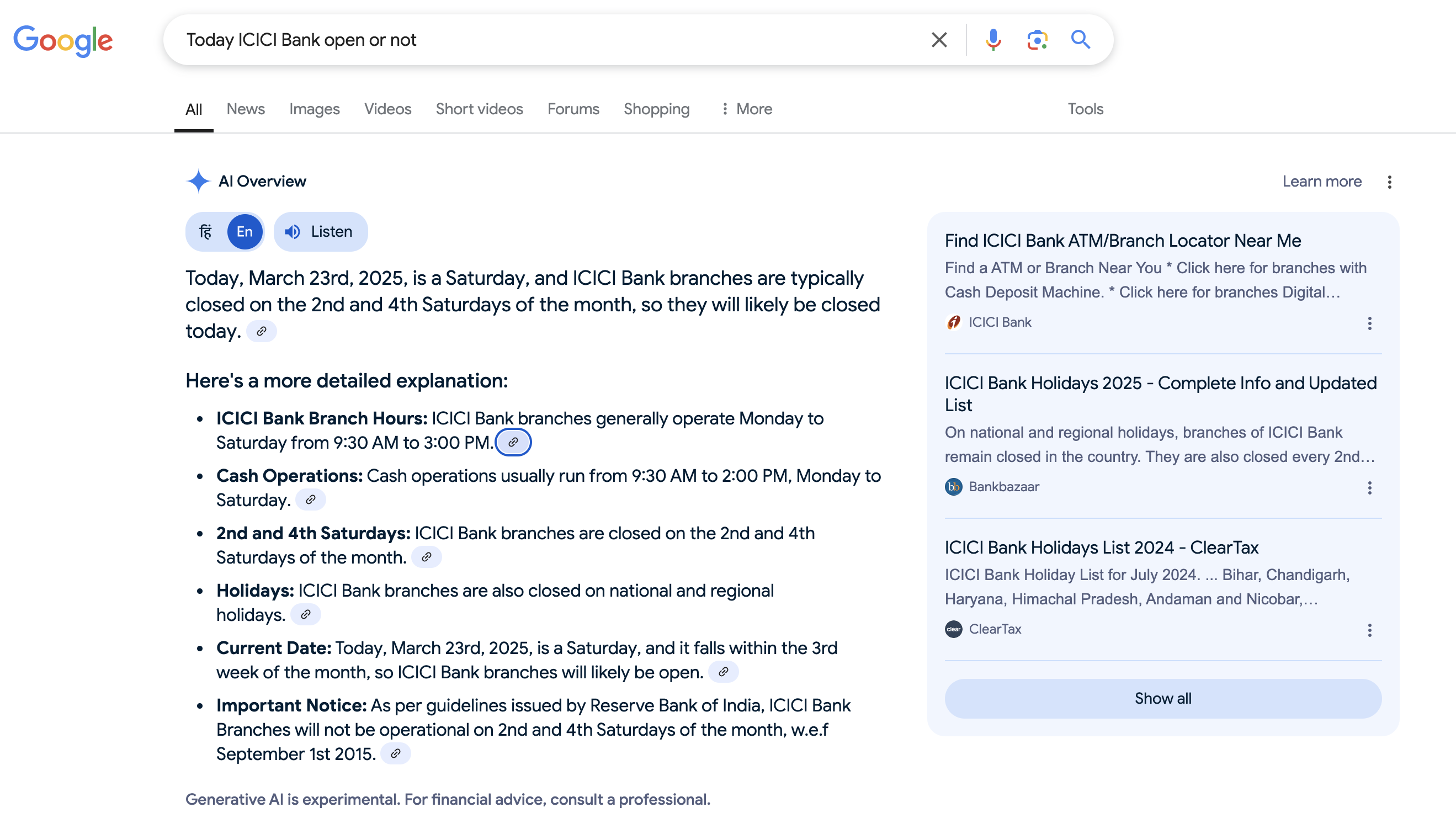
Yesterday (22nd March 2025), I used Google Search to check if ICICI Bank was open. I was planning to visit, but since banks are closed on some Saturdays in a month, I wanted to be sure before making the effort. I still rely on Google Search for tasks where I need to be 100% certain. Google provided the following response in its AI Overview:
At first glance, it looks like the correct answer. However, if you’re paying attention, you’ll realize that 22nd March 2025 is a Saturday, not a Friday. This means Google AI Overview provided the wrong answer. If you don’t double-check, you might assume it’s correct and waste a trip to the bank. Since I always verify AI-generated responses, I quickly spotted the mistake.
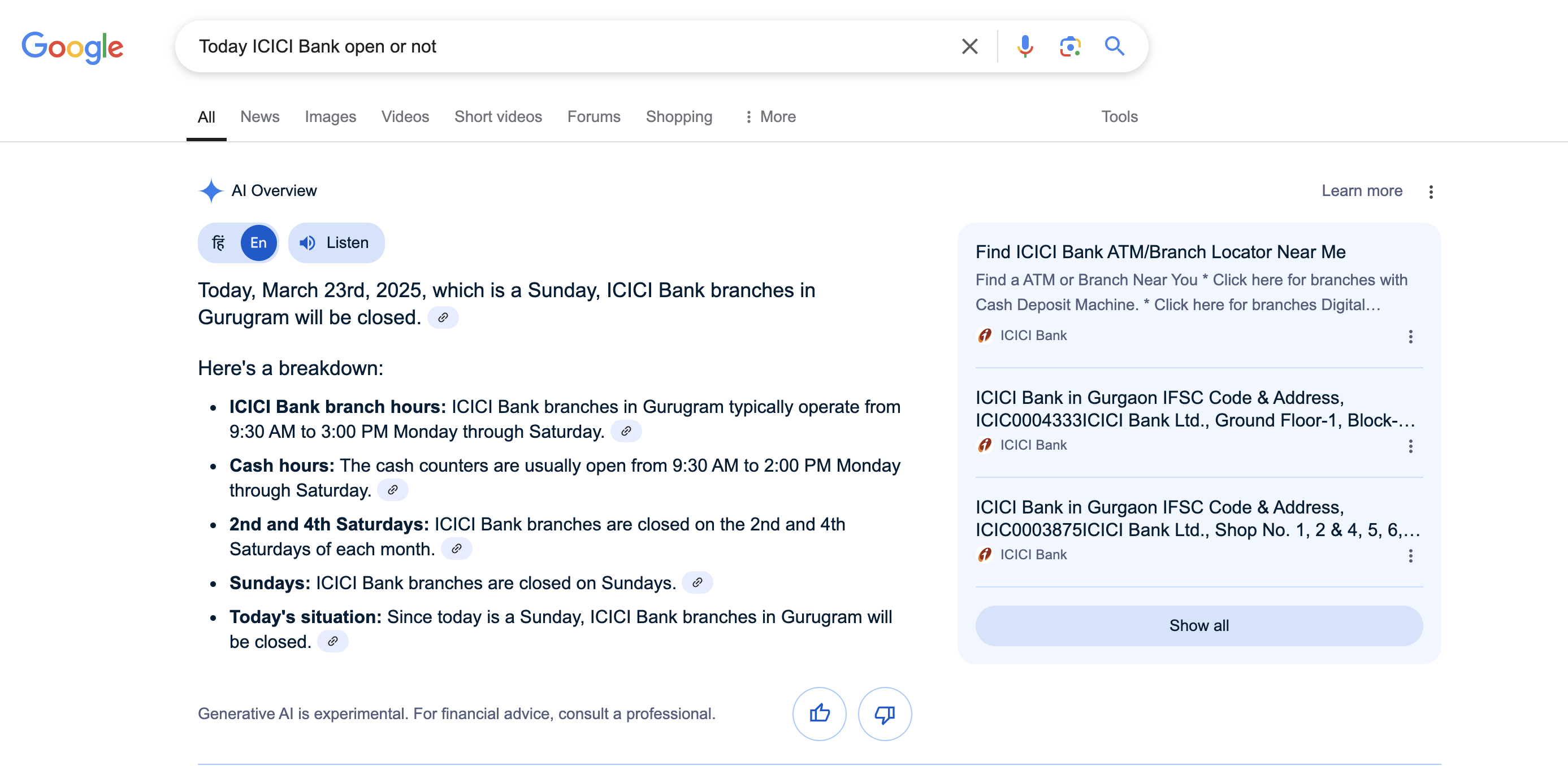
I asked the same question again today, and Google made the same error with the day. Additionally, it leaves the reader to figure out whether the date corresponds to the 2nd or 4th Saturday of the month. Ideally, an AI should provide a definitive answer.
Next, I asked ChatGPT with search mode enabled. It correctly calculated the day but assumed I was in New Delhi, providing an answer relevant to that location. However, I actually live in Gurugram. The best part of ChatGPT’s response was that it informed me that one ICICI Bank branch in Gurugram remains open on Sundays. I wasn’t aware that some ICICI Bank branches operate 24/7—this was impressive.
Most LLMs specify the current date in their system prompts. For example, Claude explicitly mentions the current date in its system prompt, ensuring accurate date calculations:
The assistant is Claude, created by Anthropic.

The current date is {{currentDateTime}}.

Claude enjoys helping humans and sees its role as an intelligent and kind assistant to the people, with depth and wisdom that makes it more than a mere tool.
This seems to be a timezone conversion issue. I am in the IST timezone, and both times I asked the question, it was before 12:30 PM IST. I assume Google’s servers operate in PST (which is 12 hours and 30 minutes behind IST). When converting the date to a day, they likely used the prior day instead.
I just asked the same question again at 1:15 PM IST, and now Google correctly shows that 23rd March 2025 is a Sunday.
Before realizing that the issue resolves after 12:30 PM IST, I initially thought the AI was referring to outdated training data. Now, it all makes sense. It’s surprising that Google AI Overview has such a fundamental bug.
I watched an hour long talk by Winston Weinberg, co-founder and CEO of Harvey. Harvey is revolutionizing the legal industry through AI. They are one of the successful examples of LLMs in production. Following are the key points from the talk:
The legal industry is particularly well-suited for large language models because it is text-based, and the value of a token is incredibly high. This could be a useful heuristic to see if your use case is a right fit for LLMs.
I like how Winston described his product philosphy – Expand and Contract. The “expand and collapse” design philosophy refers to a strategic approach in product development, particularly in the context of creating workflows and user interfaces. This concept is about building specific, detailed workflows for complex tasks and then integrating them into a cohesive user experience.
The focus on workflows to automate human work. The investment they are making in hiring domain experts and building repetitive workflows around them. Harvey collaborates closely with law firms to develop workflows that enhance efficiency and profitability, transitioning from a traditional seat-based model to one that also sells completed work.
Business model evolving from seat based model to one of selling the work. More and more AI/LLMs starts up are offering co-workers which can autonomously get the work done.
They targetted larger firms to establish their credibility. Their endorsement influence other firms and their clients.
I am working on a regulatory intelligence product. We are using LLMs in multiple document processing tasks. One of the tasks that I was working on today required me to extract text from a PDF document. The PDF in question is a circular from SAMA (The Saudi Central Bank). The 2-page long PDF is in Arabic language and looks like a natively digital document with consistent formatting rather than a scanned document.
The task that I wanted to perform was to extract the Arabic text and translate it to English. This looks like an easy task that most LLMs should be able to do since they all support PDF processing and they can read and write different languages.
Below is the screenshot of the first page of the document.
My 10-year-old niece sent me a puzzle that she wanted me to solve. She has her general knowledge paper tomorrow and was unable to get the correct answer, so she asked if I could solve the puzzle. My wife and I both tried to solve it, and we got the same answer that my niece already had. The problem was that, according to her book, that answer was not correct. So, I thought I’d ask reasoning models to find the answer.
Below is the puzzle. We have to find the value for the question mark:
It is a simple number pattern puzzle. You have to identify which pattern this puzzle uses to find the number. My wife, my niece, and I all got 9 as the answer. My niece’s book suggested 7 as the answer. We just couldn’t figure out how to get 7. To us, it looks like a printing mistake in her book.
Below is what each of the models produced. I uploaded the image and prompted them to “Solve the puzzle.”
I was watching a video which introduced me to Kurt Vonnegut shapes of stories. Kurt Vonnegut believed that all stories have simples shapes. He proposed that stories can be categorized into basic shapes based on their emotional arcs. Below are eight example shapes he discussed in his work.