Changes in Cursor Pricing

Cursor, the AI-powered code editor that has transformed how developers write code, recently underwent a significant pricing overhaul that has sparked intense debate in the developer community. The changes reveal a fundamental challenge facing AI coding tools: how to fairly price services when underlying costs vary dramatically based on usage patterns.

The Old Pricing Model

Previously, Cursor’s $20 per month Pro plan operated on a straightforward request-based system. Users received 500 requests monthly, with Claude Sonnet 4 consuming two request units due to its higher computational demands, while other models like GPT-4.1 and Gemini consumed just one unit each. This meant Pro users could make approximately 250 Claude Sonnet 4 requests per month.

While this pricing model was transparent and predictable, it failed to account for the reality of modern AI systems where token consumption varies wildly between requests. A simple code completion might use 100 tokens, while a complex refactoring task could consume 50,000+ tokens—yet both counted as a single “request” under the old system.

The New Pricing Model

On June 16, 2025, Cursor introduced a new pricing model that reflects actual API costs. The Pro plan now includes $20 of frontier model usage per month at API pricing, with an option to purchase additional usage at cost. For users who prefer unlimited usage, Cursor offers an “Auto” mode that automatically routes requests to different frontier models based on capacity.

As Cursor explained in their blog post: “New models can spend more tokens per request on longer-horizon tasks. Though most users’ costs have stayed fairly constant, the hardest requests cost an order of magnitude more than simple ones. API-based pricing is the best way to reflect that.”

Based on current API pricing, the $20 credit covers approximately 225 Claude Sonnet 4 requests, 550 Gemini requests, or 650 GPT-4.1 requests under typical usage patterns. However, with coding agents and complex context passing, actual costs can be significantly higher.

The Broader Lesson: Token Economics Matter

Cursor’s pricing evolution illustrates a critical principle for LLM-based products: token consumption patterns must drive pricing strategies. Input tokens often cost more than output tokens in real-world scenarios, making efficient context engineering essential for cost control.

For developers building products in the LLM landscape, this shift serves as a reminder that sustainable pricing requires understanding and reflecting actual usage costs. The days of flat-rate “unlimited” AI services may be numbered as providers grapple with the economic realities of rapidly advancing—and increasingly expensive—AI models.

Cost Calculator

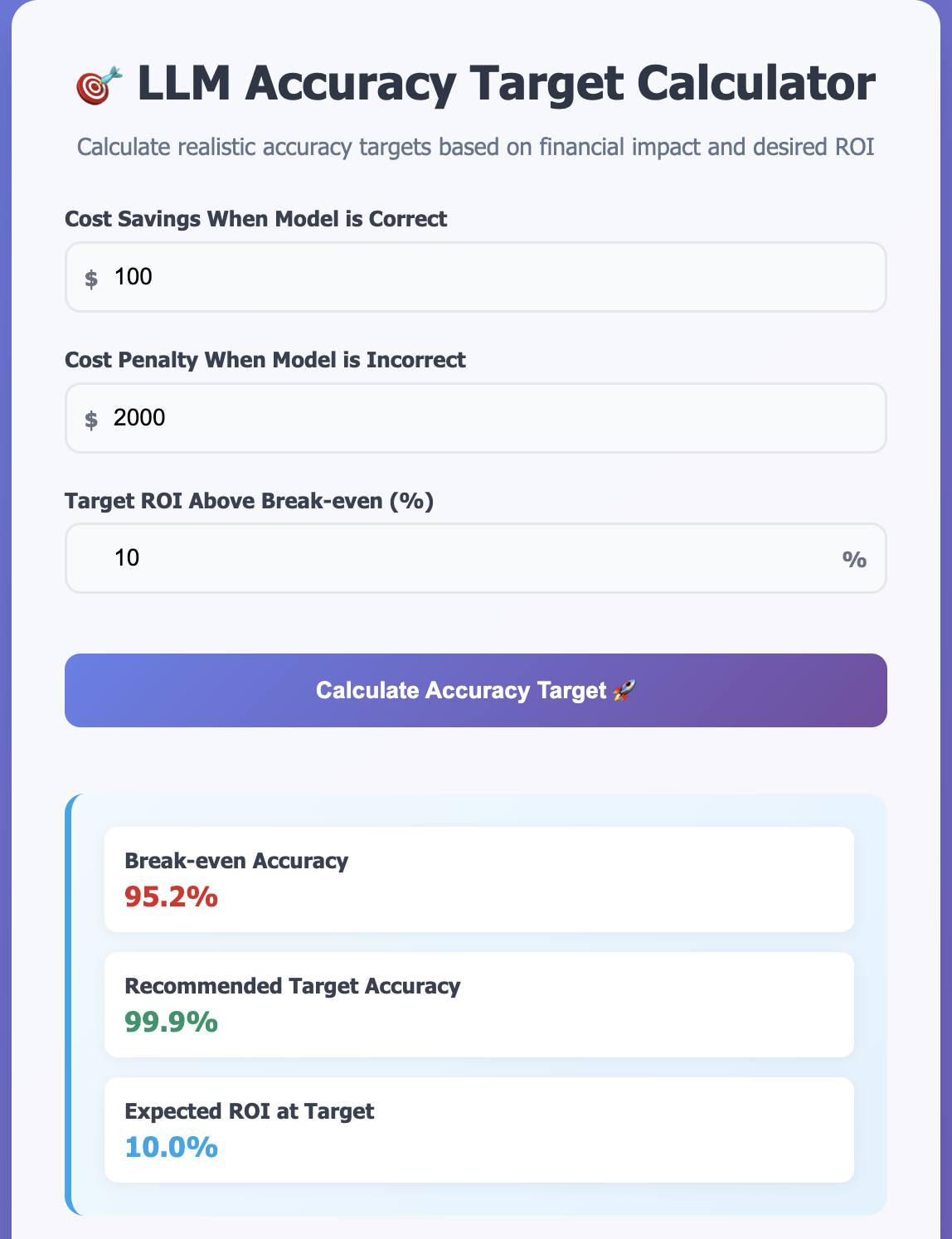
You can explore the cost implications using our interactive Cursor pricing calculator to see how the pricing changes affect different usage patterns.

As you can see in the screenshot above, the old pricing model did not account for tokens, making it significantly cheaper than the new plan. When you’re using coding agents and passing in context, you often end up hitting token usage levels similar to what I’ve shown.

Using Pydantic MCP Run Python as an Open Source Alternative to OpenAI Code Interpreter

In the last blog I discussed how I use OpenAI Code Interpreter to do RAG over data (CSV, Excel, etc.) files. OpenAI Code Interpreter is a managed offering and it does have some limitations. So, I was looking for an open source alternative. I discovered Pydantic team’s MCP Run Python package. It is an MCP server that allows agents to execute Python code in a secure, sandboxed environment. It uses Pyodide to run Python code in a JavaScript environment with Deno, isolating execution from the host system.

Continue reading “Using Pydantic MCP Run Python as an Open Source Alternative to OpenAI Code Interpreter”

Paper: AbsenceBench: Why Language Models Struggle to Detect Missing Information

While large language models (LLMs) have achieved remarkable capabilities in processing long contexts and locating specific information, a recent paper reveals a surprising blind spot: they struggle significantly when asked to identify what’s missing. The AbsenceBench paper by researchers from University of Chicago and Stanford University exposes a fundamental limitation that has far-reaching implications for how we evaluate and deploy these models.

The Problem: Detecting Absence vs. Presence

Large language models excel at the “Needle in a Haystack” (NIAH) test, where they successfully locate specific information buried within long documents. However, AbsenceBench introduces the inverse challenge: given an original document and a modified version with deliberately removed content, can models identify what’s missing?

The results are sobering. Even state-of-the-art models like Claude-3.7-Sonnet achieve only 69.6% F1-score with a modest average context length of 5K tokens. This represents a dramatic performance gap compared to their near-perfect performance on information retrieval tasks.

The Research Methodology

The researchers designed AbsenceBench across three distinct domains to test different types of missing information:

  • Numerical sequences: Mathematical progressions with specific numbers removed
  • Poetry: Excerpts from the Gutenberg Poetry Corpus with missing lines
  • GitHub pull requests: Code diffs with deliberately omitted lines

The complete dataset is available on Hugging Face and contains 4,302 instances across all domains with an average context length of 5K tokens. You can easily load the dataset for experimentation:

from datasets import load_dataset

# Load specific domain
dataset = load_dataset("harveyfin/AbsenceBench", "poetry")
# Or load other domains: "sequences", "github_prs"

To demonstrate this limitation, below is a simple reproduction. You can view the complete implementation here.

from openai import OpenAI

client = OpenAI()

system_prompt = """You are helping a student practice memorizing poems.
The student will recite a poem, but they may have missed some lines.
Your task is to identify exactly which lines are missing from their recitation.
List only the missing lines, nothing else."""

user_message = f"""Here is the complete original poem:
{original_context}
Now, here is my recitation which may be missing some lines:
{modified_context}
What lines did I miss? Please list only the missing lines, nothing else."""

response = client.responses.create(
    model="gpt-4-1-mini",
    instructions=system_prompt,
    input=user_message,
    temperature=0
)

Striking Performance Results

The experimental results reveal the extent of this limitation. In one test with 72 lines deliberately removed from a document:

gpt-4.1-mini performance:

  • Identified correctly: 37 missing lines
  • Failed to identify: 35 missing lines
  • False positives: 132 lines incorrectly flagged as missing

o4-mini performance:

  • Identified correctly: 37 missing lines
  • Failed to identify: 35 missing lines
  • False positives: 6 lines incorrectly flagged as missing

While o4-mini significantly reduced false positives, both models still missed nearly half of the actual omissions, demonstrating that this isn’t simply a problem solved by more advanced reasoning capabilities.

The Attention Mechanism Hypothesis

The research suggests this poor performance stems from a fundamental limitation: Transformer attention mechanisms cannot easily attend to “gaps” in documents since these absences don’t correspond to any specific keys that can be attended to.

This insight is crucial for understanding why the problem exists. Traditional Transformer architecture excels at finding and attending to relevant information present in the input. However, when information is missing, there’s literally nothing for the attention mechanism to focus on—creating a fundamental blind spot in the model’s processing capabilities.

The Placeholder Solution

The researchers discovered a remarkable workaround: inserting placeholders where content is missing dramatically improves performance by 35.7% on average. This finding supports their hypothesis about attention mechanisms struggling with “gaps.” When placeholders provide something concrete to attend to, models can better identify the missing content.

This suggests that the issue isn’t necessarily about understanding absence conceptually, but rather about the architectural limitations of how Transformers process information gaps.

Real-World Implications

This limitation has serious implications for several critical applications:

LLM-as-a-Judge Systems: When AI models evaluate content, essays, or responses, their inability to detect missing information could lead to inflated scores and missed deficiencies.

Legal and Regulatory Analysis: As mentioned in the original research context, regulatory intelligence systems that compare document versions need to reliably identify what has been removed or changed between iterations.

Misinformation Detection: Detecting misinformation often requires identifying what key information is conspicuously absent from a claim or report.

Academic and Content Evaluation: Grading systems that rely on LLMs may fail to penalize incomplete responses appropriately.

Quality Assurance: Any system using LLMs to verify completeness of documentation, procedures, or reports faces inherent limitations.

A Broader Pattern of AI Limitations

The paper’s findings illuminate what researchers call the “jagged frontier” of AI capabilities—where models can be superhuman at one task while failing unexpectedly at a closely related one. As noted in recent analysis, “Long context models have been getting increasingly good at passing ‘Needle in a Haystack’ tests recently, but what about a problem in the opposite direction?”

This pattern suggests that current evaluation methods may be missing critical failure modes. The stark contrast between NIAH performance and AbsenceBench results highlights how misleading current evaluations might be if they ignore absence detection.

Future Directions

The research opens several important avenues for improvement:

Architecture Innovation: Developing attention mechanisms specifically designed to handle information gaps and absences.

Evaluation Framework Enhancement: Incorporating absence detection as a standard evaluation criterion alongside traditional benchmarks.

Training Methodology: Exploring ways to train models explicitly on absence detection tasks.

Placeholder Strategies: Investigating optimal approaches for using placeholders to improve absence detection in practical applications.

Conclusion

AbsenceBench reveals a fundamental blind spot in current language models that goes beyond simple performance metrics. The inability to reliably detect missing information represents a core limitation that could undermine trust in AI systems across numerous high-stakes applications.

Bottom line: While LLMs excel at finding needles in haystacks, they struggle significantly when the needle was never there to begin with. This limitation suggests we need both architectural innovations and more comprehensive evaluation frameworks that test for what models can’t see, not just what they can find.

As we continue to deploy these systems in critical applications, understanding and addressing this absence detection limitation becomes not just an interesting research problem, but a necessity for building truly reliable AI systems. The research provides a crucial foundation for developing more robust and trustworthy language models that can handle the full spectrum of information processing tasks—including recognizing when something important is missing.

Resources
Use OpenAI Code Interpreter To RAG over user data

When building RAG systems, one common challenge is helping users query their own data. Users often come with a couple of Excel files, Word documents, or CSV files and want to ask questions like “Which department has the highest expenses?” or “What are the trends in our sales data?” Traditional RAG approaches struggle here because they’re designed for large, pre-processed knowledge bases, not for ad-hoc analysis of user-uploaded files.

I am a big fan of OpenAI’s Code Interpreter feature for solving exactly this problem. The code interpreter allows models to write and run Python code in a sandboxed environment to solve tasks. It is available in all tiers of ChatGPT, so you might already have seen it in action. Last week, I used it to process a huge (50 sheets) Excel file and extract a structured JSON from it. It first generated the code, then executed the code against my Excel file, and then gave me a link to download the JSON. The best part is that you can iterate over the solution in a step-by-step manner throughout the complete conversation.

If you have data in Excel, CSV, or any other structured format like JSON or XML, then you can use the code interpreter tool to ask questions about the data. For me, this is a better way to do RAG over user data when the data is not huge. Unlike traditional RAG that requires preprocessing, embedding, and vector storage, the Code Interpreter approach lets users directly upload their files and start querying immediately.

Continue reading “Use OpenAI Code Interpreter To RAG over user data”

Reward Hacking

One term that I have been hearing a lot lately is reward hacking. I have heard this term multiple times from folks at OpenAI and Anthropic, and it represents a fundamental challenge in AI alignment and reliability.

What is Reward Hacking?

Reward hacking, also known as specification gaming, occurs when an AI optimizes an objective function—achieving the literal, formal specification of an objective—without actually achieving an outcome that the programmers intended. This phenomenon is closely related to Goodhart’s Law, which states “When a measure becomes a target, it ceases to be a good measure”.

The technical community distinguishes between several types of reward-related failures:

  • Specification gaming: When the AI achieves the literal objective but not the intended spirit of the task
  • Reward hacking: Finding unintended exploits in the reward function as implemented
  • Reward tampering: Actively changing the reward mechanism itself
Continue reading “Reward Hacking”

Why Claude Code is not an IDE but a CLI tool?

I was listening to a talk by Anthropic folks on Claude Code https://youtu.be/6eBSHbLKuN0?t=1549.

In the talk speaker was asked why they built Claude code as CLI tool instead of IDE. They gave two reasons:

  • Claude Code is built by Anthropic and at Anthropic people use broad range of IDEs. Some people use VSCode, some use Zed, or vim or emacs. It was hard to build something that works for everyone. Terminal is the common denominator.
  • Second thing is that an Anthropic we believe we see up close how fast models are getting better. There is a good chance that by the end of the year people are not using IDEs anymore. We want to get ready for this future and we want to avoid over investing in UIs and other layers on top. The way models are progressing it may not be useful work pretty soon.

I think the second point is important here. Anthropic is taking a different view point – OpenAI is acquiring Windsurf for $ 3 billion. Microsoft has invested so much on GitHub Copilot over the last few years.

I personally think UIs are important. if you want to win enterprise adoption. Majority of the enterprise developers will need GUI based tools.

First impression of Mistral Devstral Model

Mistral released a new model yesterday. It is designed to excel at Agentic coding tasks meaning it can use tools. It is Apache 2.0 license. It is finetuned from Mistral-Small-3.1, therefore it has a long context window of up to 128k tokens. It is a 24B parameter model that uses Tekken tokenizer with a 131k vocabulary size. As per their release blog

Devstral achieves a score of 46.8% on SWE-Bench Verified, outperforming prior open-source SoTA models by more than 6% points. When evaluated under the same test scaffold (OpenHands, provided by All Hands AI 🙌), Devstral exceeds far larger models such as Deepseek-V3-0324 (671B) and Qwen3 232B-A22B.

If you have a machine with memory more than 32GB then you can run this model using Ollama

ollama run devstral:latest

I tried it on one of the use cases I am working on these days. The use case is generating Apache JEXL expressions. We extend JEXL with custom functions so in our prompt we also provide details of our parser. We also provide valid examples of JEXL expressions for model to do in-context learning. We are currently using gpt-4o-mini which has worked well for us.

I replaced it with devstral:latest via Ollama OpenAI compatible REST API and following are my findings:

  • We found devstral latency high compared to gpt-4o-mini. It takes on average 1 minute to generate code. On the other hand gpt-4o-mini responds in less than 30 seconds.
  • devstral does not follow instructions well. We explicitly instructed it to only generate code without any explanation but it still defaults to explanation. We had to add a post processing step to extract code blocks using regex
  • For some expressions it generate SQL instead of JEXL expressions. In our prompt we have given a few shot examples of valid JEXL expressions but it still generated SQL.
  • It failed to generate valid JEXL code when expression required using functions like =~ .It generated incorrect JEXL expressions

Mistral’s devstral failed to generate valid JEXL expressions. It might be better for more popular programming languages like Python or Javascript but for small languages like JEXL it failed to do a good job.

How We Used Claude to Implement Text Synchronization Feature of Videocrawl

At Videocrawl https://www.videocrawl.dev/, we’ve been exploring how AI assistants can enhance our development process. Recently, we built a text synchronization feature for our video player using Claude as our AI pair programmer. The feature highlights transcript text as a video plays, but the journey to get there revealed both the strengths and limitations of AI-assisted development.

The Initial Approach

We presented Claude with our requirements: synchronize transcript text with video playback, highlight the current text, and auto-scroll to keep it visible. Claude quickly generated a wireframe showing how the feature would look and proposed an initial implementation.

The first solution used custom HTML spans with direct styling to highlight words. While technically sound, this approach had a critical flaw: it broke our existing markdown rendering system. The highlighting was being applied at the DOM level after markdown processing, causing formatting inconsistencies.

As the developer, I had to intervene: “This breaks our markdown formatting. Can we use markdown bold tags instead of custom styling?”

Claude immediately pivoted to a new approach using markdown bold syntax (word), which preserved our existing formatting system. This was our first insight: AI needs guidance on system context that isn’t obvious from the code alone.

Continue reading “How We Used Claude to Implement Text Synchronization Feature of Videocrawl”

Giving Summary Generation Some Agency

One of the most common use cases of LLMs is summary generation. I have worked on multiple systems where we have summarized different kinds of documents – word, pdf, text, web pages, call transcripts, and video transcripts. I am building Videocrawl where we generate summaries of video content. In almost all the summary use cases I have implemented, we have gone with a static summary prompt where we instruct the LLM to generate a summary in a specific format. In my recent work, I have been playing with the idea of giving some agency to the summarizer so that we can generate dynamic summarization prompts. In this short post, I will share my approach.

Let’s make it concrete. Let’s assume that we want to summarize Search R1 paper. This paper covers how we can train LLMs to reason and leverage search engines for reinforcement learning.

Continue reading “Giving Summary Generation Some Agency”

New Videocrawl Feature: Tracking Video Progress

We’ve implemented a smart video progress tracking system in https://www.videocrawl.dev/ that remembers your watching position across sessions. Now when you close a tab or navigate away from a video, you’ll be able to pick up right where you left off when you return.

The feature includes:

  • A visual progress bar showing how much of the video you’ve watched
  • Automatic resumption from your last position when returning to a video
  • Persistent progress tracking across browser sessions
Continue reading “New Videocrawl Feature: Tracking Video Progress”