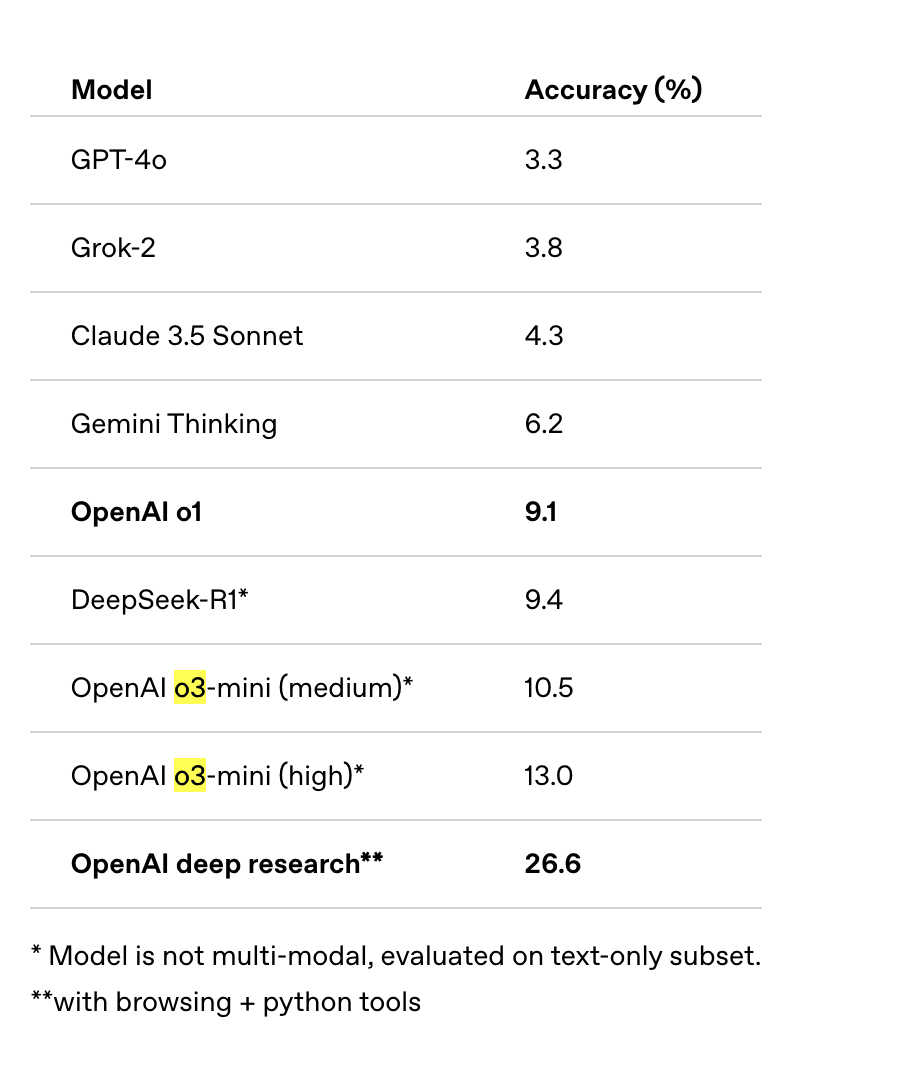
OpenAI recently released a new agentic application called Deep Research. This tool is available exclusively to pro users with a $200 monthly subscription. It utilizes their upcoming o3 reasoning model, which is not yet available via API. According to OpenAI’s blog, their Deep Research agent system achieves a score of 26.6% on the Humanity’s Last Exam evaluation benchmark. However, comparing an agent system directly to language models may not be the most appropriate comparison. A more suitable comparison would have been against similar research tools like Perplexity or Google’s Gemini Deep Research tool.
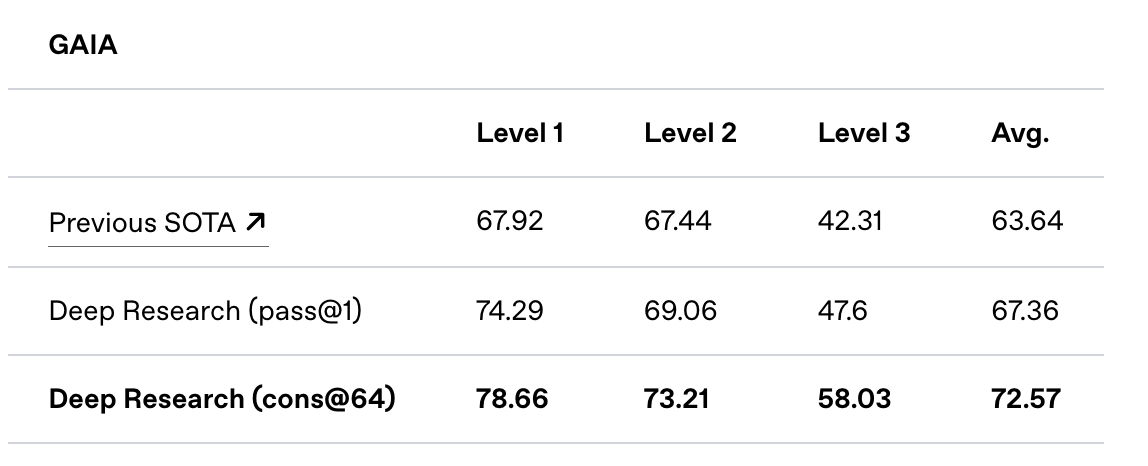
In addition to the Humanity’s Last Exam benchmark results, OpenAI shared their performance on the GAIA benchmark. GAIA is a public benchmark designed to evaluate AI systems on real-world questions, and the Deep Research agentic system has achieved a new state of the art (SOTA), leading the external leaderboard.
Today, HuggingFace launched an open source initiative to replicate OpenAI’s DeepResearch capabilities. It’s worth noting that while Google released their experimental Deep Research model in Gemini in December 2024, there weren’t any significant replication attempts at that time.
According to the HuggingFace team’s blog, they developed their prototype in under 24 hours and have improved upon the previous state of the art, advancing from Magentic-One’s 46% to 54% on the validation set.
The HuggingFace blog emphasizes that successful agent performance requires excellence in both high-level planning and execution. They argue that implementing planning in code is more reliable and efficient for several reasons:
- Code actions are much more concise than JSON.
- Need to run 4 parallel streams of 5 consecutive actions ? In JSON, you would need to generate 20 JSON blobs, each in their separate step; in Code it’s only 1 step.
- On average, the paper shows that Code actions require 30% fewer steps than JSON, which amounts to an equivalent reduction in the tokens generated. Since LLM calls are often the dimensioning cost of agent systems, it means your agent system runs are ~30% cheaper.
- Code enables to re-use tools from common libraries
- Better performance in benchmarks, due to two reasons:
- More intuitive way to express actions
- Extensive exposure of LLMs to code in training
- From building
smolagentswe can also cite a notable additional advantage, which is a better handling of state: this is very useful for multimodal tasks in particular. Need to store this image/audio/other for later use? No problem, just assign it as a variable in your state and you can re-use it 4 steps later if needed. In JSON you would have to let the LLM name it in a dictionary key and trust the LLM will later understand that it can still use it.
Running Open Deep Research Locally
Having experienced some challenges in setting up Open Deep Research locally, I’ve documented the process below. This code demonstrates how to evaluate the system against a GAIA validation set question.
Open Deep Research uses HF Smol Agent library. It is part of its code base under the examples directory. Let’s start by cloning it.
git clone git@github.com:huggingface/smolagents.git
Let’s change directory to it.
cd smolagents/examples/open_deep_research
Create a new virtual environment and install dependencies
python -m venv venv
source venv/bin/activate
Now, installl requirements
pip install -r requirements.txt
It does not install SmolAgent library. Also, they have made changes for Open Deep Research that are not yet released so we will have to install the git commit.
pip install git+https://github.com/huggingface/smolagents.git@8b02821ac2c73003ea0f533cee0f8e3852d881d9
You will also need litellm as well. litellm is an open source library and AI gateway that gives access to access 100+ LLMs with a unified API.
pip install litellm
You will have to set three API keys.
OPENAI_API_KEY=
HUGGINGFACEHUB_API_TOKEN=
SERPAPI_API_KEY=
They use https://serpapi.com/ for doing the Google searches. In my previous work I used SearXNG. SearXNG is an open-source, privacy-respecting metasearch engine that aggregates results from multiple search services. I wrote about in an earlier post.
Now, you can run run.py file to run researcher against the GAIA validation dataset. Rather than running against the complete dataset I wanted to run only a single question to keep cost in limit.
Let’s start by importing stuff we will need to run the code.
from scripts.text_inspector_tool import TextInspectorTool
from scripts.text_web_browser import SimpleTextBrowser, SearchInformationTool, VisitTool, PageUpTool, PageDownTool, \
    FinderTool, FindNextTool, ArchiveSearchTool

from smolagents import CodeAgent, LiteLLMModel, ToolCallingAgent, MANAGED_AGENT_PROMPT

from run import AUTHORIZED_IMPORTS, BROWSER_CONFIG
Next, we create an instance of the model.
model = LiteLLMModel(
    "o3-mini",
    max_completion_tokens=8192,
    reasoning_effort="medium",

)
You can try a differrent model as well.
Next, we will create a tool calling agent. This is an abstraction provided by smolagents library.
text_limit = 100000
ti_tool = TextInspectorTool(model, text_limit)

browser = SimpleTextBrowser(**BROWSER_CONFIG)
WEB_TOOLS = [
    SearchInformationTool(browser),
    VisitTool(browser),
    PageUpTool(browser),
    PageDownTool(browser),
    FinderTool(browser),
    FindNextTool(browser),
    ArchiveSearchTool(browser),
    TextInspectorTool(model, text_limit),
]

text_webbrowser_agent = ToolCallingAgent(
    model=model,
    tools=WEB_TOOLS,
    max_steps=20,
    verbosity_level=2,
    planning_interval=4,
    name="search_agent",
    description="""A team member that will search the internet to answer your question.
    Ask him for all your questions that require browsing the web.
    Provide him as much context as possible, in particular if you need to search on a specific timeframe!
    And don't hesitate to provide him with a complex search task, like finding a difference between two webpages.
    Your request must be a real sentence, not a google search! Like "Find me this information (...)" rather than a few keywords.
    """,
    provide_run_summary=True,
    managed_agent_prompt=MANAGED_AGENT_PROMPT
                         + """You can navigate to .txt online files.
    If a non-html page is in another format, especially .pdf or a Youtube video, use tool 'inspect_file_as_text' to inspect it.
    Additionally, if after some searching you find out that you need more information to answer the question, you can use `final_answer` with your request for clarification as argument to request for more information.""",
)
As you can see we are creating a web browser agent that has access to multiple tools. These tools help the agent perform multiple actions.
smolagents team has picked SimpleTextBrowser and related tools from autogen agent framework. SimpleTextBrowser works on text it does have vision capability like OpenAI operator agent used by Deep Research.
As we discussed earlier smolagents uses code for planning so they create a CodeAgent that helps plan the execution.
manager_agent = CodeAgent(
    model=model,
    tools=[ti_tool],
    max_steps=12,
    verbosity_level=2,
    additional_authorized_imports=AUTHORIZED_IMPORTS,
    planning_interval=4,
    managed_agents=[text_webbrowser_agent],
)
Finally, you can run the agent passing it a prompt as shown below. Below is the task id 17b5a6a3-bc87-42e8-b0fb-6ab0781ef2cc in https://huggingface.co/datasets/gaia-benchmark/GAIA dataset.
user_prompt = "I’m researching species that became invasive after people who kept them as pets released them. There’s a certain species of fish that was popularized as a pet by being the main character of the movie Finding Nemo. According to the USGS, where was this fish found as a nonnative species, before the year 2020? I need the answer formatted as the five-digit zip codes of the places the species was found, separated by commas if there is more than one place."


manager_agent.run(user_prompt)
The execution took 2 minutes and 24 seconds on my machine, producing the correct answer 34689.
One run of the researcher consumed 45,000 input tokens and 3,000 output tokens, costing approximately 6 cents. Here’s the researcher’s generated plan:
1. Identify the specific clownfish species referenced in Finding Nemo by confirming whether it is Amphiprion
ocellaris (the common clownfish) or another closely related species.
2. Use the search_agent tool to locate the relevant USGS report or database entries on nonnative occurrences of
this clownfish species before 2020, ensuring that the search focuses on reports that mention invasive populations
resulting from pet releases.
3. Extract the list of nonnative occurrence locations (e.g., city names, areas) from the USGS source that detail
where the species was found.
4. Cross-reference the extracted locations with a reliable ZIP code database to determine the corresponding
five-digit ZIP codes for each location.
5. Format the final list of ZIP codes as a comma-separated string, ensuring each ZIP code is exactly five digits.
Discover more from Shekhar Gulati
Subscribe to get the latest posts sent to your email.
