I conducted an LLM training session last week. To teach attendees about structured output, I built an HTML/JS web application. This application allows users to input a webpage and specify fields they want to extract. The web app uses OpenAI’s LLM to extract the relevant information. Before making the OpenAI call, the app first sends a request to Jina to retrieve a markdown version of the webpage. Then, the extracted markdown is passed to OpenAI for further processing. You can access the tool here: Structured Extraction Tool.
Note: The tool will prompt you to enter your OpenAI key, which is stored in your browser’s local storage.
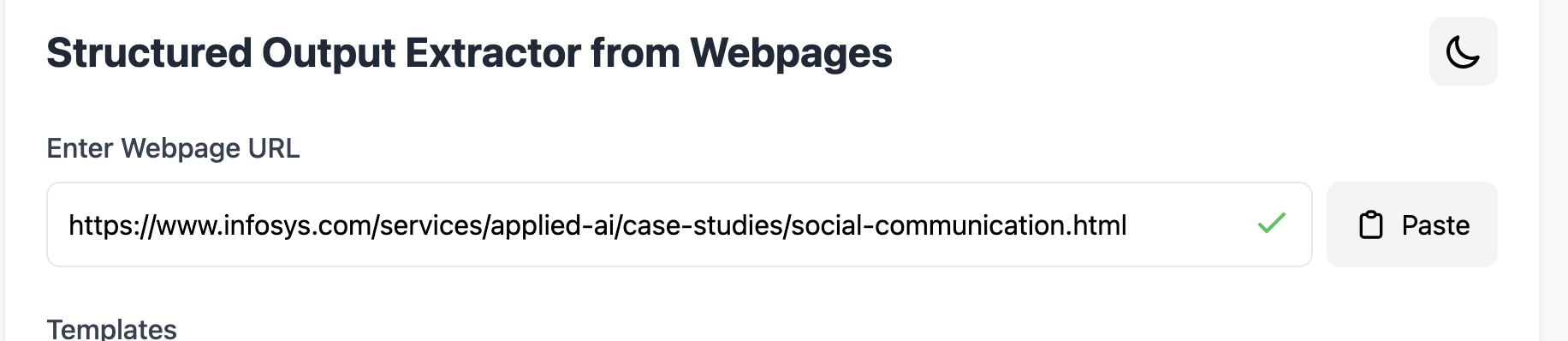
Below, I will demonstrate the app’s workflow using screenshots. The user starts by entering the webpage URL. In this example, I want to extract some information from a case study.
Next, users specify the fields they want to extract. We also support field templates for reusability. For each field, users provide a name, description, and its type.

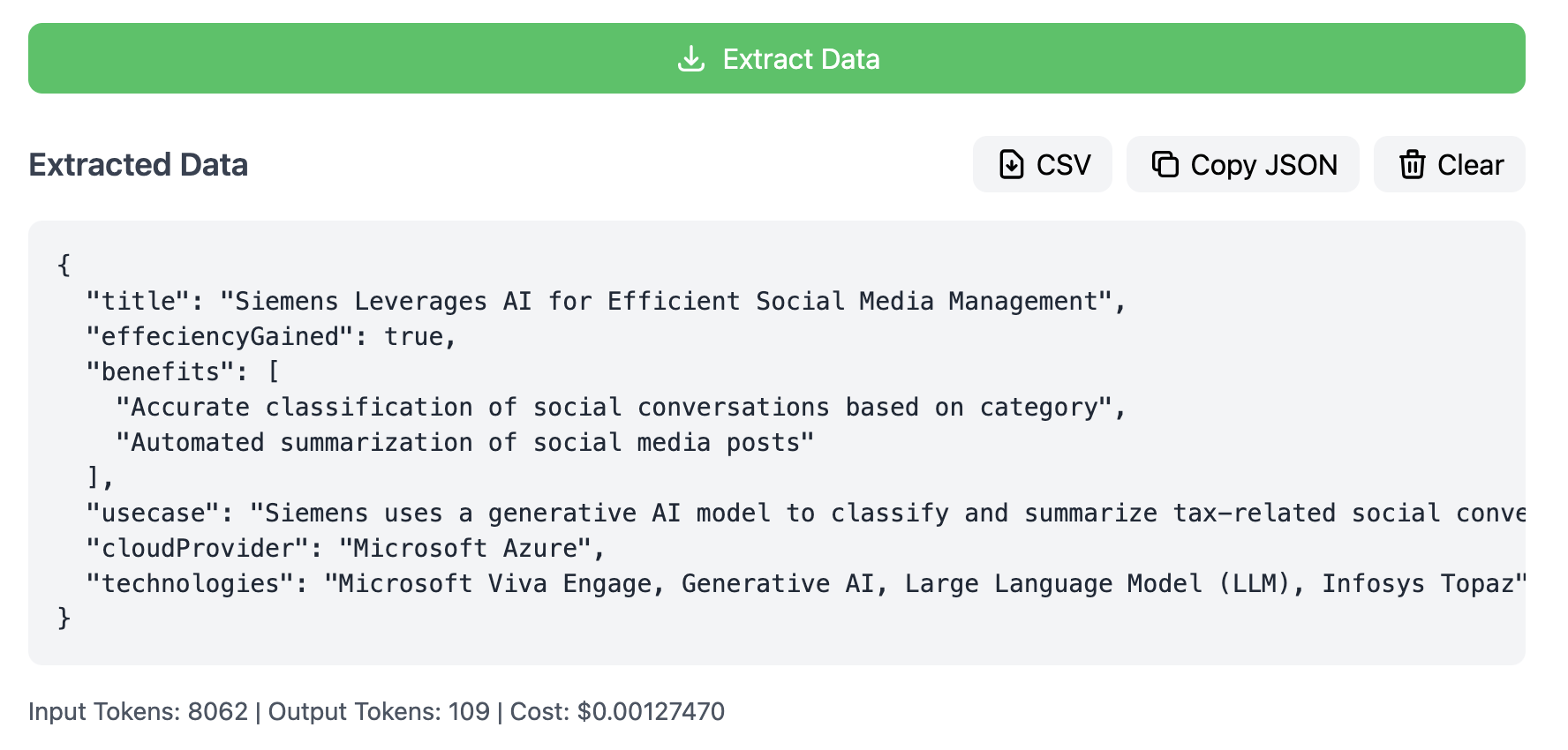
After specifying the fields, users press the Extract Data button. The app displays the extracted data, along with token usage and cost.
This application was entirely generated using Claude in a five-message, back-and-forth conversation.
I wanted to explore the kind of UI/UX other LLMs could generate, so I experimented with multiple models using WebDev Arena. This platform allows you to run a prompt in an “AI battle mode,” where two random LLMs generate and render a Next.js React web app. Interestingly, they didn’t opt for plain HTML/JS. I can think of two possible reasons:
- LLMs are trained on more React applications than plain HTML/JS code.
- React is more suitable for typical enterprise use cases, making it a more realistic choice.
WebDev Arena is an open-source benchmark evaluating AI capabilities in web development, developed by LMArena.
I asked Claude to summarize my multi-message conversation into a single prompt.
Below is the complete prompt:
Generate a web application using **HTML**, **JavaScript**, and **Tailwind CSS** with the following features:

1. **Purpose**:
    The app should extract structured data from web pages using a Large Language Model (LLM). It should be intuitive, visually pleasing, and optimized for users who will spend a significant portion of their day using it.

2. **UI Design**:

   - Use a **pleasing color palette** and ensure all UI components are styled using **Tailwind CSS**.
   - Create a **beautiful text input box** for users to enter the URL of a webpage.
   - Add tooltips to provide contextual help wherever needed.
   - Design for **ease of use** and consider best UX practices for intuitive interaction.

3. **Workflow**:

   - After entering the webpage URL, prompt users to **list the fields** they want to extract.
   - Each field requires:
     - **Name**
     - **Description**
     - **Type** (choose from: int, string, boolean, array, or date).
   - Display an initial form with one field, but include a **"Add More Fields" button** to dynamically add additional fields.
   - Include validation for inputs where appropriate (e.g., ensure URL is valid, required fields are filled).

4. **Data Extraction**:

   - Once the user defines all fields, show an **"Extract" button**.

   - When the button is clicked, display a **loader animation**.

   - Use the following cURL request to fetch the webpage's markdown via Jina

     """
     curl -X POST "https://api.jina.ai/v1/webpage" \
          -H "Content-Type: application/json" \
          -d '{
              "url": "https://example.com"
          }'
     """
   - Parse and display the extracted data in a clean, structured format based on the user's specified fields.

5. **Additional Features**:

   - Make the UI **responsive** for different screen sizes.
   - Include error handling for failed API calls or invalid inputs.
   - Optimize the app for fast performance and a seamless user experience as there can be many fields that a user might want to extract.

Generate the HTML, JavaScript, and Tailwind CSS code required to implement this application.
My expectations from this excercise
- I wanted to see what was possible in a single shot.
- My primary interest was in the app’s UX. I didn’t expect it to make actual Jina or OpenAI API calls.
- I wanted to evaluate how the models handled a long-form prompt. Did they follow all the instructions? I was particularly curious about how reasoning-focused models like o1 would perform.
- Would the models consider UX aspects, such as adding a delete button for fields? I explicitly mentioned in my prompt: “a seamless user experience as there can be many fields that a user might want to extract.”
- What title would they use for the generated web page or form?
- Would they include any surprise UX elements? I hinted at this multiple times in the prompt.
Model Details
We will try multiple LLM models. Below are details of each of them.
| S No | Model Name | Description |
|---|---|---|
| 1 | deepseek-v3 | An advanced Mixture-of-Experts (MoE) language model developed by DeepSeek AI, featuring 671 billion total parameters with 37 billion activated per token. |
| 2 | o1-2024-12-17 | OpenAI’s latest AI model, o1, represents a significant advancement towards human-like reasoning capabilities. This model is part of OpenAI’s initiative to usher in the “Intelligence Age,” aiming to leverage AI for solving complex global challenges. |
| 3 | gemini-2.0-flash-thinking-exp-1219 | A cutting-edge AI model developed by Google DeepMind, Gemini 2.0 integrates advanced reasoning capabilities with real-time data processing. |
| 4 | o1-mini-2024-09-12 | A scaled-down version of OpenAI’s o1 model, o1-Mini retains the core reasoning capabilities of its predecessor while being optimized for deployment in resource-constrained environments. |
| 5 | gpt-4o-2024-11-20 | An iteration of OpenAI’s GPT-4 model, GPT-4o incorporates optimizations for enhanced performance in natural language understanding and generation tasks. |
| 6 | gemini-2.0-flash-exp | A variant of the Gemini 2.0 series by Google DeepMind, this model emphasizes rapid processing capabilities, enabling it to handle tasks that require swift data analysis and response generation. |
| 7 | gemini-exp-1206 | An experimental model in the Gemini series, Gemini-Exp-1206 explores novel architectures and training methodologies to push the boundaries of AI capabilities. |
| 8 | qwen2p5-coder-32b-instruct | A specialized AI model tailored for coding assistance, Qwen2.5 Coder is designed to understand and generate code across multiple programming languages. |
| 9 | gemini-1.5-pro-002 | Part of the Gemini 1.5 series, this professional-grade model offers robust performance in various AI tasks, including language understanding, translation, and summarization. |
| 10 | claude-3-5-sonnet-20241022 | Developed by Anthropic, Claude 3.5 Sonnet is an AI assistant model optimized for conversational interactions. It focuses on providing coherent and contextually relevant responses, enhancing user experience in dialogue systems. |
Let’s battle now.
1. deepseek-v3 vs o1-2024-12-17
The first battle was between deepseek-v3 and o1-2024-12-17.
Deep-seek-v3 generated the following UI.

As you can see it generated a standard form with standard color palette. User can add one or more fields.
My analysis of deepseek output:
- Adding remove button in case user wants to delete a field
- No visual indicators for required field
- UX is prêtty standard
- Name of the app
Data Extraction Appalso sounded too generic and boring - Not sure why we have long buttons.
o1-2024-12-17 generated following UI.

- Nice to see that it added
?for tooltip - Added validations but they were not inline with the field
- No remove button for fields. This I was expecting o1 to figure out.
- It also chose
Data Extraction Appas the name of the app.
2. gemini-2.0-flash-thinking-exp-1219 vs o1-mini-2024-09-12
gemini-2.0-flash-thinking-exp-1219 is the thinking model from Google. Gemini 2.0 Flash Thinking Mode is an experimental model that’s trained to generate the “thinking process” the model goes through as part of its response. As a result, Thinking Mode is capable of stronger reasoning capabilities in its responses than the Gemini 2.0 Flash Experimental model.
gemini-2.0-flash-thinking-exp-1219 generated following UI.
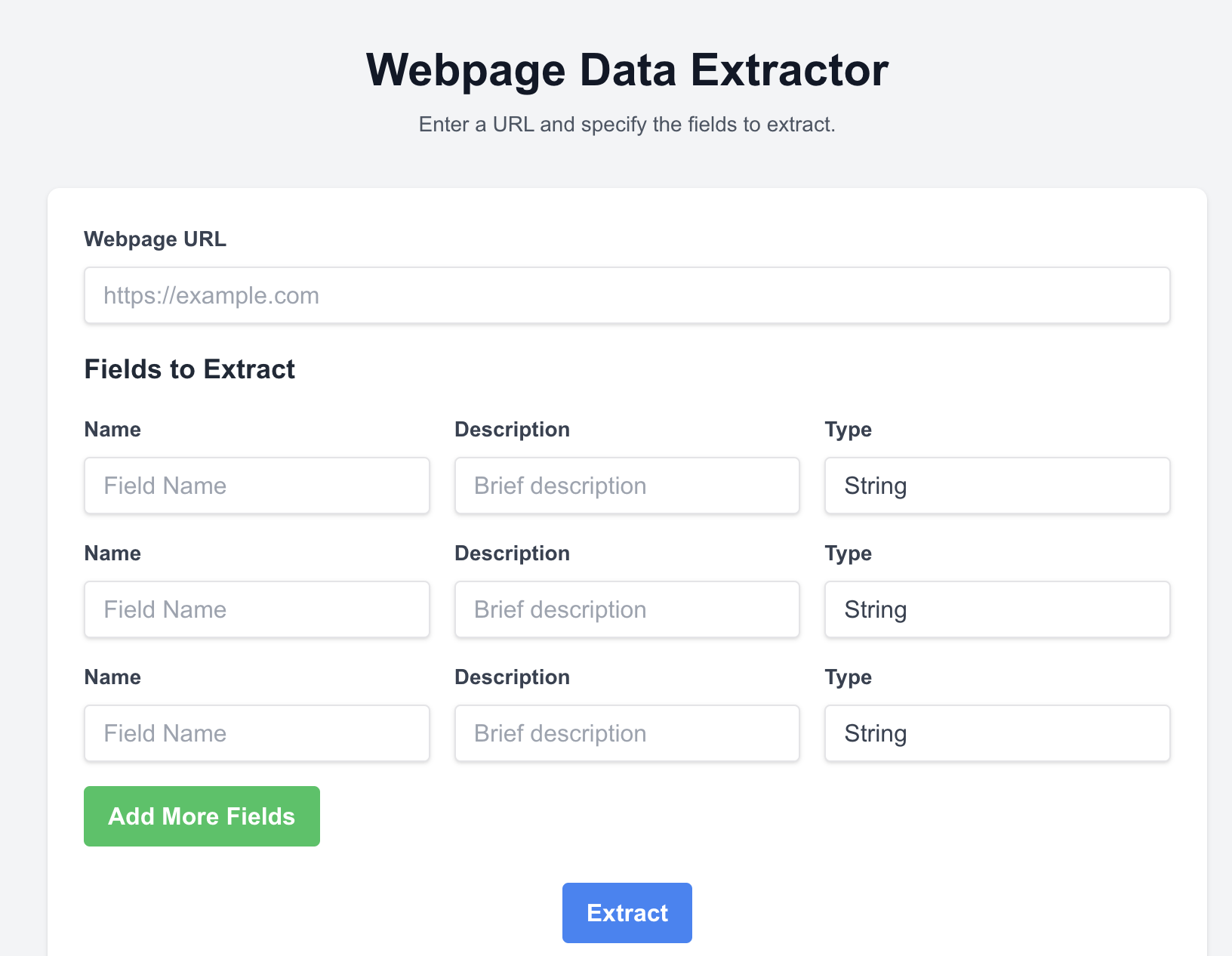
- No delete button for fields
- Each field is rendered in a horizontal row format with all its input. This help avoid long form but if description is long or we decide to add more fields then it will struggle.
- No tooltip and validation
- I like that it added a sub-title to the page
Enter a URL and specify the fields to extract. - Button sizes also looked fine.
o1-mini-2024-09-12 generated following UI.
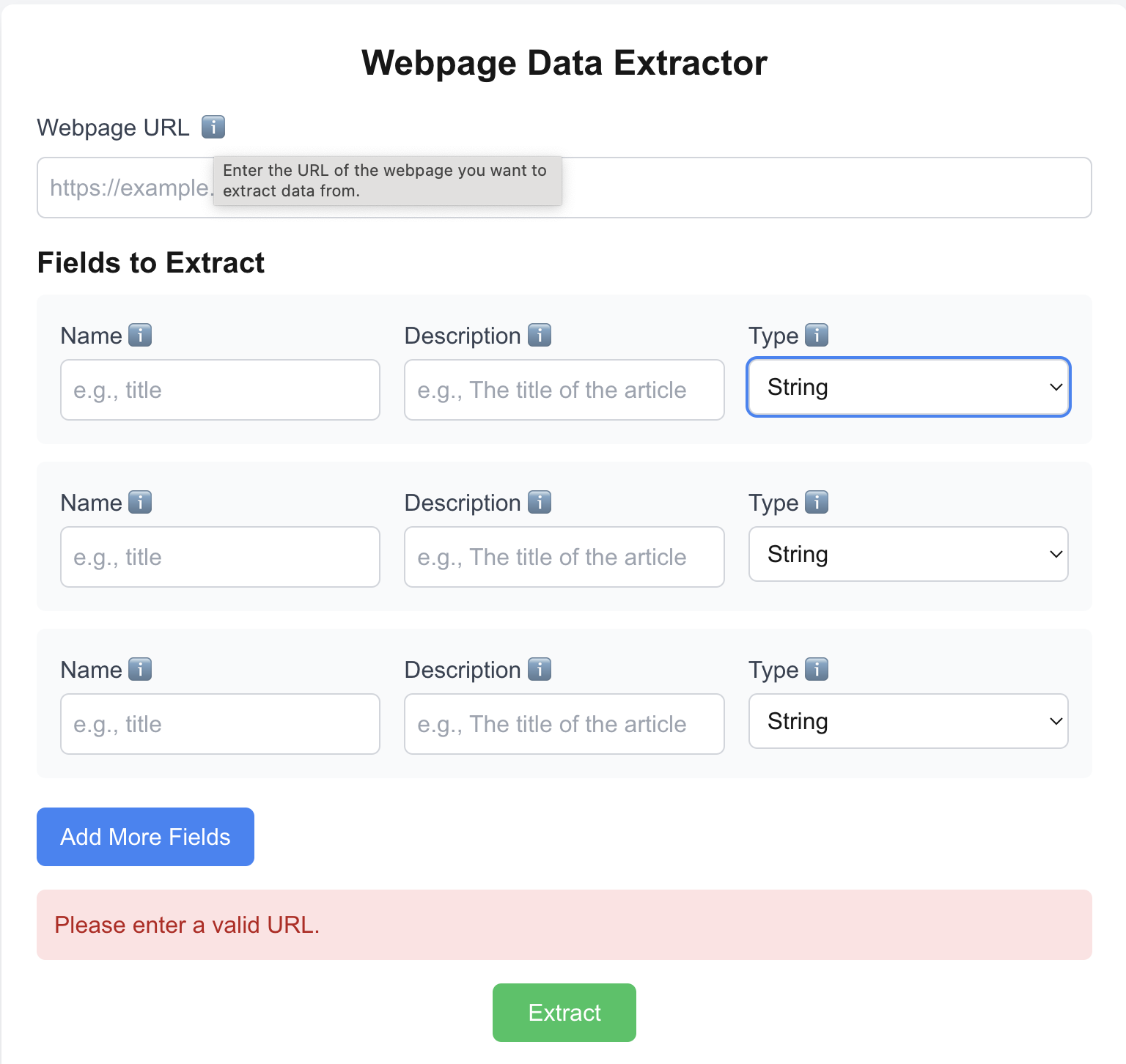
- Has tooltip and validation. But, again validation happen when you press
Extractbutton and they are not inlined. - No delete button for fields
- Each field is rendered in a horizontal row format with all its input. This help avoid long form but if description is long or we decide to add more fields then it will struggle.
- Better field placeholder names
- Button size looked fine
This is another o1-mini output
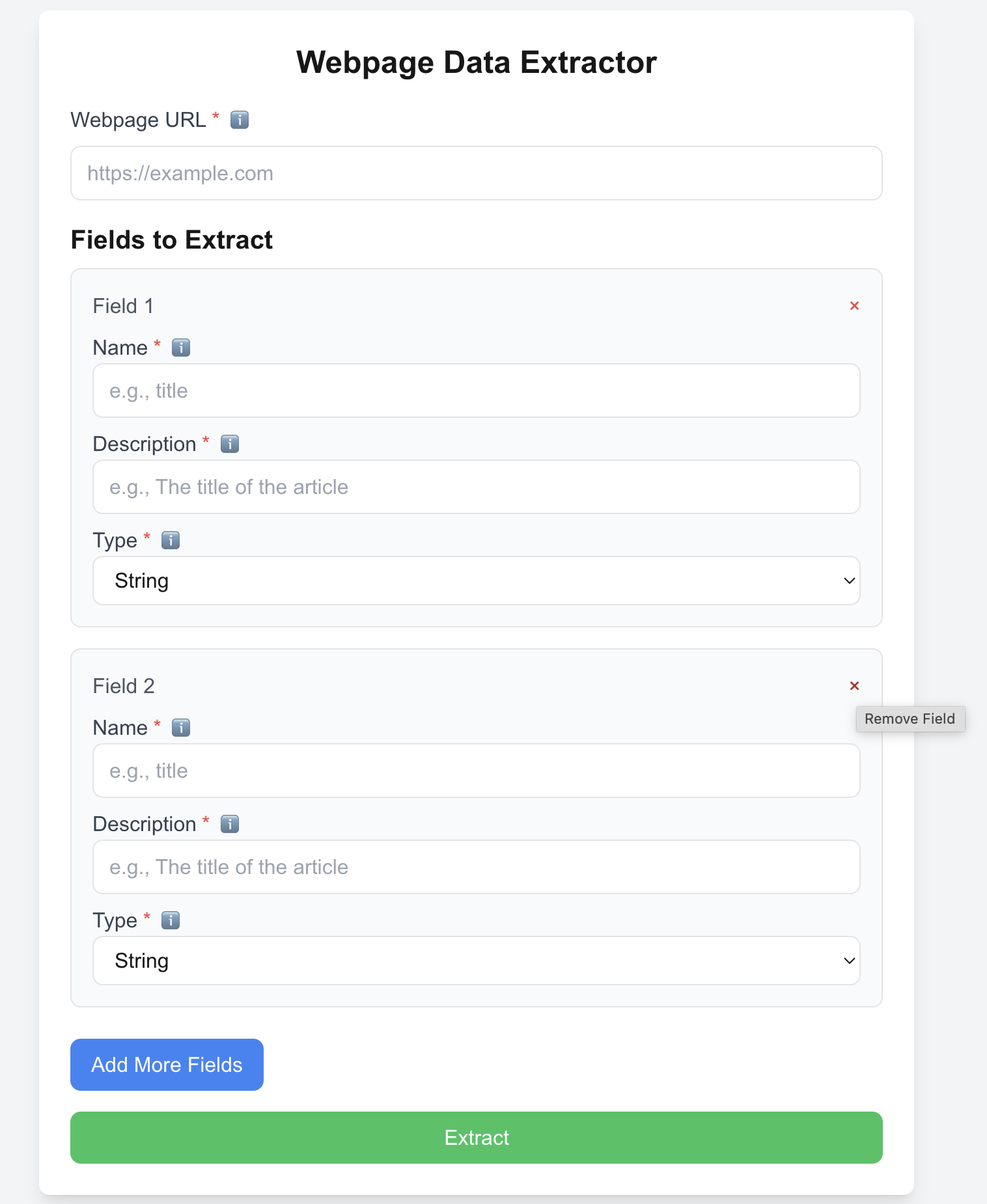
- This time it added
Removebutton as little red cross - Also, added required field indicators along with tooltip
- Not sure why size of
Extractbutton is large
3. gpt-4o-2024-11-20 vs gemini-2.0-flash-exp
Below is gpt-4o-2024-11-20 generated version.
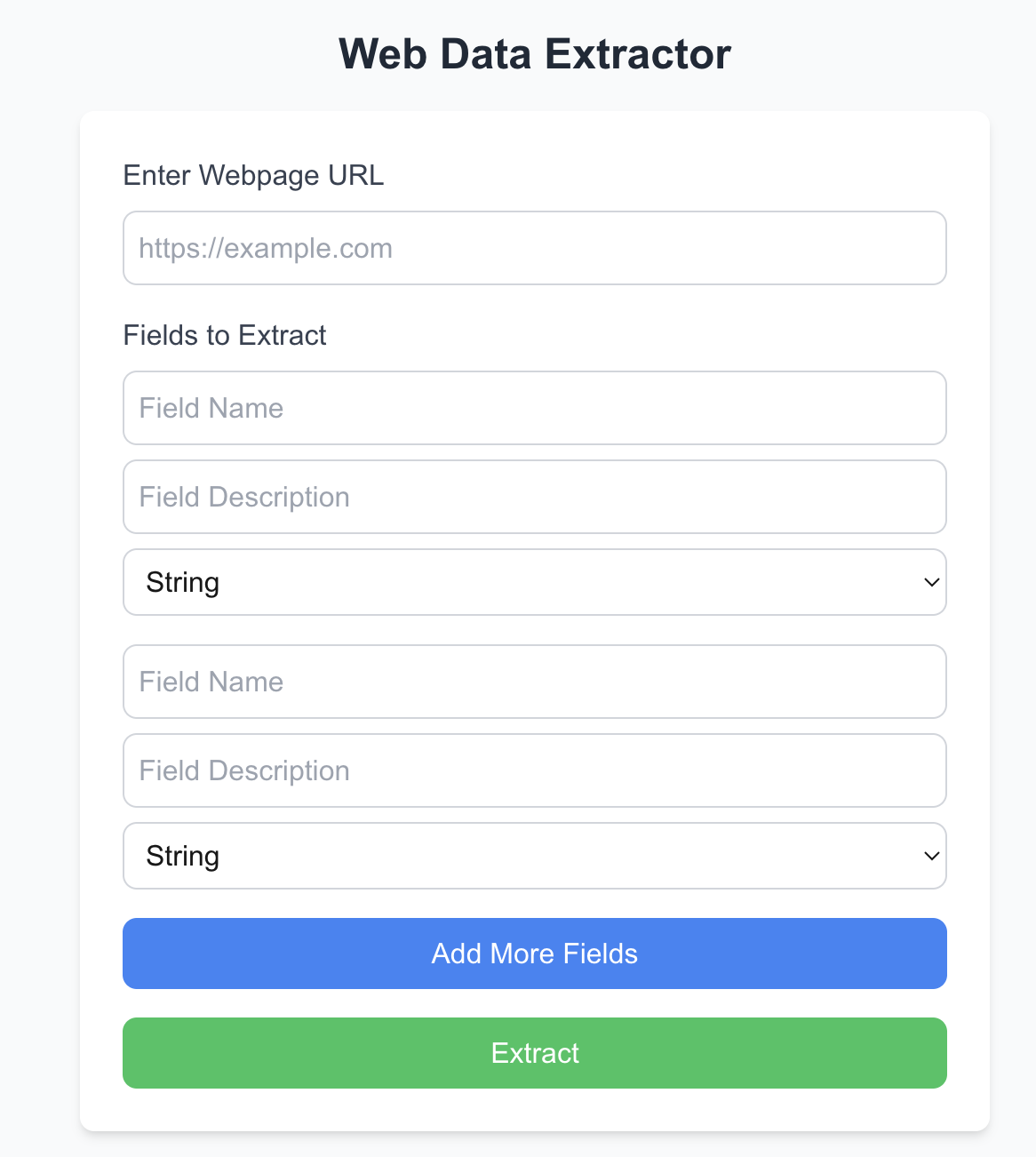
- No validation and tooltip
- No delete button for fields
- No visual indicators for required field and tooltips
- Standard UX and color palette
- Long button sizes
- Standard placeholder for fields
Below is gemini-2.0-flash-exp version generated version
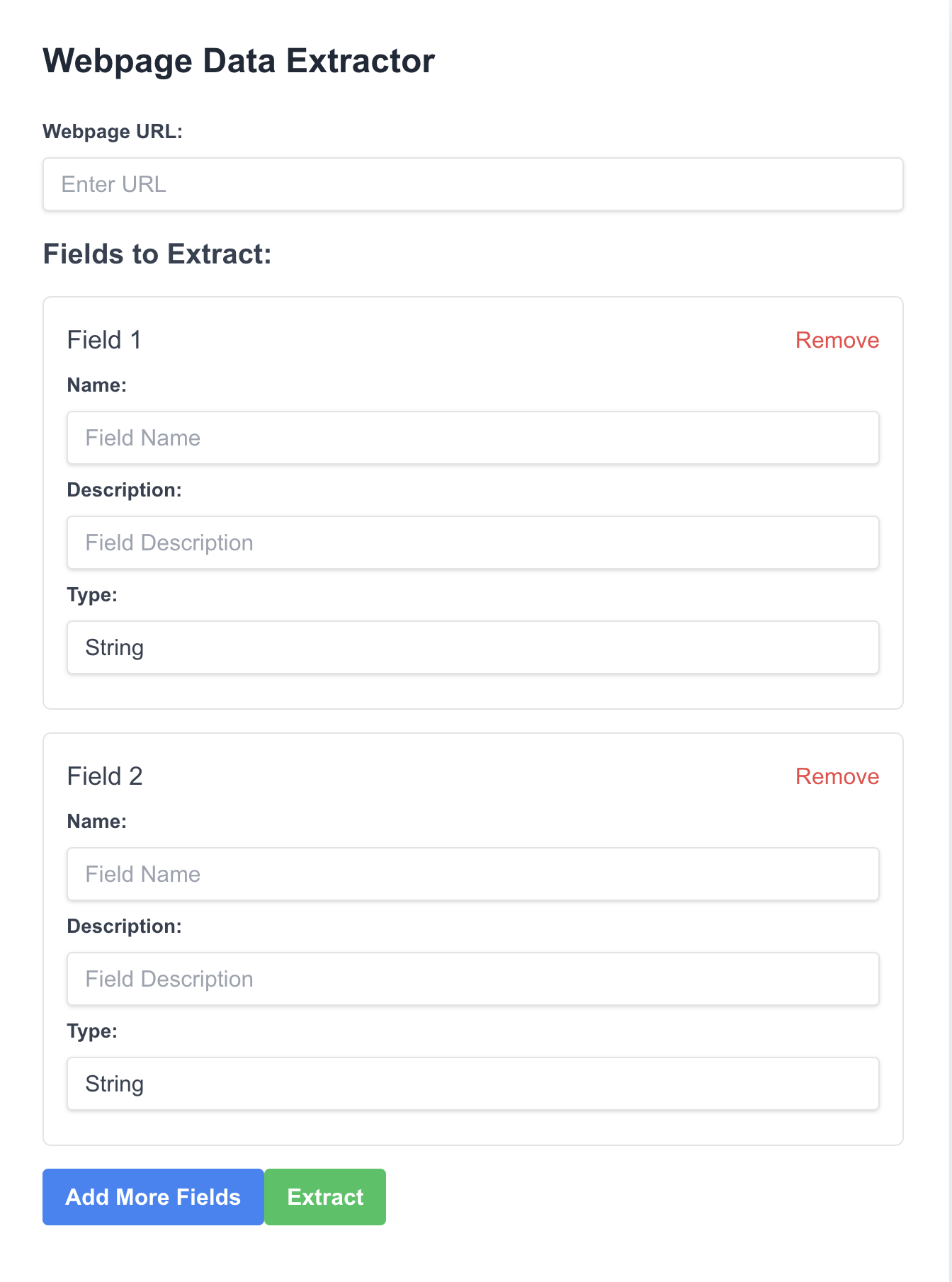
- It added
Removebutton - No tooltip
- Buttons were attached to each other. They also had different size
- Standard color palette
4. qwen2p5-coder-32b-instruct vs gemini-exp-1206
qwen2p5-coder-32b-instruct genenerated following UI.
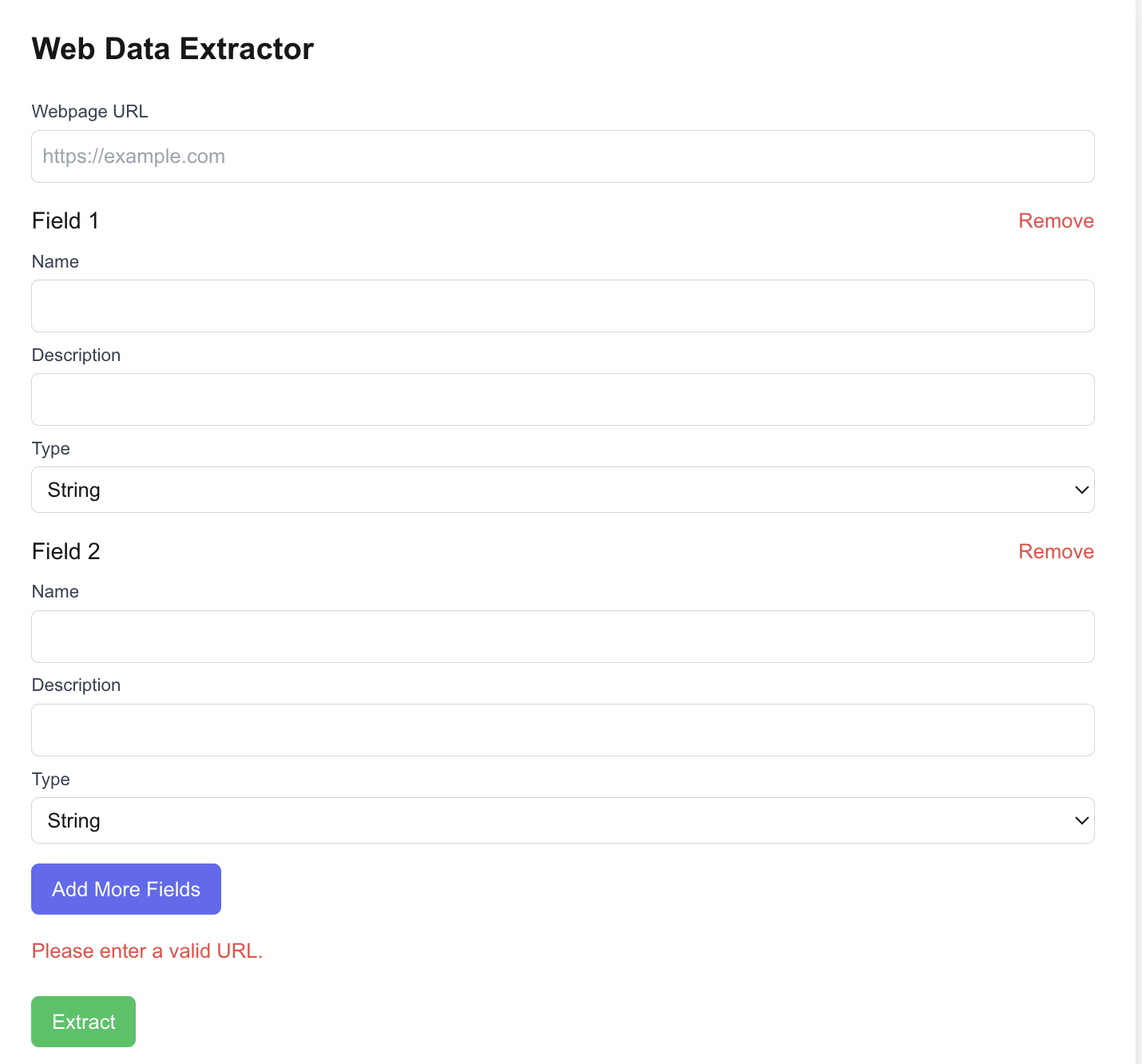
- It added
Removebutton - Has validation but no tooltip markers
- Standard color palette
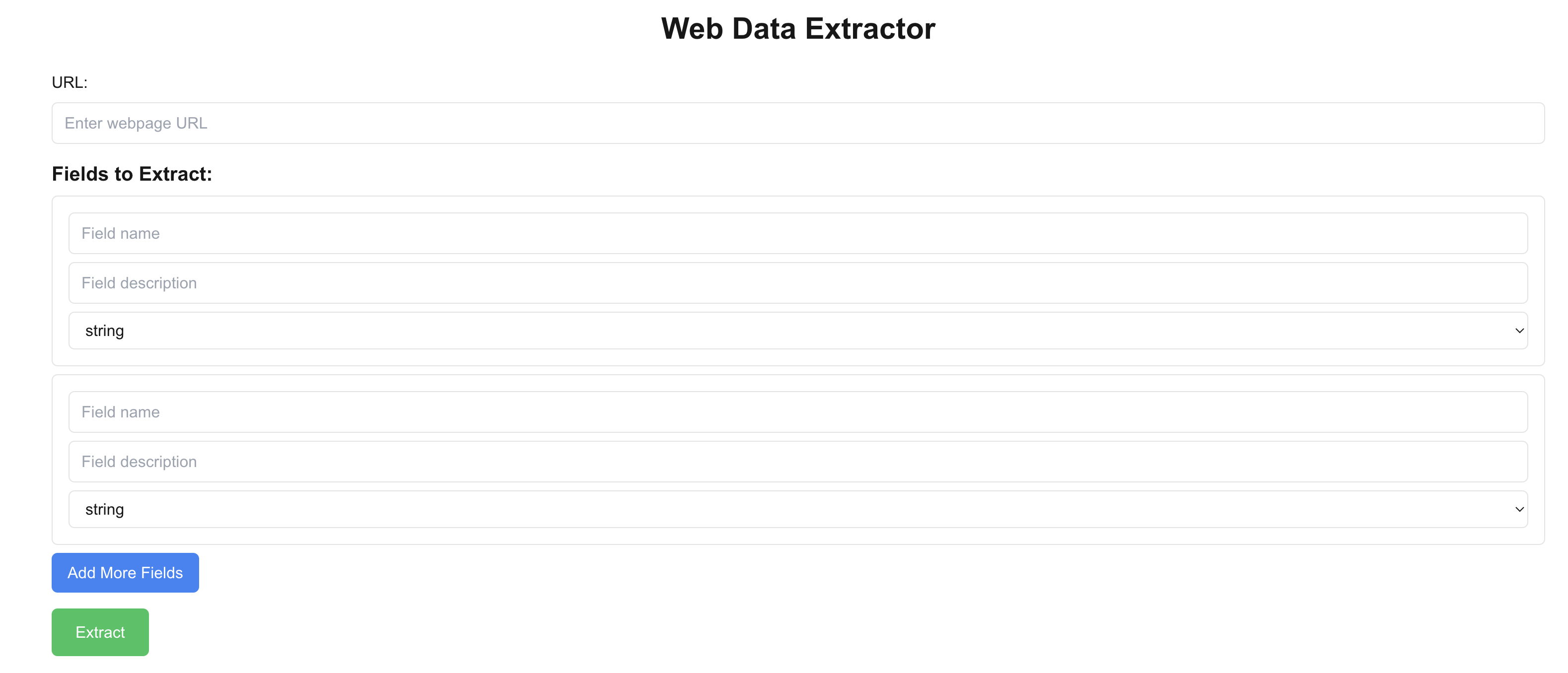
gemini-exp-1206 generated UI below. Nothing much to add.
5. gemini-1.5-pro-002 vs claude-3-5-sonnet-20241022
gemini-1.5-pro-002 generated a very poor UI. I don’t know what to write about it.

claude-3-5-sonnet-20241022 generated a good looking UI
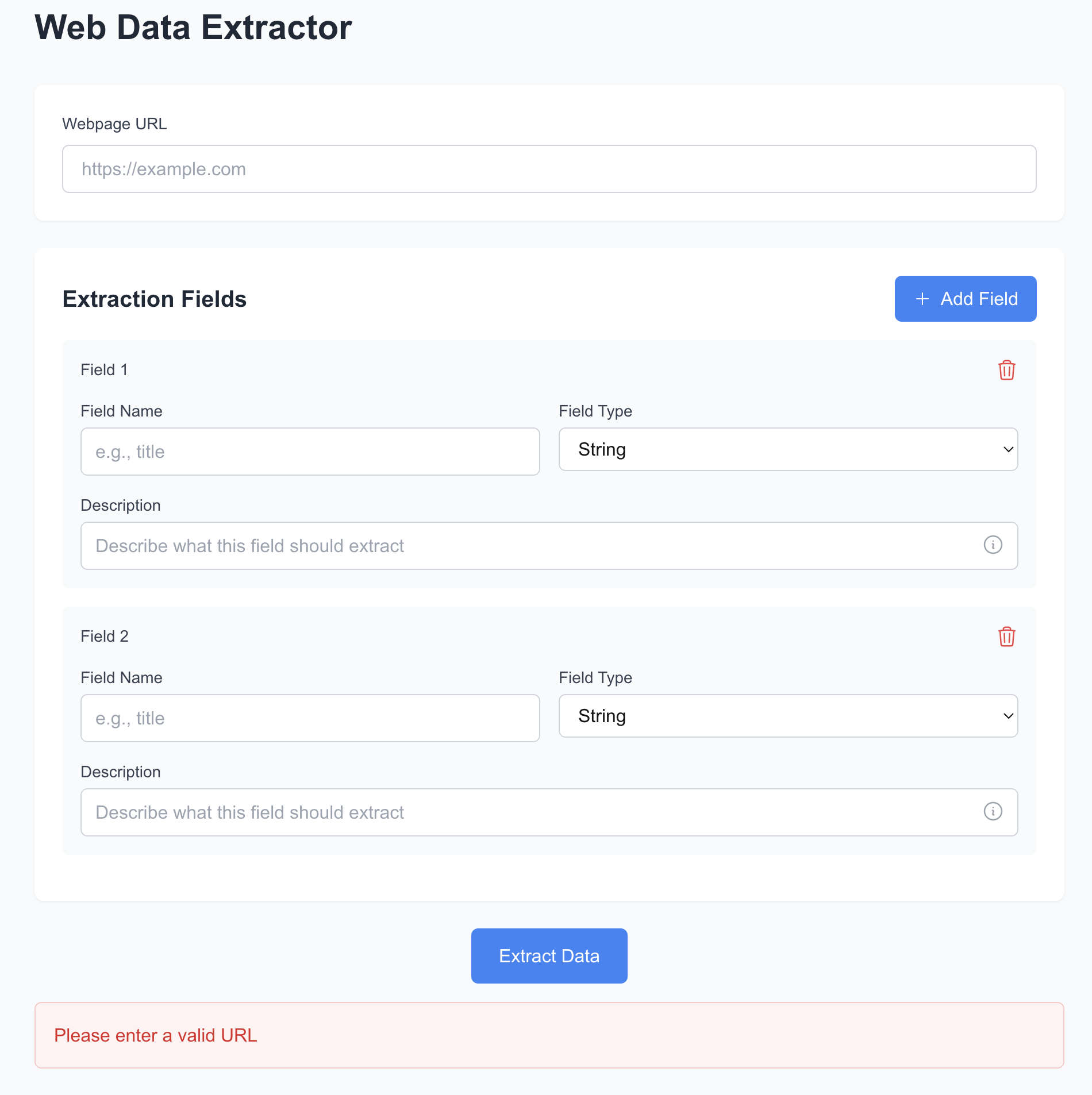
- Added delete button for removing the field. For delete action it is always recommended to confirm action. Claude Sonnet didn’t add it.
- Added validation and tooltip. I would have liked if validation messages are shown with the HTML elements.
- Didn’t add required field indicators
- Seperate section for entering web page URL and fields.
- I like
Web Data Extractorname - Seperation bewteen sections
Add fieldbutton at right top. Nice.
Conclusion
This exercise highlighted several strengths and weaknesses in the UX generated by various LLMs. While some models, like Claude, showcased thoughtful design elements such as tooltips and delete buttons, others, like gemini-1.5-pro-002, produced subpar UIs with little to no attention to UX.
What stood out the most:
- Many models failed to inline validation messages with the fields, an essential UX feature for form-heavy applications.
- The lack of required field indicators in most UIs was surprising, given its necessity for usability.
- Some models showed creativity by adding titles or subtitles, but overall, most outputs stuck to the generic stuff.
- The inclusion of a delete button for fields was inconsistent, even though it’s critical for dynamic forms.
These experiments helped me understand how different LLMs approach UI generation and how they interpret user prompts. While no model delivered a flawless UX, each provided insights into their design reasoning and capabilities.
As Paul Graham’s tweet suggests, the potential of AI to replace tools like Figma with generative solutions like Replit is growing. It’s exciting to imagine how far AI-driven UI design can evolve in the near future.
My experiments with language models for UI generation show that they can quickly create a generic first draft of a UI. However, they often miss critical usability requirements, as discussed above. I believe there is significant value in focusing on design before moving to prototyping. Design encourages thoughtful consideration of the problem, which may not happen if you jump straight to prototyping. My approach is to invest just enough effort in design and then use LLMs for rapid prototyping. This workflow has proven effective for me.
Discover more from Shekhar Gulati
Subscribe to get the latest posts sent to your email.
